
The best IPTV player depends on the device you watch on. TiviMate is built for Firestick and Android TV, IPTV Smarters Pro covers Firestick and Android, with Smarters Player Lite on Apple devices, and GSE Smart IPTV covers Apple TV. A player holds no channels of its own: it plays an IPTV service's lineup, such as the Apollo Group TV IPTV service, from your server URL, username and password, or an M3U link.
Quick pick: TiviMate for Firestick and Android TV — IPTV Smarters Pro if you need a free cross-platform option.
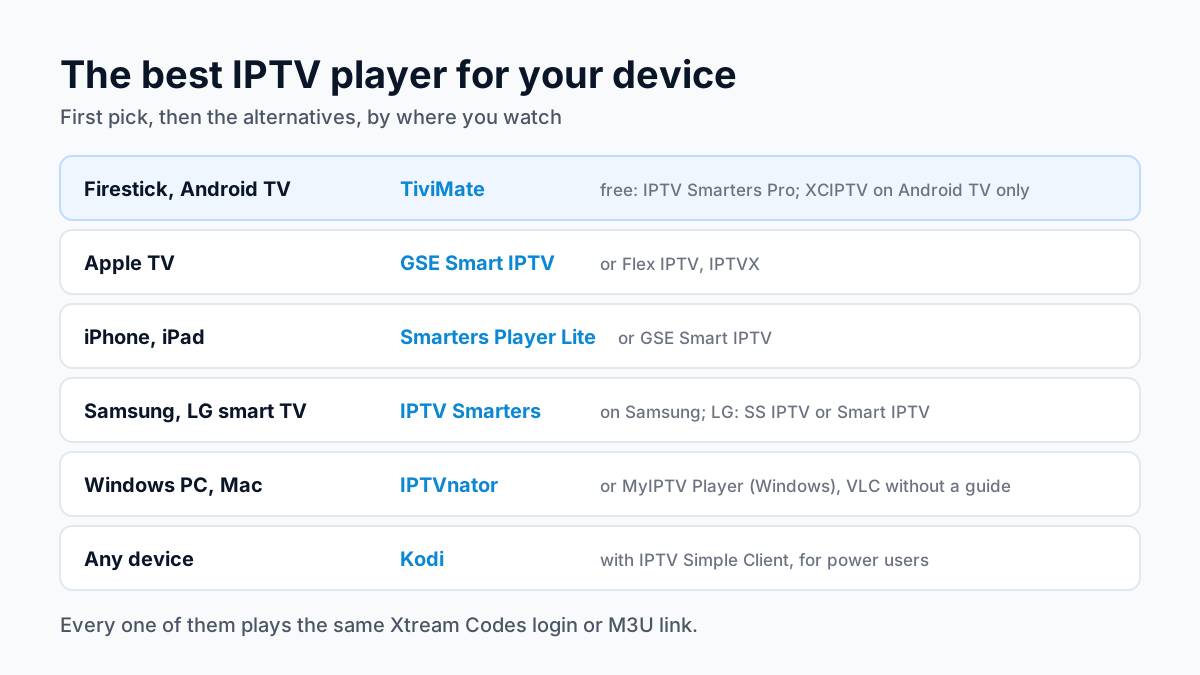
A player app contains no channels on its own; our explainer on the difference between an IPTV app and an IPTV service covers why you need both: the player, and an IPTV subscription with Xtream Codes login to play in it.
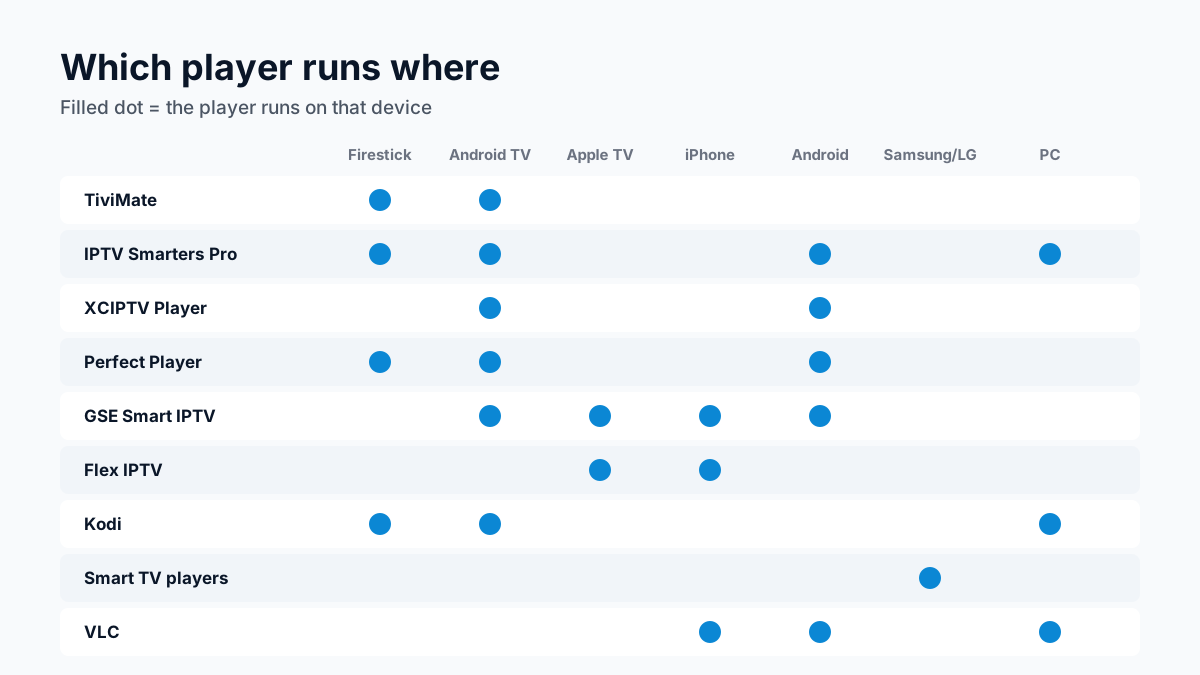
Quick Comparison — Top IPTV Players
| Player | Price | Platforms |
|---|---|---|
| 1. TiviMate | Free (paid Premium upgrade) | Firestick, Android TV, Google TV (onn 4K Pro) |
| 2. IPTV Smarters Pro | Free | Firestick, Android TV, Android, Windows and Mac |
| 3. XCIPTV Player | Free | Android TV, Android |
| 4. Perfect Player | Free | Android TV, Firestick, Android, PC (via emulator) |
| 5. GSE Smart IPTV | Apple TV edition: $4.99 | Apple TV, iOS, Android, Android TV |
| 6. Flex IPTV | Free (Pro: $5.99) | Apple TV, iOS |
| 7. Kodi (IPTV Simple Client) | Free | Android TV, Firestick, Windows, Mac, Linux, Raspberry Pi |
| 8. Smart TV players (Samsung and LG) | IPTV Smarters and SS IPTV free; Smart IPTV a one-time fee per TV | Samsung Smart TV, LG Smart TV |
| 9. VLC Media Player | Free | PC, Mac, Android, iOS |
TiviMate
Best OverallTiviMate is the first pick for Firestick and Android TV. Its TV-guide layout looks like cable, which makes it the easiest switch for cord-cutters, and channels with guide data show full program schedules. On a Google TV box such as the Walmart onn 4K Pro it installs straight from Google Play, and a wired Ethernet port helps at peak times.
Pros
- ✓ Best EPG / TV guide layout
- ✓ 4K & HDR support
- ✓ Catch-up TV & recording
- ✓ Multi-playlist support
- ✓ Parental controls
Cons
- ✗ Not available on Apple TV or iOS
- ✗ Premium features require paid upgrade
IPTV Smarters Pro
Best Free OptionIPTV Smarters Pro is a free player with an official download for Fire TV, Android and computers at getiptvsmarters.com; on iPhone, iPad and Apple TV the same developer's app is Smarters Player Lite. It takes an Xtream Codes login or an M3U playlist, and setup is a single sign-in screen.
Pros
- ✓ Completely free
- ✓ Cross-platform (Android, TV, computers; Smarters Player Lite on Apple devices)
- ✓ Xtream Codes & M3U support
- ✓ EPG with 7-day guide
- ✓ Easy setup
Cons
- ✗ Interface less polished than TiviMate
- ✗ Occasional ads
XCIPTV Player
Best UI on Android TVXCIPTV, from OTTRUN, is a free player on Google Play for Android TV, phones and tablets, built to be driven with a remote. It takes an Xtream Codes or M3U login and offers catch-up from the guide where the service has it on that channel. There is no official Fire TV download, so on a Fire Stick pick another player.
Pros
- ✓ Built for a TV remote
- ✓ Two built-in players (ExoPlayer and VLC)
- ✓ Catch-up from the guide
- ✓ Scheduled recording to storage
Cons
- ✗ No official Fire TV download
- ✗ No iOS version
- ✗ Shows ads
Perfect Player
Best for Power UsersPerfect Player is popular among IPTV enthusiasts who want full control over their player settings. You can fine-tune buffer sizes, video decoders, and EPG refresh intervals. It's particularly well-suited for users with large channel lists who want granular performance control.
Pros
- ✓ Highly customisable
- ✓ Lightweight and fast
- ✓ Excellent EPG support
- ✓ Works with M3U & XSPF playlists
- ✓ Buffer controls
Cons
- ✗ Steep learning curve for beginners
- ✗ Less polished UI
GSE Smart IPTV
Best for Apple TVGSE Smart IPTV is one of the top choices for Apple TV users. It supports Xtream Codes login (enter your Apollo Group TV credentials directly) and loads your full channel list with EPG. The iOS app lets you browse channels on iPhone and cast to Apple TV.
Pros
- ✓ Native Apple TV app
- ✓ iOS & Apple TV support
- ✓ M3U & Xtream Codes
- ✓ Chromecast support
- ✓ EPG support
Cons
- ✗ Advanced features require paid upgrade
- ✗ Interface dated on Android
Flex IPTV
Best for Apple TV 4KFlex IPTV is a polished Apple TV IPTV player that leverages Apple's tvOS interface guidelines. The app is free, and the $5.99 Pro upgrade is an affordable way to get a premium IPTV experience on Apple TV 4K with full 4K HDR support and a clean EPG layout.
Pros
- ✓ Native Apple TV interface
- ✓ 4K support on Apple TV 4K
- ✓ Smooth EPG
Cons
- ✗ Only Apple ecosystem
- ✗ Pro features are a paid upgrade
Kodi (IPTV Simple Client)
Most VersatileKodi is the most versatile media platform available and runs on virtually every device. The IPTV Simple Client addon lets you load M3U playlists and EPG data from Apollo Group TV. While setup is more involved than dedicated IPTV players, Kodi's flexibility and ecosystem are unmatched for power users.
Pros
- ✓ Runs on almost any device
- ✓ Huge plugin ecosystem
- ✓ IPTV Simple Client addon
- ✓ Completely free
- ✓ Open source
Cons
- ✗ Complex setup
- ✗ Performance varies by device
- ✗ Requires technical knowledge
Smart TV players (Samsung and LG)
Best without a streaming boxOn a Samsung TV, our support team sets customers up in IPTV Smarters with the Xtream Codes login. On an LG TV, SS IPTV is free in the LG Content Store and takes the M3U link, and Smart IPTV is a paid alternative. Smart IPTV is no longer in the Samsung store, so skip guides that tell you to search for it there.
Pros
- ✓ No streaming box needed
- ✓ Installs from the TV's own app store
- ✓ IPTV Smarters takes the Xtream Codes login
- ✓ SS IPTV is free on LG
Cons
- ✗ Which apps exist depends on the TV's model year
- ✗ SS IPTV takes an M3U link only
- ✗ Smart IPTV charges per TV
VLC Media Player
Best for PC/MacVLC is the simplest way to watch IPTV on a Windows PC or Mac. Open your Apollo Group TV M3U playlist link in VLC via Media → Open Network Stream, and the channel list opens. There's no EPG, so it's best for users who know what channel they want to watch.
Pros
- ✓ Free and open source
- ✓ Works on Windows, Mac, Linux
- ✓ No account required
- ✓ Plays M3U playlists
- ✓ Rock-solid video engine
Cons
- ✗ No built-in EPG
- ✗ Not optimised for 10-foot TV use
- ✗ Requires manual playlist management
Honourable mention: Startup Show, a free M3U playlist player for iPhone, iPad and Android with AirPlay to the TV. See the Startup Show setup guide.
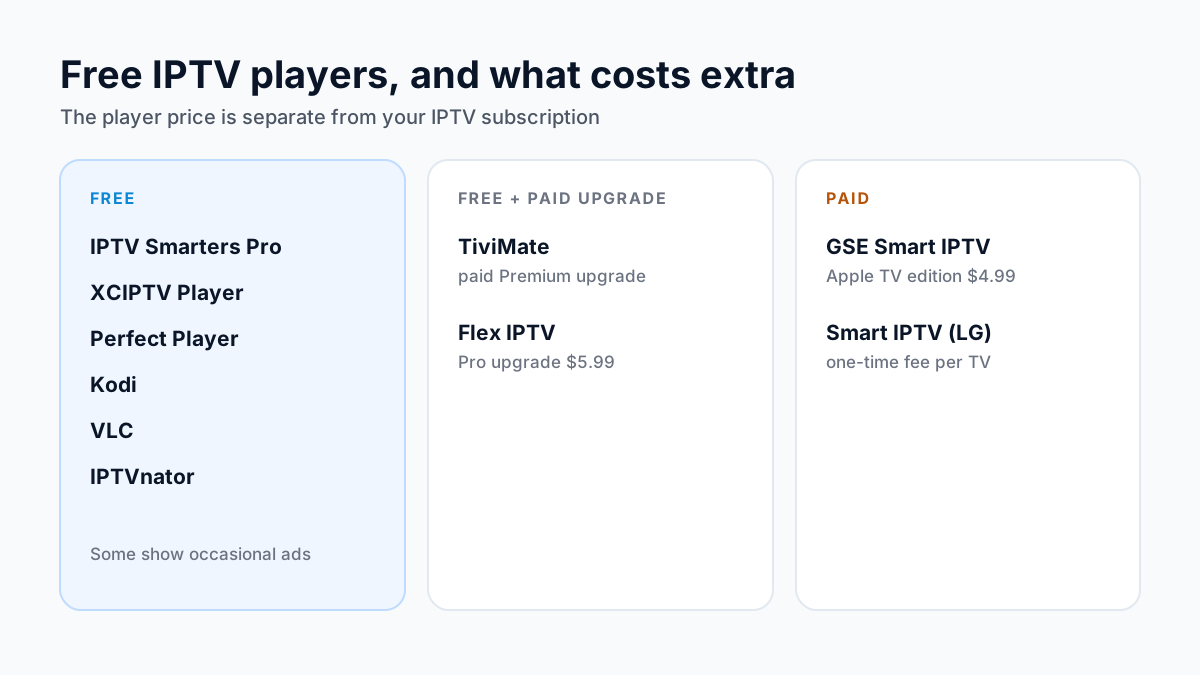
The Best Free IPTV Player
IPTV Smarters Pro is the best free IPTV player for most people because it runs on Firestick, Android TV and Android with one login, and its developer's Smarters Player Lite covers iPhone and Apple TV. XCIPTV Player, Perfect Player, Kodi and VLC are free too, and on a computer IPTVnator is free and open source. TiviMate and Flex IPTV are free to install with paid upgrades, while GSE Smart IPTV's Apple TV edition and Smart IPTV on LG TVs cost a small fee.
How Do You Set Up Any IPTV Player?
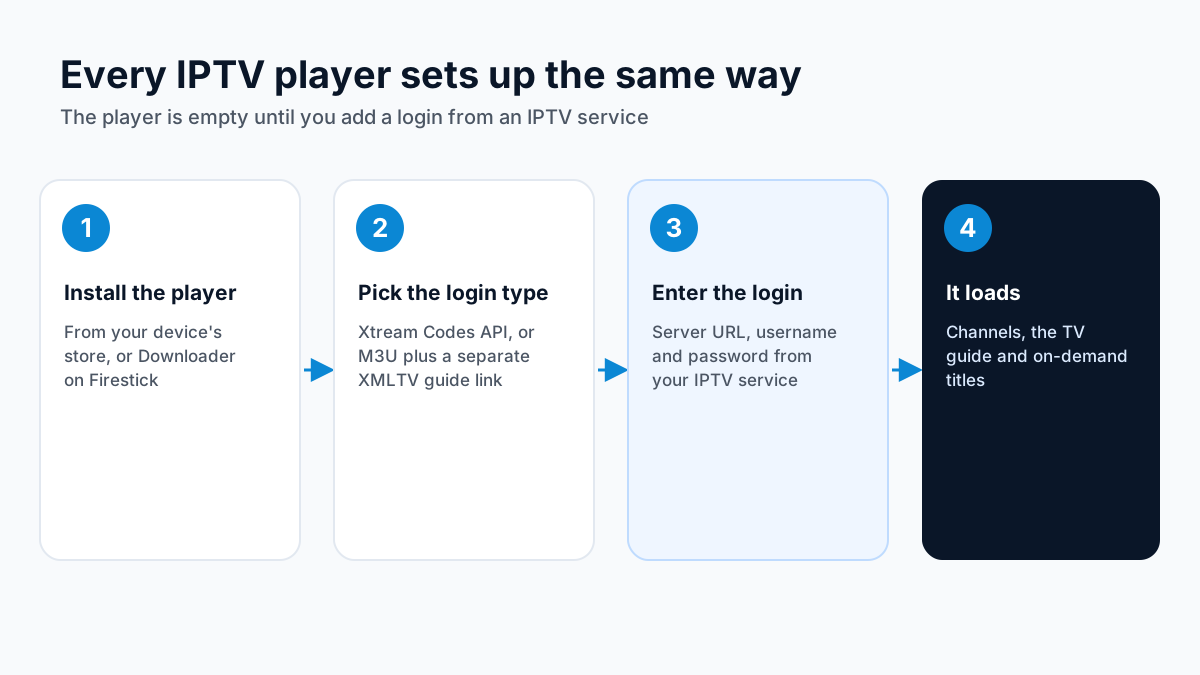
Install the player for your device, choose the Xtream Codes API login (or M3U with a separate XMLTV guide link), enter the server URL, username and password from your IPTV service, and the channels, guide and on-demand titles load.
Setup Guides by Device
Player reviews, setup and playlist guides
- TiviMate Review — What the free tier does, what Premium adds, and who should pay for it.
- IPTV Smarters Pro Review — The free cross-platform player reviewed: strengths, limits and who it suits.
- IPTV Smarters Setup — Step-by-step login with Xtream Codes details on every platform Smarters supports.
- M3U vs Xtream Codes — The two login formats explained, with a table of which player accepts which.
- Xtream Codes Setup — Server URL, username and password: where each field goes and the common typing errors.
- IPTV EPG Setup — Adding a TV guide source in TiviMate, IPTV Smarters, Kodi and other players.
- XCIPTV Player — A free Android TV and phone player from Google Play, with native Xtream Codes login.
- Perfect Player IPTV — A lightweight M3U player for older Android boxes and Firesticks.
- Smart IPTV (SIPTV) — The MAC-address activated player for smart TVs and Firestick.
- Startup Show App — Login and M3U setup for the Startup Show player.
- Record IPTV — Recording and whole-home DVR options by device, including storage requirements.
- IPTV DVR System — A media-server DVR built on Plex, Emby or Jellyfin, for recording to one place and watching anywhere.
- APTV — The APTV player left the App Store in October 2026: what it did, and which Apple TV players replace it.
- Chillio IPTV — Chillio left the Apple App Store in August 2026 but is still on Google Play for Android TV; the Apple TV players that replace it.
- Record on LG TV — Time Machine ended with 2021 models and never recorded apps; the box and home-DVR routes that do record IPTV.
- IPTV on Stremio — Loading an M3U playlist and EPG into Stremio through an add-on.
- Closed Captions — Where live-TV captions come from, how to switch them on in each player, and why a channel sometimes has none.
- Free IPTV Apps — Free IPTV players and free ad-supported live TV apps in the US, side by side.
Frequently Asked Questions
What is the best IPTV app for Firestick?
TiviMate is the best IPTV app for Amazon Firestick. It has a polished TV-guide interface, 4K support, catch-up TV, and the best EPG handling of any player we cover. IPTV Smarters Pro is the best free alternative. Both are sideloaded with Downloader, which works on Fire OS sticks only: Vega OS models (Fire TV Stick 4K 3rd Gen, 4K Select and HD) cannot install apps from outside the Amazon Appstore.
What is the best free IPTV player for Android TV?
IPTV Smarters Pro and XCIPTV Player are both excellent free IPTV players for Android TV. They support Xtream Codes API, M3U playlists, and full EPG. No subscription required for the app itself.
Can I use TiviMate on Apple TV?
No — TiviMate is only available for Android-based devices (Firestick, Android TV, ONN 4K). For Apple TV, the best IPTV players are Smarters Player Lite (the official Smarters app), GSE Smart IPTV, Flex IPTV and IPTVX. APTV and Chillio are not: the APTV app is no longer on the App Store, and Chillio IPTV is off the Apple App Store and now Android TV only.
What is the best IPTV app for Apple TV?
GSE Smart IPTV is the strongest pick on this list for Apple TV: a native tvOS app that takes an Xtream Codes login and loads the guide. Flex IPTV is a polished Apple-only alternative with a $5.99 Pro upgrade, and IPTVX is a free player with iCloud sync. TiviMate does not run on Apple TV.
What is the best IPTV player for Windows?
IPTVnator is the strongest free option: it is open source, runs on Windows, macOS and Linux (download it from the github.com/4gray/iptvnator releases page), and takes an Xtream Codes login or an M3U link with an XMLTV guide. On Windows, MyIPTV Player from the Microsoft Store (publisher Vbfnet Apps) also works, and VLC plays an M3U link without a guide. IPTV Smarters Pro also has an official Windows download at getiptvsmarters.com/download; the Smarters-named Microsoft Store apps are from other publishers.
Do IPTV players work with Apollo Group TV?
Yes. Players that take an Xtream Codes login need your Apollo Group TV server URL, username and password; players that take only an M3U link, such as SS IPTV and VLC, use the M3U link our support sends.
Sources
Checked on . Store listings and prices change; these are the pages to re-check.
- Amazon Developer: Vega OS (Fire TV sticks that cannot sideload)
- Google Play (US): TiviMate IPTV Player
- IPTV Smarters, official downloads (getiptvsmarters.com)
- Google Play (US): XCIPTV PLAYER, by OTTRUN
- App Store (US): GSE SMART IPTV PRO (Apple TV), by GSE Technology Ltd, $4.99
- App Store (US): GSE SMART IPTV PRO (iPhone and iPad), by GSE Technology Ltd, $2.99
- App Store (US): IPTVX, by Bending X - FZE
- App Store (US): Flex IPTV, by artur tagirov
- App Store (US): Smarters Player Lite, by WHMCS SMARTERS
- Smart IPTV, developer site (siptv.app)
- IPTVnator, official repository (GitHub)
- VLC media player (videolan.org)
- Kodi PVR IPTV Simple Client, official add-on repository (GitHub)
Updated
Before you buy
What to know about Apollo Group TV
- Prepaid, no auto-renewalYou renew only when you choose to. Nothing is charged automatically.
- Support 24/7Every day, day and night. A person answers on WhatsApp, before and after you buy.
- Familiar ways to payVisa, Mastercard, Google Pay or Apple Pay.
- Terms in writingRead the refund policy and terms before you pay.
Try it before you pay
A free 24-hour trial lets you test the service before paying anything.
Start Free 24hr TrialOpens WhatsApp · a person replies 24/7
Plans from $19.99/month. Full Apollo Group TV price list →