
Startup Show subscription: what you actually pay for
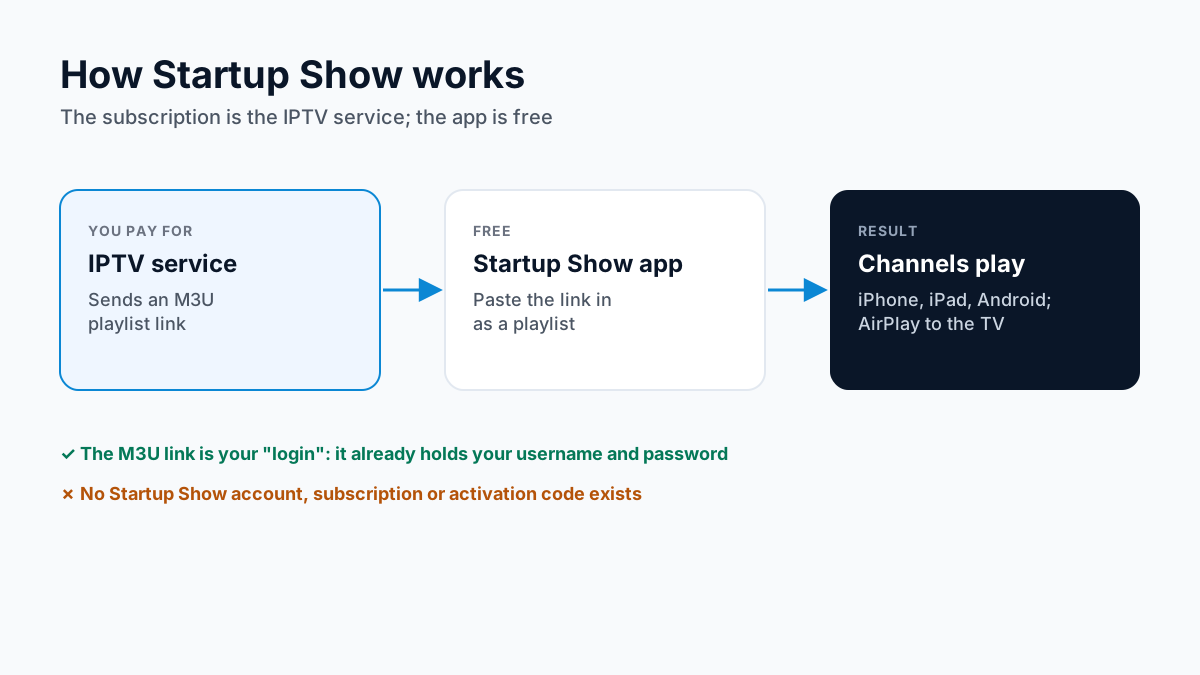
Startup Show is only a player. Its developer describes it as an app for adding your M3U playlists, and says plainly that it supplies no content apart from a sample video. The developer's site sells no subscription, account or activation code, and both store listings are free.
So a “Startup Show subscription” is really a subscription to an IPTV service, which gives you the playlist to load into the app. With Apollo Group TV that is an Apollo Group TV IPTV subscription, and you can try free for 24 hours — no credit card required.
What is the Startup Show login?
There is no Startup Show account. When the app asks for a playlist, what it wants is the M3U link from your IPTV service: one long web address that already contains your username and password. Paste it in as a remote playlist and give the app a minute to load the channels.
Startup Show's listings describe M3U playlists and do not mention an Xtream Codes login, so ask for the M3U version of your details. Our M3U vs Xtream Codes guide explains the difference.
Treat that link like a password. Anyone who has it can play your channels, and every screen playing at once counts against your plan's connections, so a shared link can stop your own TV from loading. See how IPTV connections are counted.
Where to get Startup Show (and Startup Show TV)
The developer's site, startup-show.tv, links to two stores: the App Store and Google Play. Check the publisher before you install, because a similarly named “StartUp Show” from Enterprise Nation is an unrelated business video app that will not take a playlist.
| Device | Where | Note |
|---|---|---|
| iPhone, iPad | App Store: Startup Show, by Mickael Patrice | Free; needs iOS 18.0 or later. |
| Android phone or tablet | Google Play: Startup Show, by App4All 2000 | Free; the listing links to startup-show.tv. |
| Android TV, Google TV | Google Play: Startup Show TV, by App4All 2000 | The same publisher's TV version. |
| Samsung or LG TV | Listed on the developer's site | We found no store listing to confirm it; check your TV's app store. |
| Apple TV | No Apple TV app | AirPlay from an iPhone or iPad instead. |
| Amazon Fire TV Stick | No official download | Use IPTV Smarters Pro from its official download. |
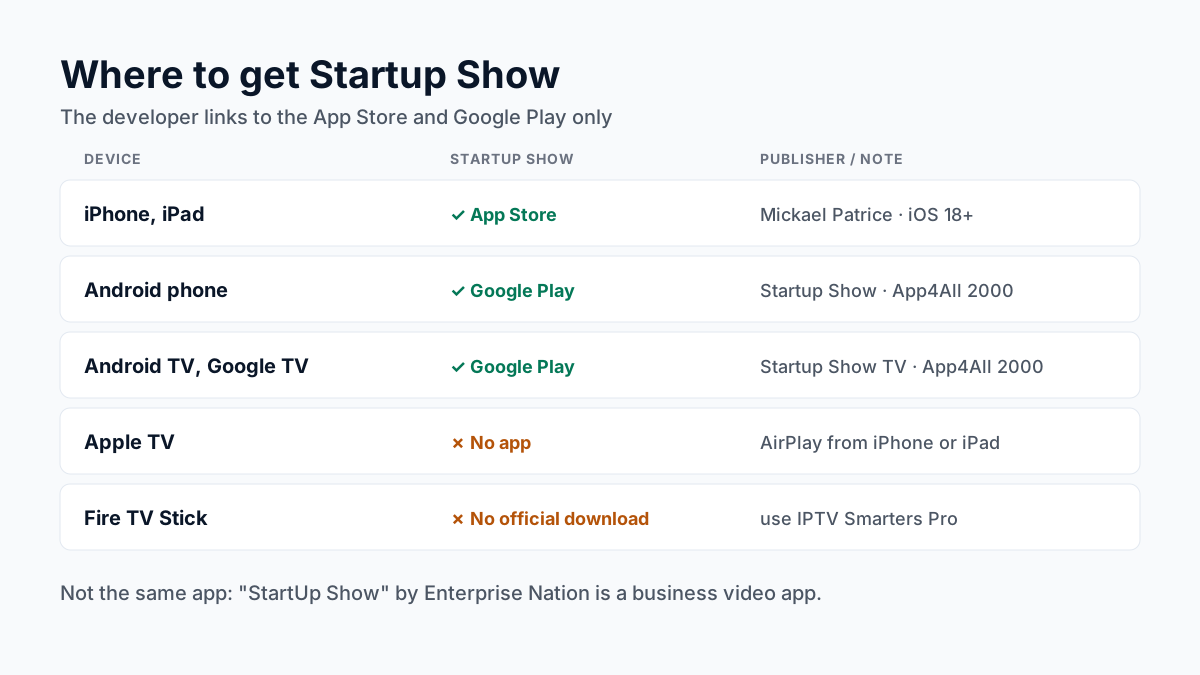
On a Fire Stick there is no official version, and an IPTV app holds your login, so we do not recommend a copy from a mirror site. Use IPTV Smarters Pro instead: our Apollo Group TV Downloader code guide has the steps. This works on Fire OS sticks only: Vega OS models (Fire TV Stick 4K 3rd Gen, 4K Select and HD) cannot install apps from outside the Amazon Appstore; see which Fire TV sticks still sideload.
Set up Startup Show with Apollo Group TV
- Install Startup Show from the App Store, or Startup Show or Startup Show TV from Google Play.
- Ask for your Apollo Group TV M3U playlist link on WhatsApp.
- Open the app and choose to add a playlist.
- Paste the whole M3U link. Copy it rather than retyping: one wrong character breaks it.
- Save, and wait for the channel list to load before you judge what is there.
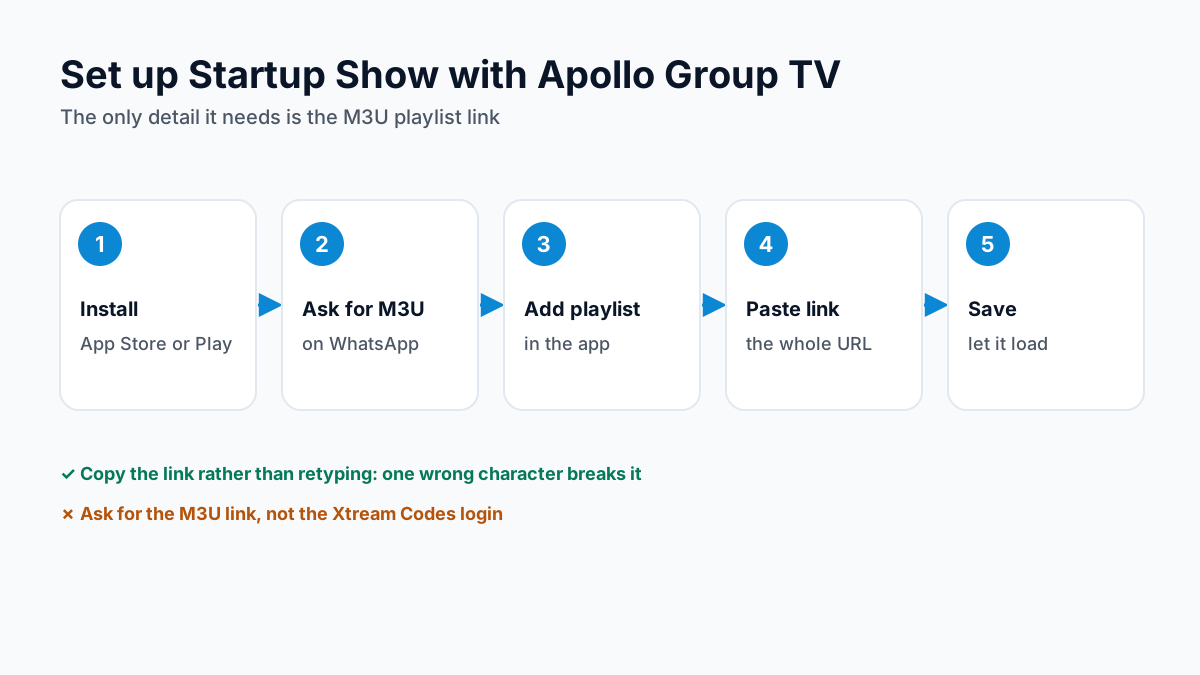
Labels can differ slightly between app versions; we checked these steps against the store listings on 28 October 2026, not on a device.
Ask for my M3U link on WhatsAppStartup Show TV: watching on the big screen
On an Android TV or Google TV, install Startup Show TV, the same publisher's TV version, and add the playlist there. On an iPhone or iPad, the app supports AirPlay: start a channel and send it to an Apple TV or an AirPlay-compatible smart TV on the same Wi-Fi network.
If you watch on the TV most evenings, a player on the TV itself frees up your phone. Our guide to setting up IPTV on Apple TV covers the apps that run there.
Startup Show payment: what is free and what is not
The app costs nothing on either store, and the iPhone listing states it has no advertisements. The only payment is for the IPTV service. For Apollo Group TV, that is arranged on WhatsApp; the methods and plans are on our Apollo Group TV payment methods page.
Anyone asking you to pay for a Startup Show code or activation is not the app's developer.
When Startup Show will not load
- Playlist will not load. Check the whole link was pasted, with nothing cut off at either end. If it still fails, ask support to confirm your line is active.
- Empty TV guide. An M3U playlist may need a separate guide address. Our IPTV EPG guide explains how that works.
- Buffering. Usually the network, not the app. Our IPTV buffering fixes go through the causes.
Startup Show questions, answered
Do I need a Startup Show subscription?
No. Startup Show is a free player, and its developer sells no subscription, account or activation code for it. What you pay for is an IPTV service, whose M3U playlist link you add to the app. Any site selling a "Startup Show subscription" is selling an IPTV service under the app's name.
What is my Startup Show login?
Startup Show has no account to sign in to. The "login" is the M3U playlist link from your IPTV service, a single web address that already contains your username and password. Paste it into the app as a playlist.
Does Apollo Group TV work with Startup Show?
Yes. Ask on WhatsApp for your M3U playlist link rather than the Xtream Codes login, because Startup Show takes playlists. It arrives in the same chat, usually within minutes of request.
How do I pay for Startup Show?
You do not pay for the app: it is free on the App Store and Google Play. You pay for the IPTV service whose playlist you add. For Apollo Group TV, the payment methods and plans are on our payment page.
Is Startup Show on Firestick or Apple TV?
Not officially. The developer links only to the App Store and Google Play and offers no Fire TV, Apple TV or APK download. On an Apple TV, AirPlay from an iPhone or iPad. On a Fire Stick, use IPTV Smarters Pro from its official download instead.
Comparing players? See our IPTV player comparison, the XCIPTV guide and our TiviMate review.
Sources
Checked on . Store listings and prices change; these are the pages to re-check.
Updated
Before you buy
What to know about Apollo Group TV
- Prepaid, no auto-renewalYou renew only when you choose to. Nothing is charged automatically.
- Support 24/7Every day, day and night. A person answers on WhatsApp, before and after you buy.
- Familiar ways to payVisa, Mastercard, Google Pay or Apple Pay.
- Terms in writingRead the refund policy and terms before you pay.
Try it before you pay
A free 24-hour trial lets you test the service before paying anything.
Start Free 24hr TrialOpens WhatsApp · a person replies 24/7
Plans from $19.99/month. Compare every plan and price →