
What is different about the Fire TV Stick 4K Select
The 4K Select is the first Fire TV stick that does not run Android. Every Fire TV before it ran Fire OS, Amazon's version of Android, which is why Android player apps could be installed on them. The 4K Select, launched in October 2025, runs Vega OS instead: a Linux-based system whose apps are written with React Native, according to Spyrosoft's technical overview and Amazon's own Vega developer portal, which pitches Vega as the platform for “the future of Fire TV Sticks”.
That change matters more for IPTV than for anything else. Mainstream streaming services have rebuilt their apps for Vega, and PCWorld found most big names working on it by April 2026. IPTV players have not been part of that move. TiviMate, IPTV Smarters Pro and the other players that read an Xtream Codes login are Android apps, and an Android app cannot run on Vega.
The 4K Select is not alone. PCWorld reports that the newer Fire TV Stick HD also ships with Vega OS. Amazon has also renamed the Android-based Fire TV Stick 4K to the Fire TV Stick 4K Plus, AFTVnews reported, to separate it from the Select on the shelf.
Fire OS vs Vega OS for IPTV
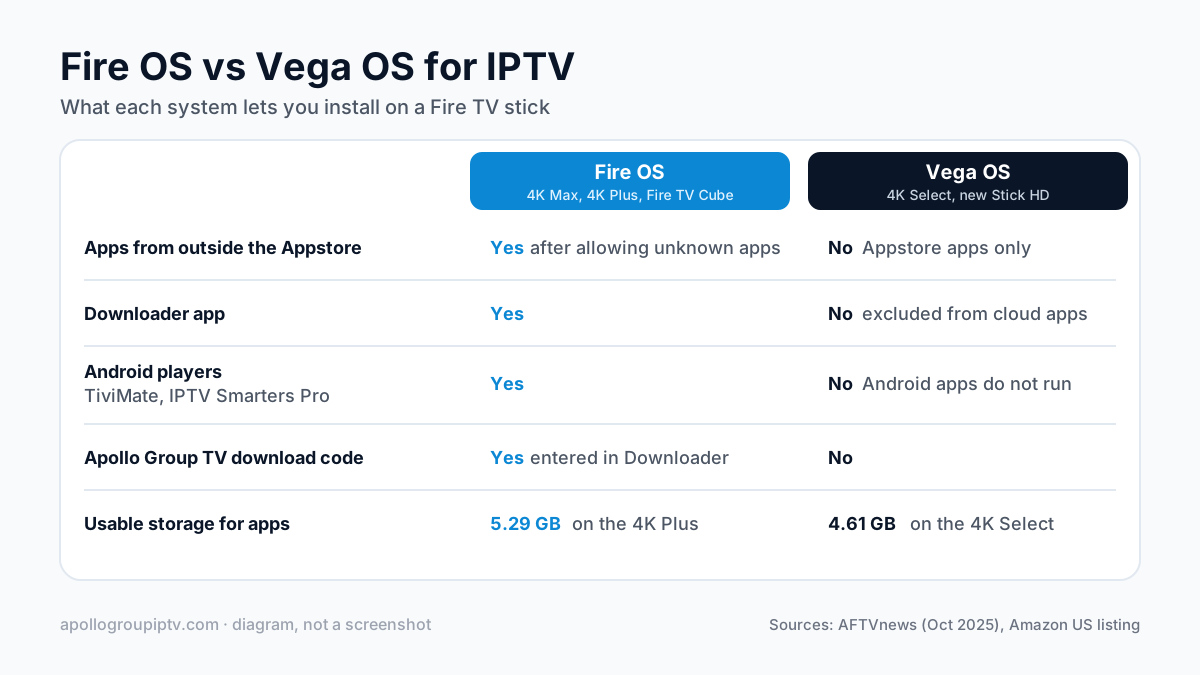
A Fire OS stick can install any Android IPTV player; a Vega OS stick can install only what Amazon publishes for Vega in its Appstore. The table sets out what that means in practice.
| For IPTV | Fire OS (4K Max, 4K Plus, Fire TV Cube) | Vega OS (4K Select, new Stick HD) |
|---|---|---|
| Install apps from outside the Appstore | Yes, after allowing unknown apps in Developer Options | No, Appstore apps only |
| Downloader app | Yes | No; Amazon excludes utility apps such as Downloader from its cloud-app program |
| Android player apps (TiviMate, IPTV Smarters Pro) | Yes | No; Android apps do not run on Vega |
| Apollo Group TV download code | Yes, entered in Downloader | No |
| Usable storage for apps | 5.29 GB on the 4K Plus, per AFTVnews | 4.61 GB on the 4K Select, per AFTVnews |
Some Android apps that are missing on Vega reach it as an “Amazon cloud-hosted app”: Amazon runs the Android version on its own servers and streams the screen to the stick. AFTVnews reported in October 2025 that Amazon picks which apps join that program and that games and utility apps are left out. No IPTV player has been reported among them.
Why Downloader and the download code fail on it
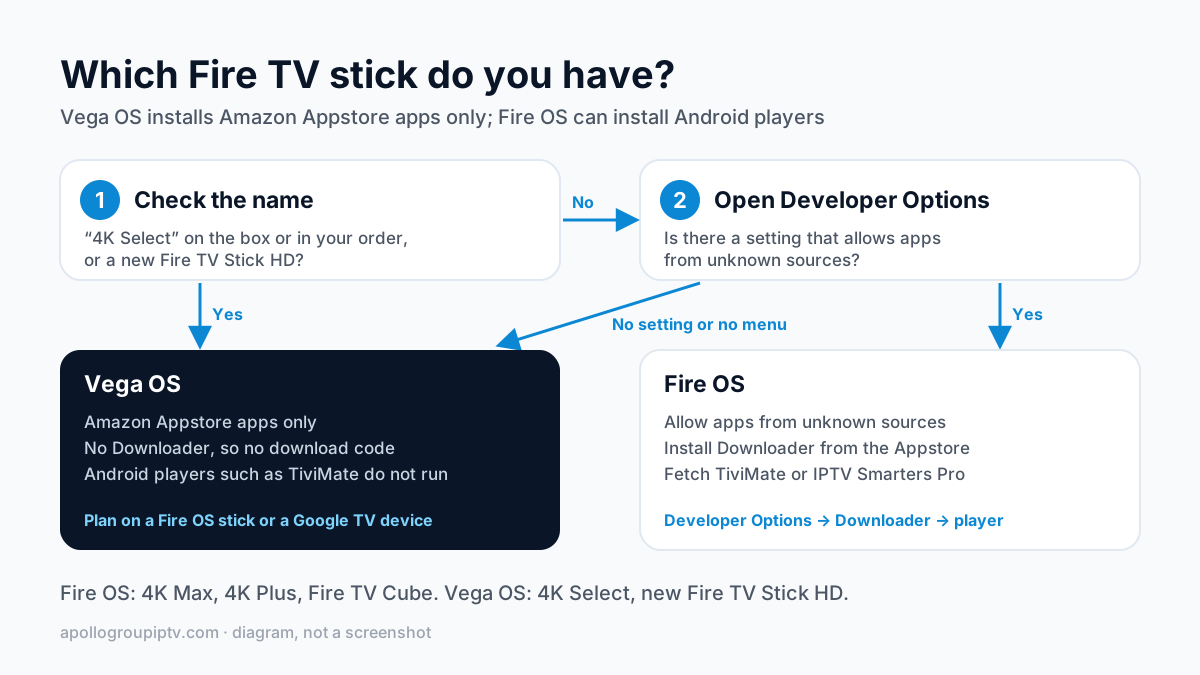
Because there is nowhere to switch sideloading on. On a Fire OS stick, the Firestick IPTV setup starts by allowing apps from unknown sources in Developer Options, then installs Downloader from the Appstore and uses it to fetch the player. Each step fails on the 4K Select.
AFTVnews tested this in October 2025. Developer options appear only after the stick is registered as a developer device under an Amazon developer account. Even then there is no unknown-sources setting. The only way to load an app is to connect the stick to a computer by USB and push a Vega-format app with Amazon's developer tools, which does nothing for an Android player.
The same goes for the code-based install. The Apollo Group TV download code is typed into Downloader, so with no Downloader there is nothing to type it into. Guides that promise a workaround for Downloader on a 4K Select describe a Fire OS stick, not this one.
Can you get an IPTV player from the Appstore on Vega?
Not one that we can point you to. On Vega, the Appstore is the only source of apps, and it carries only apps rebuilt for Vega or picked for Amazon's cloud-app program. When AFTVnews tested the 4K Select at launch, it found no media player apps in its Appstore at all.
The safe statement is the simple one: Android IPTV players cannot be installed on a Vega OS stick. A player could appear in the future if a developer rebuilds one for Vega and Amazon publishes it, so search the Appstore on your own stick if you already own one. Until then, plan on a different device.
How to check which Fire TV you own
Check the name first. “4K Select” on the box or in your Amazon order means Vega OS. So does a new Fire TV Stick HD.
Before you buy, read the listing. Amazon's US listing for its newest Fire TV Stick 4K, read on 15 October 2026, says: “For enhanced security, this device prevents sideloading or installing apps from unknown sources. Only apps from the Amazon Appstore are available for download.” A stick sold with that line cannot install an Android IPTV player, whatever it is called.
On a stick you already own, open Developer Options. A Fire OS stick has a setting there that allows apps from unknown sources. If the stick has no such setting, or no Developer Options menu at all, treat it as Vega OS.
Which device to buy instead
Buy a Fire OS stick or a Google TV device: both install the players this service is set up for. Prices are US list prices before tax, checked 13 October 2026, from dated secondary reports.
| Device | System | US list price | How the player installs |
|---|---|---|---|
| onn 4K Pro (2026 model), Walmart | Google TV | $59.88 | Google Play Store |
| Amazon Fire TV Stick 4K Max | Fire OS | $84.99 | Downloader |
| Google TV Streamer | Google TV | $149.99 | Google Play Store |
| Amazon Fire TV Cube | Fire OS | $199.99 | Downloader |
The onn 4K Pro is the cheapest of the four and needs no sideloading at all; the TiviMate setup on the onn 4K Protakes a few minutes. If you prefer Amazon's remote and menus, the Fire TV Stick 4K Max is the Fire OS stick to pick, and the Fire TV Stick 4K Plus is the cheaper Fire OS option. Any other Google TV or Android TV box works the same way as the onn; see IPTV on Android TV boxes. For more models side by side, including Apple TV, see the streaming box comparison for IPTV.
Already bought a 4K Select?
You have two good options. If it is new, check the return window on your Amazon order and swap it for a Fire OS or Google TV device. If you keep it, use it for the mainstream streaming apps it does run and add a second device for IPTV on another HDMI port.
AFTVnews reports that the 4K Select supports Miracast like other Fire TV models, so mirroring a Windows PC or an Android phone to it may work, with the same limits as mirroring to a Roku: no guide on the TV and channel changes on the phone or PC. We have not tested this on a 4K Select.
Where to go next
Pick the device, then follow its guide; the setup steps for every supported device cover Fire OS, Google TV and the rest. Apollo Group TV plans start at $19.99 a month with no contract on the subscription plans page, and once your player is installed you can try free for 24 hours — no credit card required.
How this guide was checked
Checked on 15 October 2026. We did not test a Fire TV Stick 4K Select ourselves; every hands-on finding above is attributed to the outlet that tested it.
- Sideloading and Developer Options: AFTVnews, Sideloading is truly dead on the Fire TV Stick 4K Select (16 October 2025).
- Cloud-hosted apps and the Downloader exclusion: AFTVnews, Amazon will stream select Android-only apps from the cloud (2 October 2025).
- Storage, USB, Miracast and the empty media-player category: AFTVnews, 20 missing or worse features (21 October 2025).
- The 4K Plus rename: AFTVnews, Amazon adds Plus to the Android-based Fire TV Stick 4K (15 October 2025).
- Vega on the Fire TV Stick HD and app support: PCWorld, The new Fire TV OS is for Amazon, not you (30 April 2026).
- Linux base and React Native: Spyrosoft, Amazon Vega OS; Amazon Appstore developer portal, Vega.
- Device prices: 9to5Google: Walmart onn 4K Pro (2026) hits shelves for $60 (2026-04-15), secondary source.
- Device prices: Walmart.com onn 4K Pro (2026) listing (bot-check, not readable) (accessed 2026-10-13).
- Device prices: AFTVnews: Amazon increases the price of all Fire TVs (2026-08-24), secondary source.
- Device prices: 9to5Google: Google TV Streamer price increase (2026-08-31), secondary source.
Updated
Ready to start streaming?
55,000+ channels · 4K UHD · Free 24hr trial — no credit card
Plans from $19.99/month. Compare every plan and price →