
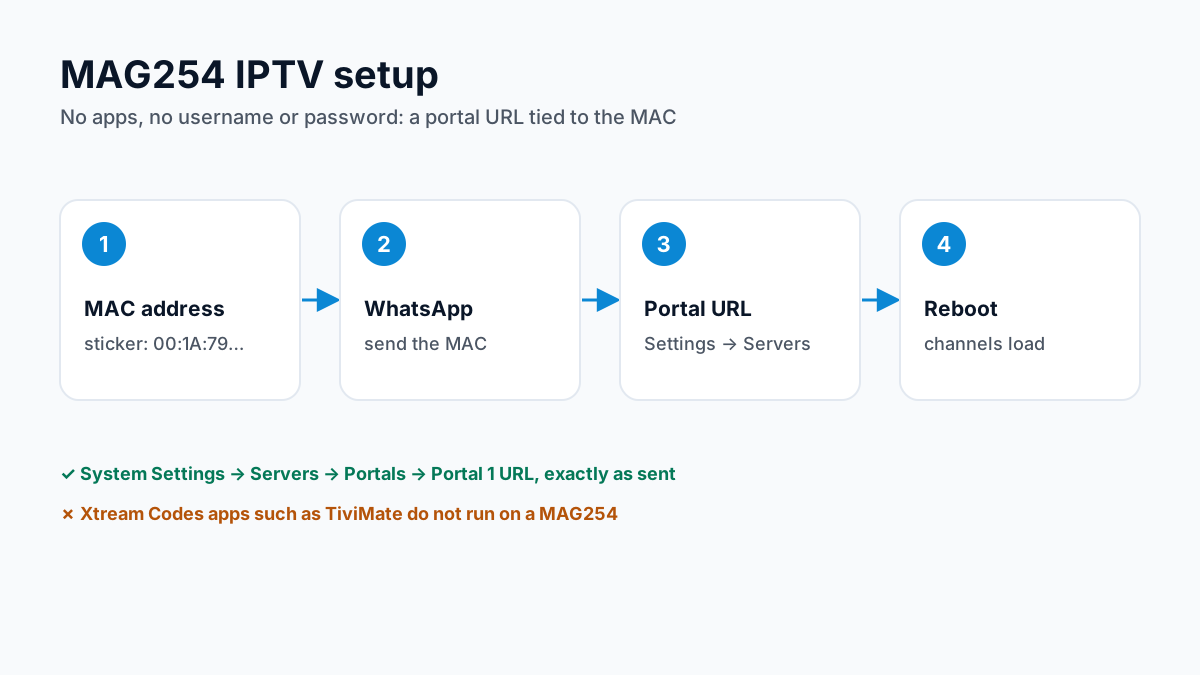
To set up IPTV on a MAG254, you enter your provider's Stalker Portal URL under System Settings → Servers → Portals and reboot the box. The channel list and TV guide then load on the MAG home screen, with no apps, playlists or passwords to type. Activation is tied to the MAC address on the sticker under the box: send it to Apollo Group TV on WhatsApp when you buy an IPTV subscription and the portal URL comes back in the chat.
This guide covers the exact MAG254 setup steps, the most common errors, and an honest look at whether you should keep the MAG254 or upgrade in 2026. You can check the portal on your own box withthe free 24-hour trial before choosing a plan.
MAG254 Specifications
- Video output
- HDMI and composite (AV), up to 1080p Full HD — no 4K
- Video codecs
- MPEG-1/2, H.264 (High Profile, level 4.1) and H.265 (HEVC), per Infomir's datasheet
- Network
- 100 Mbit Ethernet; Wi-Fi built in on the MAG254w1/w2 only, otherwise Infomir's USB adapter
- Ports
- 2 × USB 2.0, S/PDIF optical audio
- Software
- Linux with the Stalker/Ministra portal client — no apps, no playlists
- Status
- Discontinued by Infomir; sold used and refurbished
In practice: the MAG254 decodes H.264 and H.265 channels up to 1080p, but it cannot output 4K. The same setup below applies to the MAG250, MAG256 and MAG322.
MAG254 IPTV Setup Steps (Portal URL)
💡 MAG boxes use a portal URL, not Xtream Codes credentials. Ask for the MAG portal URL specifically when you activate.
MAG254 vs Newer Boxes — Should You Upgrade?
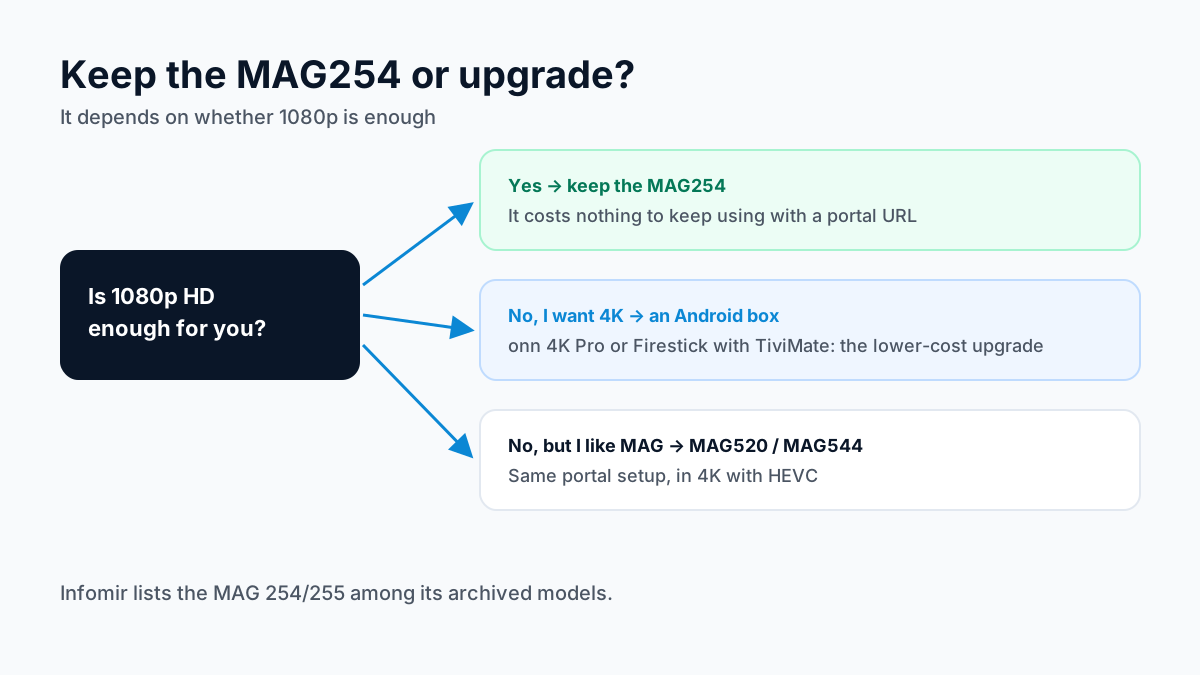
Infomir now lists the MAG 254/255 among its archived models and describes the MAG 322 as the evolution of the MAG254 with HEVC support. Neither change stops an existing MAG254 from working with a portal URL.
| Device | Max Quality | Setup Method | Best For |
|---|---|---|---|
| MAG254 / MAG256 | 1080p Full HD | Stalker Portal URL | Keeping an existing box — still reliable for HD live TV |
| MAG322 / MAG324 | 1080p Full HD | Stalker Portal URL | Slightly faster menus, same picture quality |
| MAG520 / MAG544 | 4K HEVC | Stalker Portal URL | MAG loyalists who want 4K sports and movies |
| Firestick 4K / Onn 4K Pro | 4K | IPTV app (TiviMate, Smarters) | Cheapest 4K upgrade — more apps, modern interface |
Bottom line: keep the MAG254 if 1080p is enough — it costs nothing to keep using. If you want 4K, a Firestick 4K or the Onn 4K Pro with TiviMate is the better-value upgrade over a new MAG box. Your Apollo Group TV subscription works on all of them.
MAG254 Troubleshooting
❓ Page loading error on boot
The portal URL is wrong or the line is inactive. Re-enter the URL exactly as sent, confirm your internet works, reboot. Still failing? Send us your MAC address on WhatsApp to verify activation.
❓ Blocked or 'MAC not registered' message
Your box's MAC address hasn't been added to the portal yet. Send the MAC (starts 00:1A:79) to support and it will be linked to your subscription.
❓ Channels freeze or buffer
The MAG254's 100 Mbit Ethernet port is plenty for HD, so buffering is usually the connection: use a wired connection instead of the Wi-Fi dongle, and reboot your router. See the full IPTV buffering guide for more.
❓ Remote not responding
Replace the batteries first — MAG remotes fail slowly and intermittently as batteries drain. If it has died completely, a universal MAG replacement remote will do the job.
Frequently Asked Questions — MAG254
Is the MAG254 still worth using in 2026?
Yes — for HD viewing. The MAG254 is an older box (Full HD 1080p, no 4K), but it remains stable and perfectly usable for live TV. If you have one, there is no need to replace it to use IPTV. If you are buying new and want 4K, choose a MAG520/MAG544 or a Firestick 4K instead.
How do I set up IPTV on my MAG254?
Go to System Settings → Servers → Portals, enter your provider's portal URL in the Portal 1 URL field, then reboot the box. With Apollo Group TV, your portal URL arrives on WhatsApp after you send us the MAC address printed on the sticker under the box.
Where is the MAG254 MAC address?
On the barcode sticker on the underside of the box — it starts with 00:1A:79. You can also see it on-screen under Settings → System Information. Your IPTV provider needs this MAC address to activate the box on their portal.
What is the difference between MAG254 and MAG256?
The MAG256 is the later revision with a newer chipset and higher H.264 and H.265 decoding levels (Infomir's datasheets list HEVC on both); both are 1080p boxes that set up identically with a Stalker portal URL. The same Apollo Group TV portal URL works on both.
Does the MAG254 support 4K?
No. The MAG254 maxes out at Full HD 1080p. 4K playback requires a newer box such as the MAG520, MAG524 or MAG544, or an Android device like the Firestick 4K or Onn 4K Pro. Apollo Group TV streams work on all of them.
Can I still buy a MAG254 in 2026?
Not new — Infomir discontinued it — but used and refurbished units are common. Any MAG254 that powers on and reaches the portal screen will work; check that the MAC sticker on the underside is intact and matches the on-screen MAC, because activation is tied to that address. If you are buying a box today rather than reusing one, a 4K model or an Android box is the better purchase.
Does the MAG254 have Wi-Fi?
Only the MAG254w1 and MAG254w2 have Wi-Fi built in. The plain MAG254 is Ethernet-only unless you add Infomir's USB Wi-Fi adapter — generic dongles are often not recognised. For live sports, wired Ethernet is the better connection on any of them.
Can I use Xtream Codes or an M3U on a MAG254?
The MAG254's built-in software is a portal client, so the standard setup is a portal URL, not a username and password. Apps that take Xtream Codes credentials, such as TiviMate and IPTV Smarters Pro, do not run on it. Ask support for the MAG portal URL specifically.
My MAG254 says 'page loading error' — how do I fix it?
This usually means the portal URL was typed incorrectly or your line is inactive. Re-enter the URL exactly as sent (no spaces), check your internet connection, and reboot. If the error persists, message support on WhatsApp with your MAC address so we can check the activation.
Have a different MAG model? Our general MAG box IPTV guide covers the MAG250 through MAG520. Buffering issues? Read the IPTV buffering fix guide.
Sources
Checked on . Store listings and prices change; these are the pages to re-check.
Updated
Before you buy
What to know about Apollo Group TV
- Prepaid, no auto-renewalYou renew only when you choose to. Nothing is charged automatically.
- Support 24/7Every day, day and night. A person answers on WhatsApp, before and after you buy.
- Familiar ways to payVisa, Mastercard, Google Pay or Apple Pay.
- Terms in writingRead the refund policy and terms before you pay.
Try it before you pay
A free 24-hour trial lets you test the service before paying anything.
Start Free 24hr TrialOpens WhatsApp · a person replies 24/7
Plans from $19.99/month. View Apollo Group TV pricing & plans →