
TiviMate IPTV Player
Verdict: the TiviMate IPTV player is the one we recommend for Firestick and Android TV. Its cable-style TV guide is its strongest point, it takes M3U, Xtream Codes and Stalker Portal logins, and its listing names recording, catch-up and multiview among its features. It is built for a TV remote, not iPhone, Smart TVs or touchscreens. We describe it from its Google Play listing rather than score it. Subtitles: IPTV closed captions.
Recommended for: Firestick and Android TV homes that live in the TV guide
TiviMate has 5M+ downloads on Google Play. Like any player, it shows nothing until you add a login, such as the one that comes with an Apollo Group TV plan.
This review explains how the TiviMate IPTV app works with an ApolloGroupTV line on a Firestick or Android TV box, and whether TiviMate Premium is worth it for your setup.
What the TiviMate IPTV Player Does
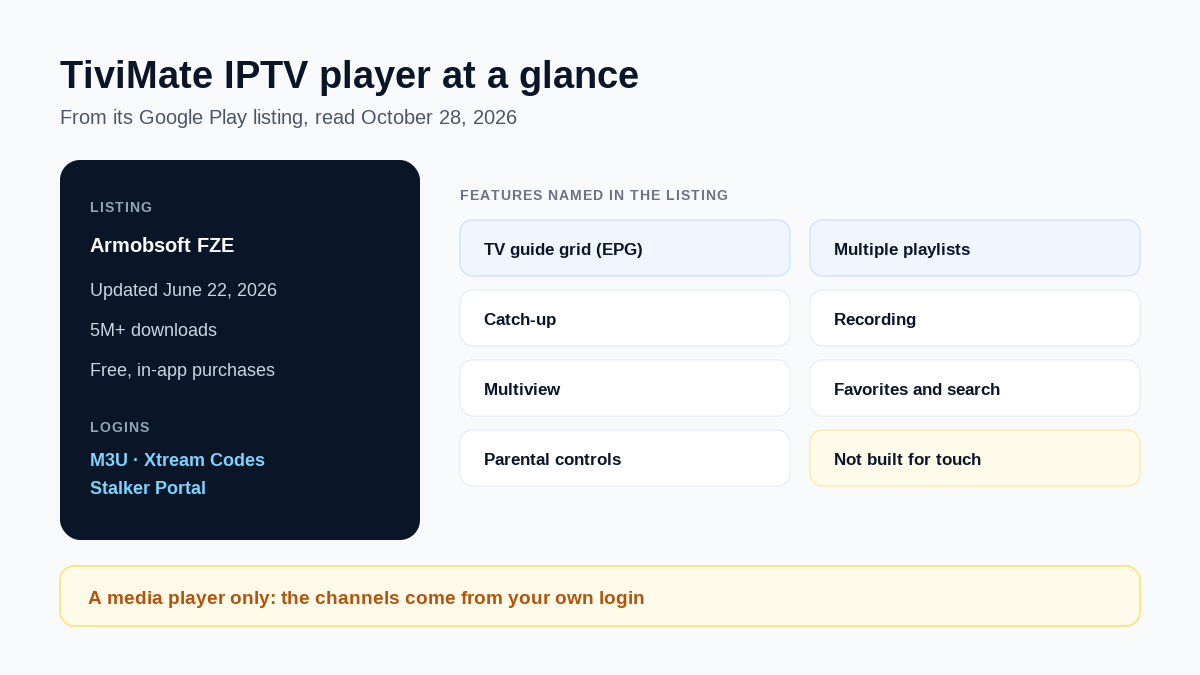
Every fact below is from TiviMate's Google Play listing, read on October 28, 2026. The listing is explicit that the app is a media player only: it provides no channels, and any paid upgrade unlocks app features, not content.
| Developer | Armobsoft FZE |
| Last update | June 22, 2026 |
| Downloads | 5M+ |
| Price | Free to install, with in-app purchases |
| Logins | M3U, Xtream Codes, Stalker Portal |
| Features named | TV guide grid, multiple playlists, favorites, catch-up, recording, search, parental controls, multiview |
| Built for | Android TV and remote control; not optimized for phones or tablets |
EPG (TV Guide)
TiviMate's EPG is the feature people choose it for. It displays the full guide in a familiar grid layout — similar to cable TV's guide — showing program names, times, and descriptions for every channel in your list that has guide data.
With an Apollo Group TV Xtream Codes login, the 7-day guide comes with the channels; a large guide takes a few minutes to load the first time.
Does TiviMate Play 4K?
TiviMate plays 4K channels on 4K-capable devices such as the Firestick 4K Max, where the source broadcasts in 4K. Plan on about 35 Mbps per 4K stream, as our IPTV internet speed guide explains; how fast a stream starts and whether it buffers depends on your connection and the source feed.
TiviMate Free vs Premium — Is Premium Worth It?
TiviMate is free to install from Google Play and offers in-app purchases. Its listing names a TV guide grid, catch-up, recording, multiview, multiple playlists and parental controls among its features, and says a paid subscription or premium upgrade unlocks app features only, not channels or other content. The listing does not say which features need Premium, and TiviMate's companion app listing only says it unlocks “Premium functionality” on devices without Google Play.
So check the upgrade screen inside the app before you buy, and buy only if a feature you need sits behind it. Recording steps are in our guide to recording IPTV.
TiviMate vs IPTV Smarters Pro
| Feature | TiviMate | IPTV Smarters Pro |
|---|---|---|
| TV guide | Cable-style grid | Guide plus separate sections |
| Logins | M3U, Xtream, Stalker | Xtream Codes or M3U |
| Apple devices | No | Smarters Player Lite (WHMCS Smarters) |
| Windows | No | Official download (getiptvsmarters.com) |
| Recording | Listed as a feature | Not confirmed |
| Price | Free, with in-app purchases | Free |
| Where to get it | Google Play | Official APK from getiptvsmarters.com |
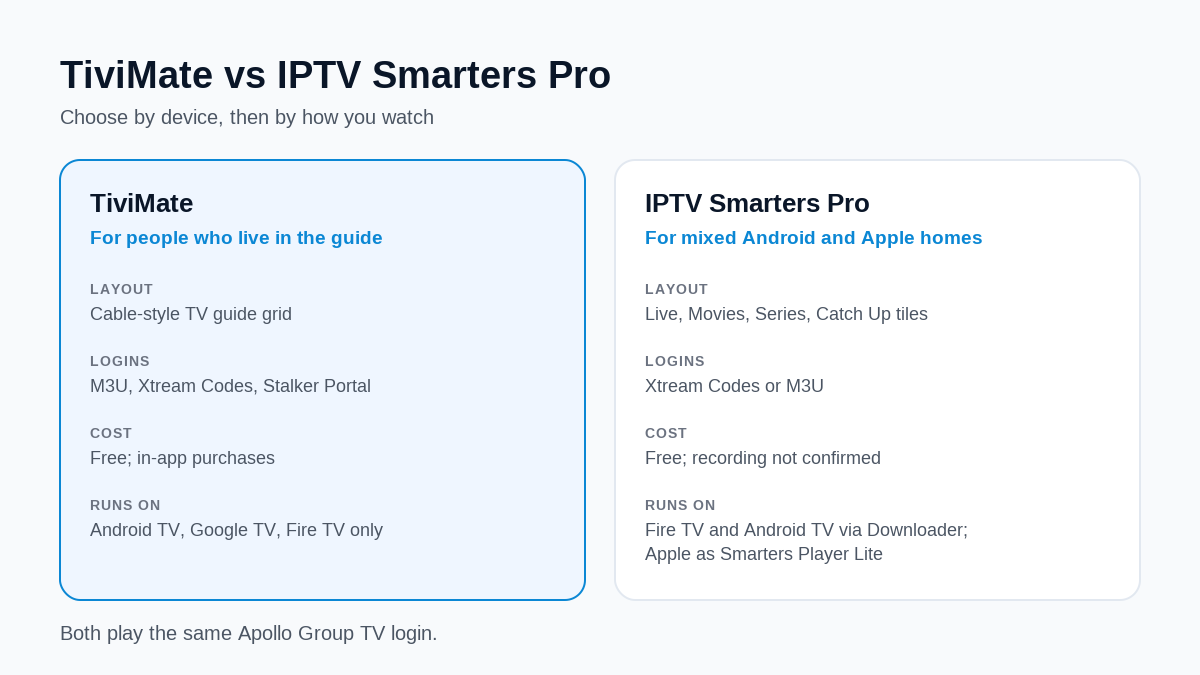
Use TiviMate if you watch on Firestick or Android TV. Use IPTV Smarters Pro if you also watch on Apple devices, where WHMCS Smarters publishes it as Smarters Player Lite. Read our full verdict on IPTV Smarters Pro.
Which Devices Can Run TiviMate?
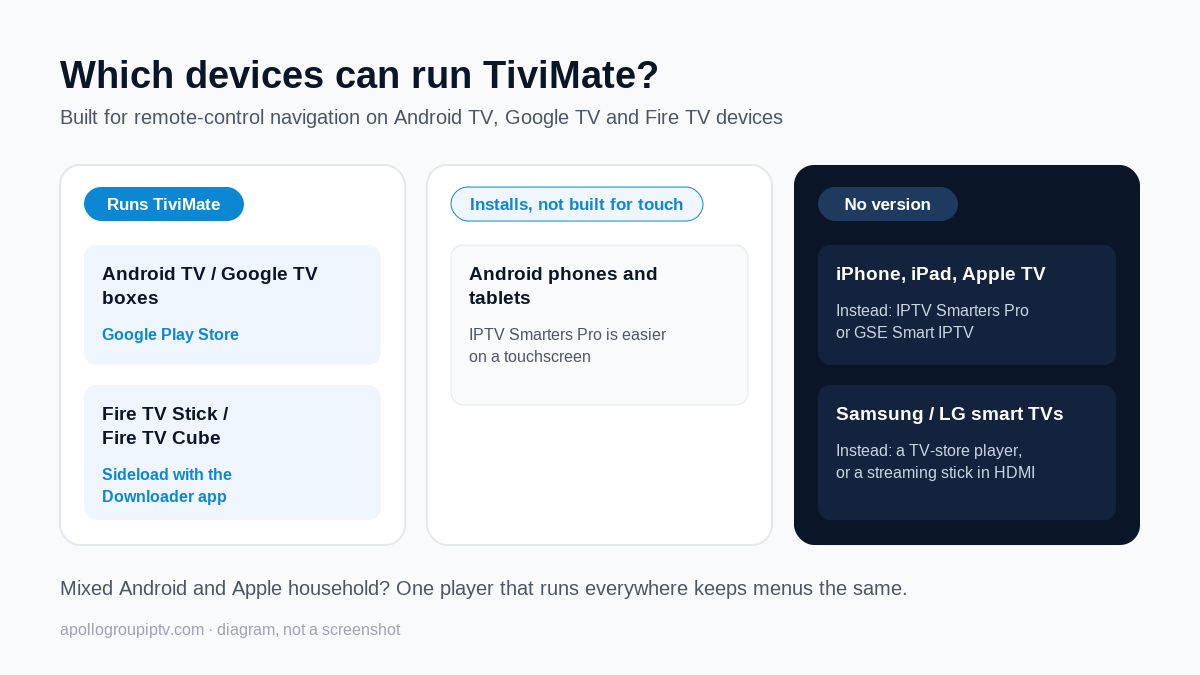
The TiviMate IPTV player for Android runs on Android TV, Google TV and Amazon Fire TV devices. Its Google Play listing says it is designed for remote-control navigation and is not optimised for touch devices such as phones and tablets, and there is no version for iPhone, Windows, Samsung Tizen or LG webOS.
| Device | TiviMate? | How to install / alternative |
|---|---|---|
| Android TV / Google TV boxes | Yes | Google Play Store |
| Fire TV Stick / Fire TV Cube | Fire OS models | Sideload with the Downloader app; Amazon blocks sideloading on Vega OS sticks (4K 3rd Gen, 4K Select, HD (2026)) |
| Android phones and tablets | Installs, but not built for touch | IPTV Smarters Pro is easier on a touchscreen |
| iPhone, iPad, Apple TV | No | Smarters Player Lite or GSE Smart IPTV Pro |
| Samsung / LG smart TVs | No | A TV-store player, or a streaming stick in HDMI |
On a Walmart Onn box, our TiviMate setup for the Onn 4K Pro covers the Google TV screens step by step.
Which Login Type Should You Choose in TiviMate?
Choose Xtream Codes. TiviMate also accepts M3U playlists and Stalker Portal addresses, but an Xtream Codes login loads live channels, the guide, movies and series in one step, with nothing extra to paste.
- Xtream Codes: server URL, username and password. Guide and on-demand sections fill in automatically.
- M3U playlist: one long link. The guide usually needs a separate XMLTV link added under the playlist's EPG sources.
- Stalker Portal: the format MAG boxes use, tied to a MAC address; only worth using if your line was issued that way.
The trade-offs are explained in our M3U vs Xtream Codes explainer.
Which TiviMate Settings Are Worth Changing First?
Hide the channel groups you will never watch, build a favourites list, set the guide to refresh daily and turn on parental controls if children use the TV. These four changes make the largest line-up manageable.
- Groups: hide whole categories, such as languages you do not speak, so the guide shows only what you use. With 55,000+ channels on an Apollo Group TV line, this matters.
- Favourites: long-press a channel and add it to favourites; the favourites group can be set to open first.
- Guide refresh: a daily update keeps the 7-day EPG current without slowing start-up.
- Catch-up: on channels with an archive, scroll back in the guide and play a programme from the past 7 days.
What Are the Common TiviMate Problems and Fixes?
Most TiviMate issues are a login typo, a guide that has not finished downloading, or a device short on storage.
Playlist will not add
Check the server URL includes http and the port exactly as sent, and that the username and password have no trailing space.
Guide empty or wrong times
Update the EPG from the playlist settings and wait a few minutes; if every programme is off by the same hours, set the device's time zone to automatic first. Our guide to fixing a blank IPTV TV guide covers the rest.
Recordings fail
A Fire TV Stick has little internal storage. Point the recording folder to external USB storage (on a stick this needs an OTG adapter) or to network storage before scheduling recordings.
Who Should Choose a Different Player?
Skip TiviMate if you mainly watch on an iPhone, iPad, Apple TV, Windows PC or a Samsung or LG TV without a streaming stick, because there is no version for those platforms. It is also more than you need if you only want on-demand movies and series, where a simpler player is quicker to navigate.
Households that mix Android and Apple devices often settle on one player that runs everywhere, so the menus look the same on every screen. Our roundup of IPTV players by device compares the options side by side.
TiviMate FAQ
Which IPTV provider works with TiviMate?
Any IPTV provider that gives you an M3U link, an Xtream Codes login or a Stalker Portal address; TiviMate itself sells no channels. An Apollo Group TV plan comes with an Xtream Codes login, the type that fills the guide, movies and series in one step.
Does TiviMate include any channels?
No. Its store listing describes it as a media player only; the channels, guide and on-demand titles come from the subscription you add.
Do I need Premium to watch live TV?
The listing does not say which features need Premium. It says a premium upgrade unlocks app features only, not channels or other content, so the channels always come from the subscription you add.
Can I run TiviMate on two TVs with one subscription?
Yes, if your plan covers two devices. Apollo Group TV plans run from 1 to 4 devices, and each one can play a different channel at the same time.
How to Set Up TiviMate with ApolloGroupTV
See our complete step-by-step guide: How to install IPTV on Firestick.
- 1Install TiviMate via the Downloader app on your Firestick (Fire OS models; Amazon blocks sideloading on Vega OS sticks).
- 2Open TiviMate and tap Add Playlist → Xtream Codes API.
- 3Enter your ApolloGroupTV Server URL, Username, and Password.
- 4Tap Add — channels and EPG load automatically.
- 5Open Settings → EPG and set the guide to update daily.
Sources
Checked on . Store listings and prices change; these are the pages to re-check.
- Amazon US listing: Fire TV Stick 4K (3rd Gen), “prevents sideloading or installing apps from unknown sources”
- Amazon Developer: Fire TV device specifications (Vega OS: 4K 3rd Gen, 4K Select, HD (2026); Fire OS 8: 4K Plus (2025), 4K Max and 4K 2nd Gen)
- Google Play (US): TiviMate IPTV Player
- Google Play (US): TiviMate Companion (unlocks Premium on devices without Google Play; read 2026-11-14)
Updated
Before you buy
What to know about Apollo Group TV
- Prepaid, no auto-renewalYou renew only when you choose to. Nothing is charged automatically.
- Support 24/7Every day, day and night. A person answers on WhatsApp, before and after you buy.
- Familiar ways to payVisa, Mastercard, Google Pay or Apple Pay.
- Terms in writingRead how refunds work and the full service terms before paying.
Try it before you pay
A free 24-hour trial lets you test the service before paying anything.
Start Free 24hr TrialOpens WhatsApp · a person replies 24/7
Plans from $19.99/month. Check monthly and multi-month prices →