

What APTV is, and what it is not
APTV is a player, not a service. It plays the streams in a playlist you give it and shows nothing until you do. The channels, the guide data and any catch-up come from your IPTV provider; APTV only decides how they look and how you move between them.
The app is published by Suzhou Xiying Guangnian Technology Co., Ltd and sits in the App Store's Utilities category. Its US App Store listing describes it, in Chinese, as a cross-platform IPTV M3U player with live previews and catch-up. The feature list covers HLS, HTTP and RTMP streams, H.264 and H.265 hardware decoding, 4K with HDR and HLG, picture in picture, AirPlay and DLNA casting, M3U playlists, an electronic program guide, categories, favorites and history, several sources at once, and iCloud sync. The interface lists English among 12 languages.
APTV is free to download with an optional Pro upgrade sold as an in-app purchase. The listing does not say which features need Pro, so check inside the app before you count on one. This page is built from the listing and its version history, read on 15 October 2026; we have not run APTV ourselves.
Which Apple devices APTV runs on
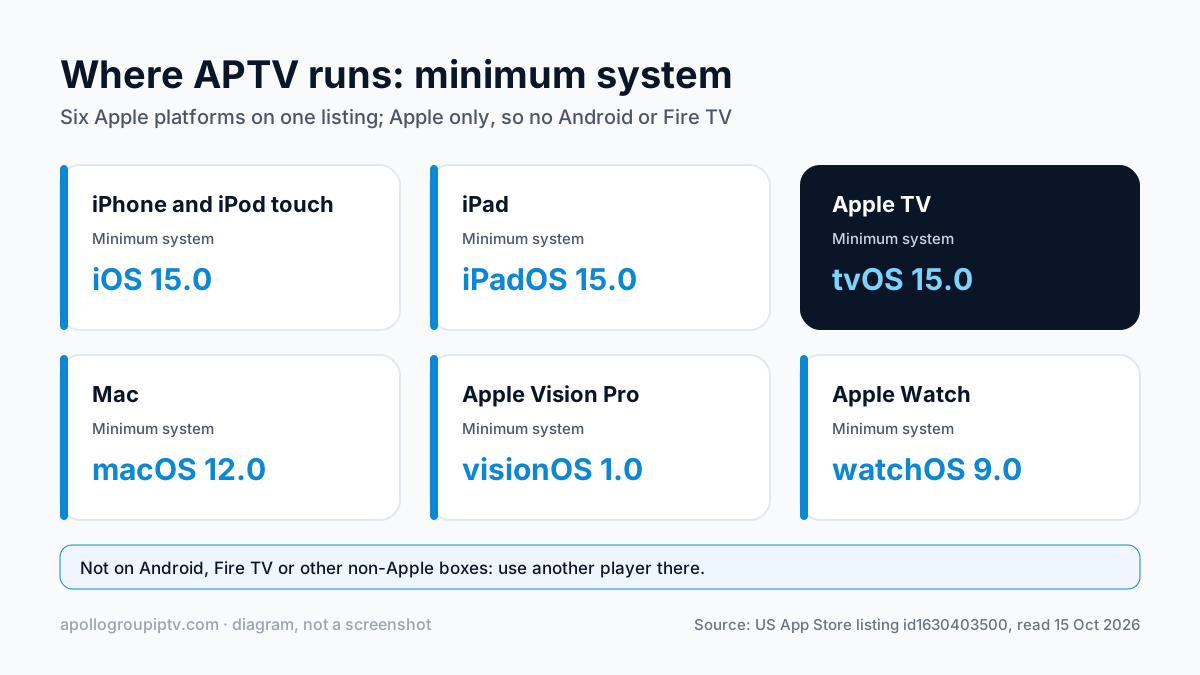
APTV runs on every current Apple platform, which is unusual for an IPTV player. The minimum versions below are from the App Store listing.
| Device | Minimum system | Notes |
|---|---|---|
| iPhone and iPod touch | iOS 15.0 | Full app, picture in picture |
| iPad | iPadOS 15.0 | Full app; the version history adds full-screen output to an external display |
| Apple TV | tvOS 15.0 | Living-room app with the remote |
| Mac | macOS 12.0 | Desktop app |
| Apple Vision Pro | visionOS 1.0 | Listed as supported |
| Apple Watch | watchOS 9.0 | Listed as supported |
If you also watch on a Fire TV or Android box, APTV is not available there; it is Apple-only. The Apple TV IPTV setup guide covers the other players for the box under your TV.
Adding your playlist to APTV
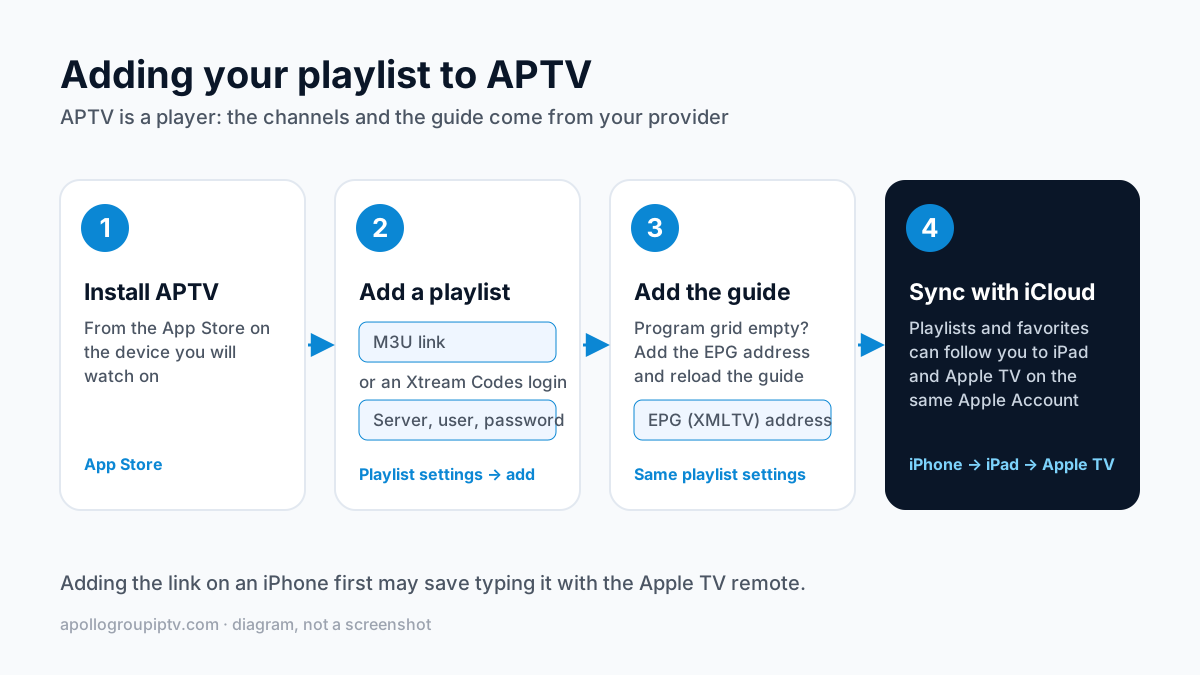
You add a playlist in APTV's playlist settings by pasting the address your provider gives you. The listing describes APTV as an M3U player, and an M3U link is a single web address that carries your login inside it, so it is the safest way in. Apollo Group TV subscribers can ask support for their M3U link and paste it there.
Xtream Codes is the other common login: a server address, a username and a password typed into separate boxes. APTV's version history on the US App Store lists a fix for “xtream code” configuration compatibility in 2026, which shows the app handles that login type. The difference between the two is set out in our M3U and Xtream Codes comparison; with an Xtream login, the guide usually comes with the channels, while an M3U link may need the guide added separately.
The steps, whichever login you use:
- Install APTV from the App Store on the device you will watch on.
- Open the app's playlist settings and choose to add a new one.
- Paste the M3U link, or enter the server address, username and password for an Xtream Codes login.
- Save and wait for the channel list to load. Large playlists take longer the first time.
- Open a category and start a channel to confirm it plays.

Typing a long M3U link with an Apple TV remote is slow. Adding it on an iPhone first and letting iCloud carry it to the TV may save the typing, as described in the sync section below.
Adding the TV guide
The guide in APTV comes from an EPG, also called XMLTV: a second address that lists what is on each channel. If the program grid is empty after your playlist loads, the playlist did not bring a guide with it, and you add the EPG address in the same playlist settings.
APTV's version history shows steady work on this part of the app. Recent versions added a switch to stop the guide loading automatically, a button to reload the guide from a program's detail page, a way to see which source a guide entry came from, and one-tap clearing of the guide cache. Clearing the cache and reloading is the first thing to try when the guide shows the wrong programs.
The address itself comes from your provider. Where to find it, and how XMLTV matching works, is in our guide to adding an EPG to an IPTV player.
Keeping iPhone, iPad and Apple TV in sync
APTV lists iCloud sync among its core features, and its version history adds a manual iCloud sync button in 2026. In practice, that means your playlists and favorites can follow you from the iPhone to the iPad and the Apple TV, as long as each device is signed in to the same Apple Account.
Two cautions from the listing. First, it does not say whether sync needs the Pro purchase, and one App Store reviewer says they bought it for sync, so check before you rely on it. Second, several versions fixed crashes linked to iCloud sync, so if the app misbehaves after a sync, update it before you change anything else.
If sync does not carry a playlist over, add it on each device by hand. Setting it up on the iPhone is covered in our iPhone and iPad IPTV guide.
APTV vs IPTV Smarters Pro vs GSE Smart IPTV
APTV suits Apple-only homes that want one player on every screen; IPTV Smarters Pro is the simplest free option; GSE Smart IPTV is the one to choose if you also cast to a Chromecast TV.
| What matters | APTV | IPTV Smarters Pro | GSE Smart IPTV |
|---|---|---|---|
| Price model | Free, Pro upgrade in-app | Free | Paid Pro edition on Apple TV |
| Login types | M3U; Xtream Codes per version history | Xtream Codes or M3U | Xtream Codes or M3U |
| Apple devices | iPhone, iPad, Apple TV, Mac, Vision Pro, Watch | iPhone, iPad, Apple TV | iPhone, iPad, Apple TV |
| Casting to a TV | AirPlay and DLNA | AirPlay screen mirroring | AirPlay, plus Chromecast from the cast icon |
| Also on Android | No, Apple only | Yes | Yes |
| Stand-out feature | Live previews and iCloud sync | Free, with a simple login screen | Chromecast support |
TiviMate is not an option on any Apple device: it is Android-only. For the full field, including Flex IPTV on Apple TV, see the IPTV player comparison.
APTV problems and fixes
Most APTV problems come from the playlist or the guide address, not the app.
The playlist will not load. Check the link for a missing character, and open it in Safari on the same network: if it downloads, the link is fine. If you entered an Xtream Codes login, check that the server address includes the port and that the username and password match exactly. Then update APTV, since the version history shows Xtream compatibility fixes.
Channels load but the guide is empty. Add the EPG address in the playlist settings, then use the reload option. The guide can take a few minutes on a large playlist.
The guide shows the wrong programs. Clear the guide cache and reload. If one channel stays wrong, its ID does not match the guide; the EPG not working fixes cover that case.
The app crashes after an update. The version history lists crash fixes in nearly every release, so update to the newest version and restart the device.
Where to go next
Compare APTV with the other players before you settle; the top IPTV players ranked by device is the place to start. Apollo Group TV plans start at $19.99 a month with no contract on our plans and pricing page, and you can try free for 24 hours — no credit card required. The login works in APTV or any other player.
Updated
Ready to start streaming?
55,000+ channels · 4K UHD · Free 24hr trial — no credit card
Plans from $19.99/month. Check monthly and multi-month prices →