
IPTV meaning: what Internet Protocol Television is
IPTV stands for Internet Protocol Television: live TV, video on demand and time-shifted TV carried as IP data packets rather than as a broadcast signal. Both Wikipedia's Internet Protocol television article and the IEEE technology navigator entry on IPTV describe live TV and video on demand delivered this way; IEEE also lists time-shifted viewing.
The "Internet Protocol" part is the same set of rules that moves web pages and email. A cable company sends every channel down the wire at once and your box tunes to one. An IPTV system sends only the stream you ask for, cut into packets, and your device puts the packets back together into picture and sound.
So "what is IPTV" has a technical answer and an everyday one. Technically, it is a delivery method. In everyday use in the USA, people usually mean a paid IPTV service that streams live channels to an app. Both meanings are correct, and the rest of this page keeps them apart, because the difference decides what you are actually buying.
How does IPTV work? Step by step
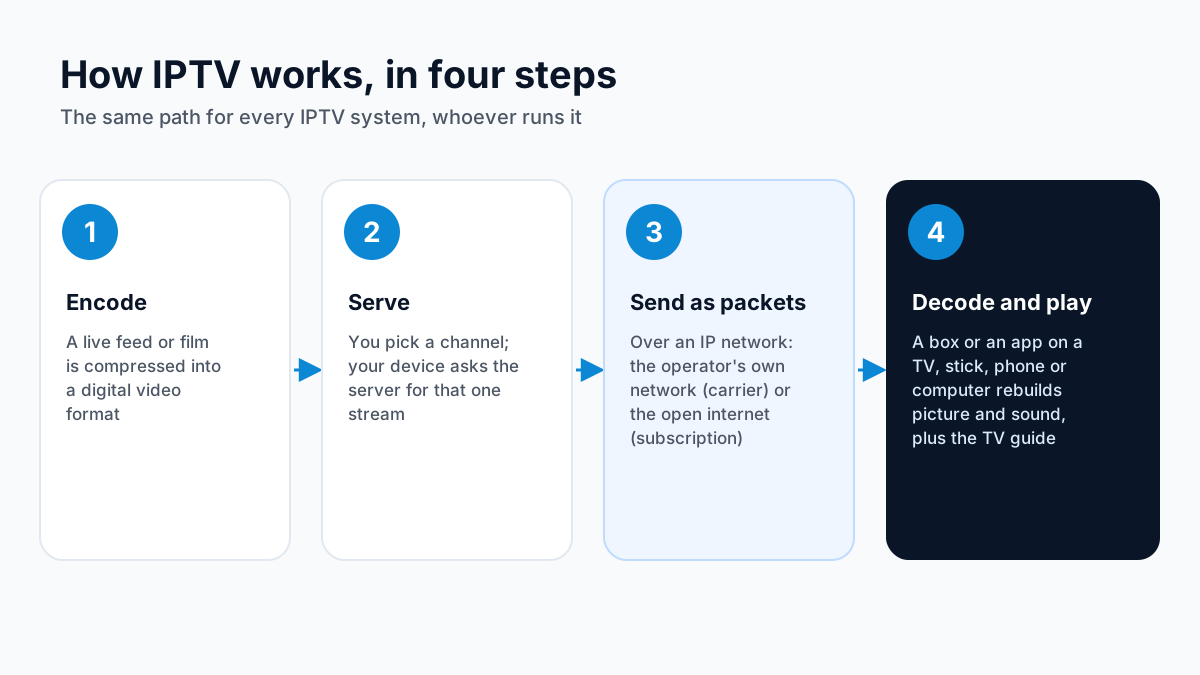
IPTV works by encoding a channel into a compressed digital stream, sending it across an IP network in small packets, and having a player on your device decode those packets back into video in near real time. Every IPTV system follows the same four steps, whoever runs it.
- 1
The channel is encoded.
A live feed or a stored film is compressed into a digital video format.
- 2
The stream is served.
When you pick a channel, your device requests that one stream from the provider's servers.
- 3
The packets travel over an IP network.
On carrier IPTV the packets stay on the operator's own managed network. On subscription IPTV they cross the open internet, through your home broadband, Wi-Fi or Ethernet, like any other video.
- 4
A player decodes and displays it.
A set-top box or an app on a Smart TV, Fire TV Stick, Android TV device, phone or computer reassembles the packets and plays them. The same player usually loads an electronic program guide (EPG) so you can see what is on.
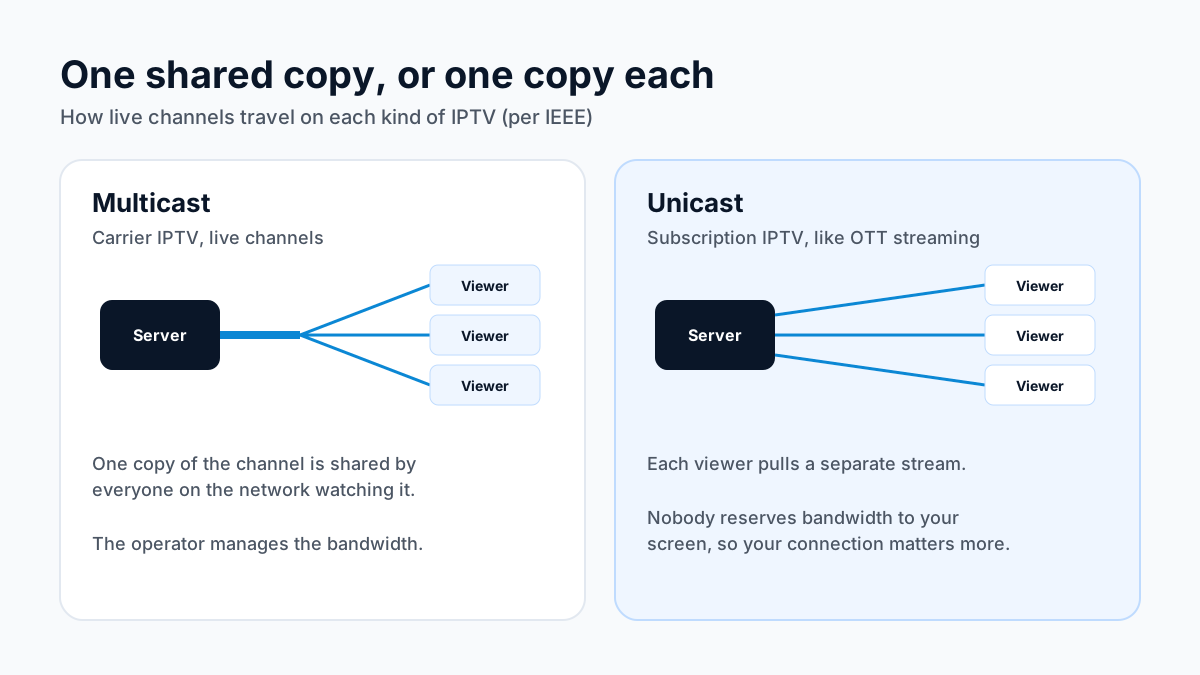
The way the stream is sent differs between the two kinds of IPTV. According to IEEE's IPTV topic page, carrier IPTV typically sends live channels by IP multicast, where one copy of a channel is shared by every viewer on the network who is watching it, and sends on-demand video by unicast, where each viewer gets a private copy. Subscription IPTV over the open internet is unicast: each viewer pulls a separate stream, exactly as an over-the-top (OTT) streaming service does.
That is why your own connection matters more with subscription IPTV: nobody reserves bandwidth between the server and your screen.
Carrier IPTV vs subscription IPTV
Carrier IPTV is TV that your internet provider runs over its own managed network to a set-top box it supplies; subscription IPTV is a separate service that streams channels over the open internet to an app on a device you already own. They share a name and a protocol, and almost nothing else a viewer would notice.
| Carrier IPTV | Subscription IPTV | |
|---|---|---|
| Who runs it | Your internet or phone provider | A separate service, independent of your internet provider |
| Network | The provider's own managed network, end to end | The open internet, over whatever broadband you have |
| How live channels are sent | Typically IP multicast (one shared copy per channel) | Unicast (one copy per viewer), like OTT streaming |
| Equipment | The provider's set-top box | Your own Smart TV, Fire TV Stick, Android TV box, phone or computer, plus a player app |
| Who controls picture quality | The provider manages bandwidth on its own lines | Shared between the service's servers, the internet route and your home network |
| Where you can watch | Usually on the provider's line at the address on the account | Anywhere the app runs and has an internet connection |
| How you sign up | Bundled with broadband or phone service | Separately, with a login the service sends you |
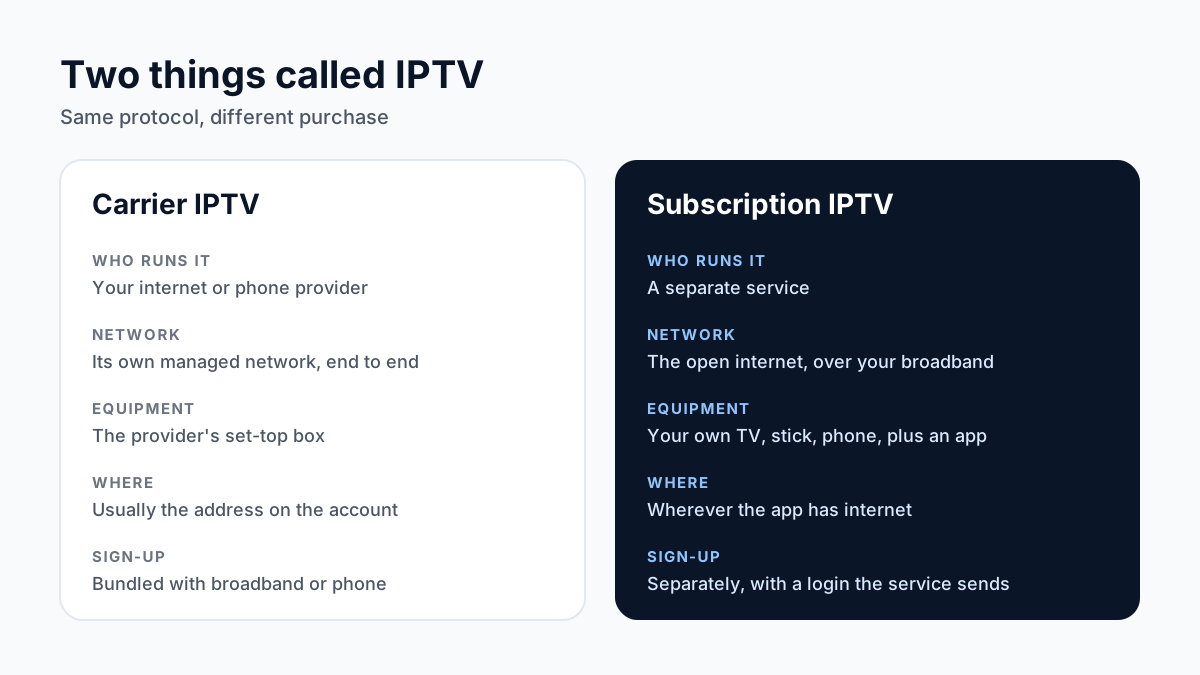
The textbook definition of IPTV describes the left-hand column. Most of what is advertised as "IPTV" to US consumers today is the right-hand column, and the two are different purchases. With carrier IPTV you are buying a TV package from the company that already brings the internet into your home. With an IPTV subscription you are buying access to a set of streams, and you supply the device, the app and the connection yourself.
Apollo Group TV is a subscription IPTV service, the right-hand column; see what Apollo Group TV offers. If you want the trade-offs of that model against a traditional package, the IPTV vs cable comparison covers them row by row.
What is an IPTV service? Apps vs services
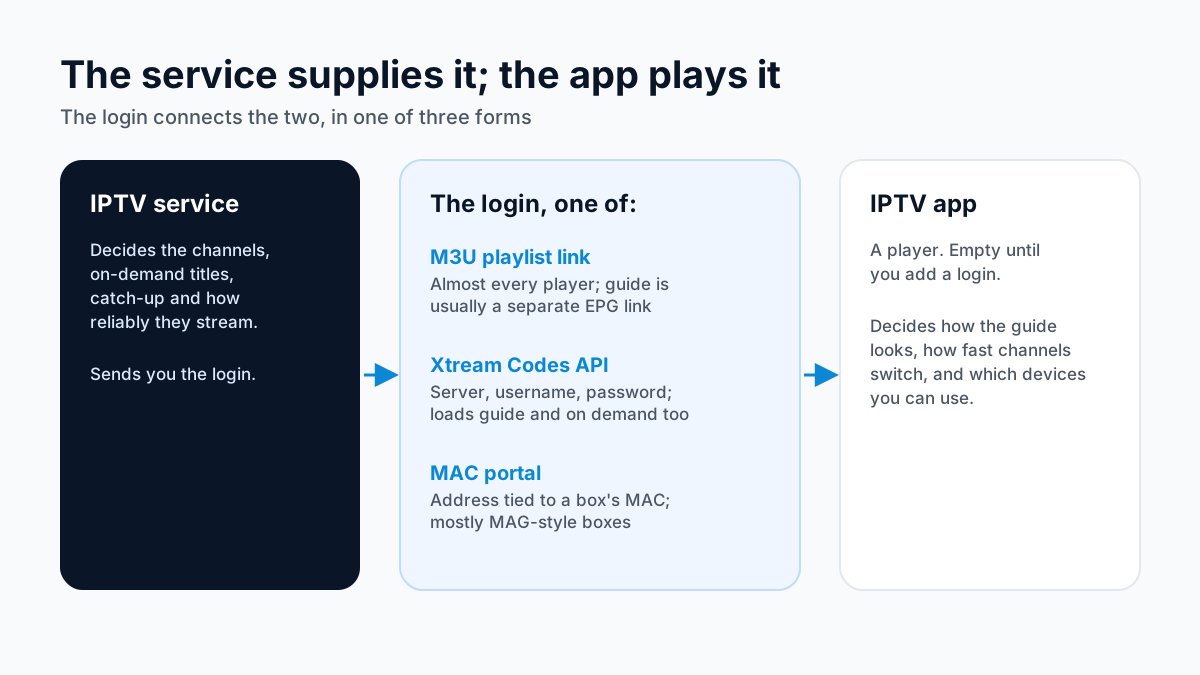
An IPTV app is not the same as an IPTV service. An IPTV app is a player that plays streams; an IPTV service is the provider that supplies the streams and the login. The app is empty until you add a service's details to it.
Player apps in the app stores ship without channels, and their listings for IPTV players say so. The IPTV Plus player listing on the US App Storecarries this disclaimer: "This app does not provide or include any content or channels. IPTV Plus is a video player only."
So when you download a player and open it, you see an empty screen asking for a playlist URL, an Xtream Codes login or a portal address. Those details come from the service you subscribe to. That gives you two separate choices to make:
- The service decides which channels, on-demand titles and catch-up you get, and how reliably the streams are delivered.
- The app decides how the guide looks, how fast channels switch, and which devices you can use.
If you are comparing players for your device, start with the guide to IPTV player apps. If you are comparing services, the overview of what an IPTV service includes explains what to check before you pay.
Live TV, on demand and catch-up
IPTV comes in three forms: live TV, which plays channels as they air; video on demand (VOD), which lets you pick a film or episode from a library; and time-shifted or catch-up TV, which lets you watch a programme after it aired. Most subscription services bundle all three behind one login.
- Live TV. Linear channels streamed as they are broadcast. You browse them with the EPG, the same grid of channels and times you know from cable.
- Video on demand. A library of films and series you start whenever you like. It works like the on-demand streaming apps, except the library sits inside your IPTV service rather than in a separate app.
- Time-shifted and catch-up TV. Programmes recorded on the service's side so you can restart a show in progress or go back to one that already aired. How far back you can go, and which channels support it, varies by service and by channel.
IPTV vs cable, satellite and streaming apps
IPTV differs from cable and satellite in how the signal reaches you: cable uses a dedicated wire into the home and satellite uses a dish, while IPTV uses an internet connection. It differs from on-demand streaming apps mainly in what it carries: IPTV is built around live channels, while most streaming apps are built around a library.
| Subscription IPTV | Cable TV | Satellite TV | On-demand streaming apps | |
|---|---|---|---|---|
| How it reaches you | Internet connection | Coaxial or fiber line from the cable company | Dish on the building | Internet connection |
| Main content | Live channels, plus on demand and catch-up | Live channels, plus on demand | Live channels, plus on demand | Mostly on-demand library |
| Equipment | Device you own plus a player app | Provider's box, or the provider's app | Dish and receiver | Device you own plus the service's own app |
| Installation | Install an app and sign in | Line activation, sometimes a technician | Dish installation | Install an app and sign in |
| Watch away from home | Wherever the app has internet | Through the provider's app, where allowed | Through the provider's app, where allowed | Wherever the app has internet |
| Depends on your home internet | Yes | No, for the TV line itself | No, but weather can affect the signal | Yes |
The line between "IPTV" and "streaming" is blurry, since both travel over the internet. The useful distinction is the experience: an IPTV service looks and behaves like a channel lineup with a program guide, while an on-demand app looks like a catalogue.
For the full costs and trade-offs against a cable package, read how IPTV compares with cable TV.
What you need to watch IPTV
To watch subscription IPTV you need four things: a broadband connection, a compatible device, a player app for it, and an active login from an IPTV service. You do not need a dish, a cable line or a technician.
- An internet connection. The speed you need depends on the bitrate of the streams and on how many screens play at once: an HD stream needs less than a 4K stream, and each extra screen adds its own stream. A wired Ethernet connection or a strong 5 GHz Wi-Fi signal to the TV usually matters more than the headline speed on your bill.
- A device. A Smart TV, a Fire TV Stick, an Android TV box, a phone or tablet, or a computer. The list of supported devices and setup guides shows which ones Apollo Group TV covers and how to set each one up.
- A player app. The app that runs on that device and reads your login. See the comparison of IPTV players by device.
- A service login. The account details from the service you subscribe to: a playlist URL, an Xtream Codes username and password, or a portal address.
M3U, Xtream Codes and portal logins
An IPTV service gives you access in one of three ways: an M3U playlist link, an Xtream Codes API login, or a MAC portal address tied to your device. Which one you use depends on your app and device, not on the channels you get.
- M3U playlist. A web address pointing to a text file that lists every channel and its stream address. Almost every player accepts one. The program guide usually comes as a separate EPG link.
- Xtream Codes API. A server address, username and password. The app asks the server for channels, on-demand titles, catch-up and the guide in one go, so setup is often simpler than a playlist.
- MAC portal. A portal address registered against the MAC address of a set-top box or app. Mostly used by MAG-style boxes and apps that imitate them.
If you are deciding between the first two, the M3U vs Xtream Codes guide compares them side by side.
IPTV basics: the guides in this series
- Kids Channels — The kids channels a family subscription should cover, including French-language.
- Worldwide Channels — International channels from Europe, the Middle East, South Asia and Africa.
- Movies & Series — What the on-demand library inside an IPTV subscription covers, and how to browse it.
Where to go next
The next step depends on your question: how to choose a service, what it costs, or what the law says. Each has its own page.
- Choosing a service in the USA: see how Apollo Group TV compares with US live TV options.
- Prices: the Apollo Group TV plan and price page lists every plan and what each includes.
- Trying before you pay: how the Apollo Group TV trial works explains how to request a test login and what it covers.
- The law: whether IPTV is legal in the USA is a separate question, answered in our guide to IPTV and the law.
Sources
Checked on . Store listings and prices change; these are the pages to re-check.
Updated
Before you buy
What to know about Apollo Group TV
- Prepaid, no auto-renewalYou renew only when you choose to. Nothing is charged automatically.
- Support 24/7Every day, day and night. A person answers on WhatsApp, before and after you buy.
- Familiar ways to payVisa, Mastercard, Google Pay or Apple Pay.
- Terms in writingRead the refund policy and terms before you pay.
Try it before you pay
A free 24-hour trial lets you test the service before paying anything.
Start Free 24hr TrialOpens WhatsApp · a person replies 24/7
Plans from $19.99/month. View Apollo Group TV pricing & plans →