
What is worldwide IPTV?
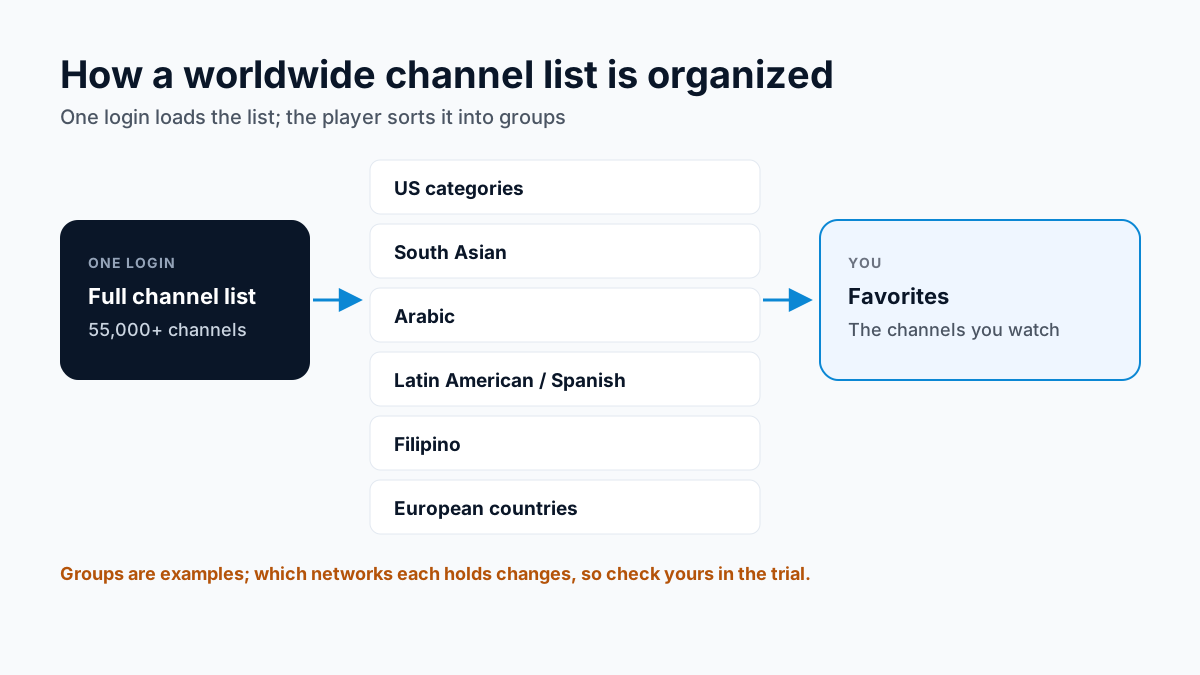
A cable or satellite package is built around one country's channels, with international channels sold as add-ons, one language at a time. A worldwide IPTV subscription works the other way round: one channel list that spans many countries, organized so you can find your own. On Apollo Group TV IPTV that list has 55,000+ live channels, delivered over your internet connection with no dish.
That suits households that watch in more than one language: the news from home, a film in the language you grew up with, and US channels, all in one app on one bill. The Apollo Group TV plans and prices page shows that bill on each plan length.
How international channels are organized
Your player app sorts the channel list into categories, and international channels sit in groups named by country or by language, for example a South Asian, Arabic, Spanish-language or European country group, alongside the US categories. Which groups a list has, and which networks sit in each, varies, so check your own country by name during the trial.
We describe the lineup by group rather than by network, because which networks a group holds changes over time. If one channel is the reason you are signing up, search for it by name during the Apollo Group TV free trial and watch it at the hour you normally would.
How to find your home country's channels
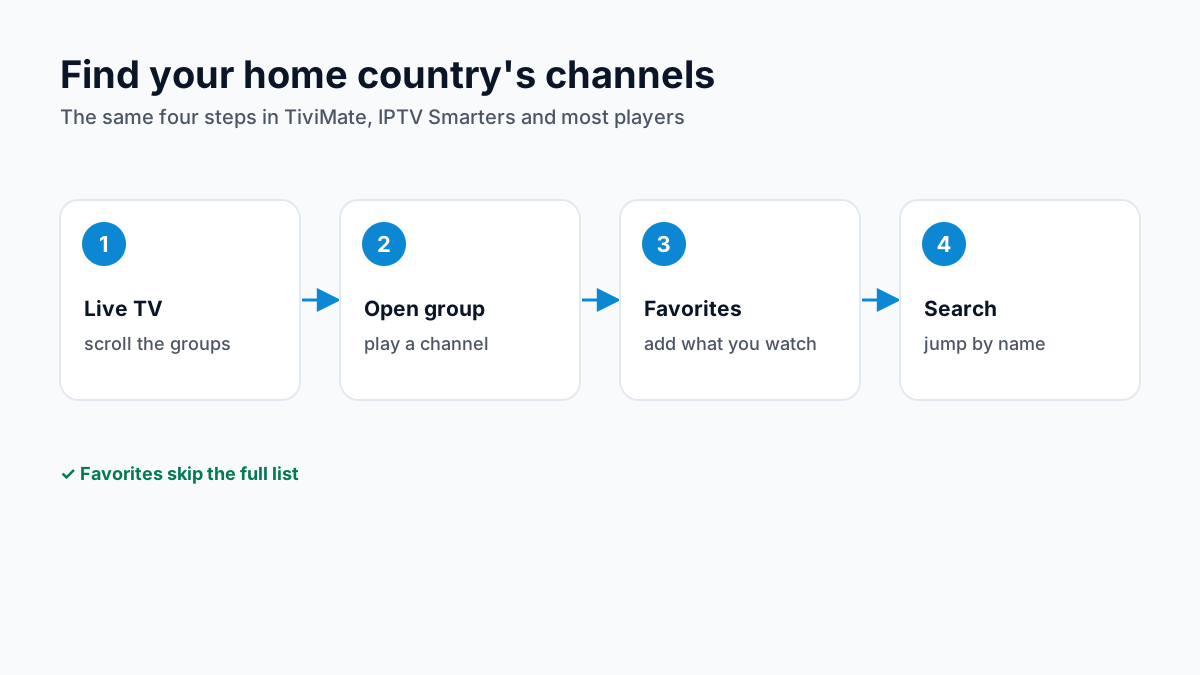
The steps are the same in TiviMate, IPTV Smarters and most other players:
- Open Live TV and scroll the category list to your country or language group.
- Open the group and play a channel to check it loads.
- Add the channels you actually watch to a Favorites group, so you skip the full list next time.
- Where your player has a search (IPTV Smarters lists one), use it to jump to a channel by name instead of scrolling.
New to the players themselves? The IPTV player comparison shows which app runs on your device.
Watching across time zones
Live channels from another country air on that country's schedule. The evening news from home may land in the middle of your working day, and a late-night show there can be breakfast time here. Two things help.
- Catch-up. On supported channels you can replay programs from the last 7 days from the TV guide, so you watch the news from home when it suits you.
- The right clock on your device.The guide shows times in your device's time zone, so check the date and time zone in the device settings if every listing looks shifted.
On-demand movies and series have no schedule at all; our IPTV VOD guide covers that side of the subscription.
Do you need a VPN for worldwide IPTV?
Not for Apollo Group TV: it does not require a VPN, and international channels play over an ordinary US internet connection. A VPN changes how your traffic reaches the internet, not what is in the channel list, and it can slow streams down if the VPN server is far away or busy.
If you already use one and channels stop loading, our guide to IPTV and VPNs explains how to test with it switched off and how split tunneling keeps the IPTV app outside the VPN.
Screens for a multilingual household
In many households each person watches in a different language at the same time. Every screen playing at once uses one connection, so two people watching two countries' channels need a plan for two screens. Plans come for 1 to 4 screens, with each extra screen discounted (2 devices −20% · 3 devices −25% · 4 devices −30%); our guide to watching IPTV on several screens explains how connections are counted.
Global IPTV and live sport
Sport sits in its own category in the channel list, described by category rather than by league or network. Apollo Group TV does not hold broadcast rights to any league, event, network or tournament, and which events a channel shows depends on the channel. If a particular competition matters to you, check the channel during the trial, and see our guide to IPTV and the law.
IPTV international channels: what to check in the trial
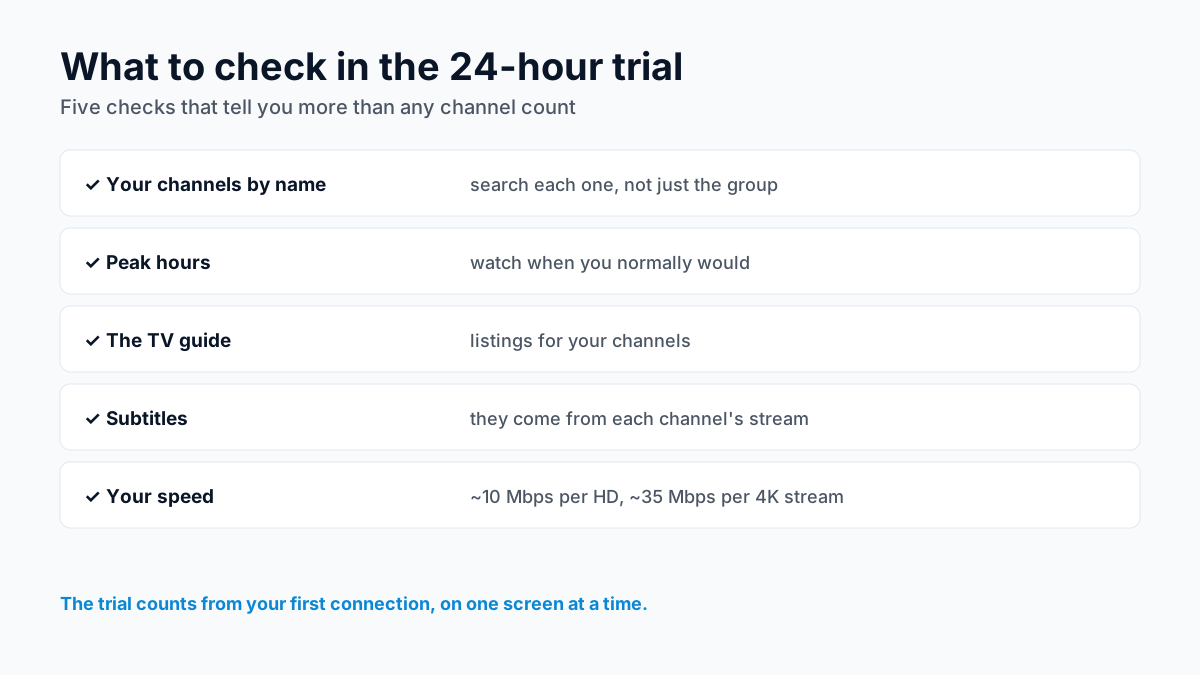
A big channel count tells you little until you have watched your own channels on your own connection. During the 24-hour trial, which counts from your first connection, check:
- Your channels by name. Search for each one you watch, not just the country group.
- Peak hours. Watch at the time you normally would, when servers and your own network are busiest.
- The TV guide. See whether your channels show program listings in the guide.
- Subtitles. If you rely on them, check the CC control on each channel; they come from the channel's own stream.
- Your speed. About 10 Mbps per HD stream and 35 Mbps per 4K stream, added up per screen.
Subtitles work differently on live channels and on demand; our IPTV subtitles guide explains why some channels have none.
Worldwide IPTV questions, answered
What is worldwide IPTV?
A single IPTV subscription whose channel list spans many countries and languages, grouped into categories in your player app. Apollo Group TV has 55,000+ live channels and 180,000+ VOD titles in one plan, from $19.99 a month and prepaid with no auto-renewal.
Can I watch channels from my home country in the US?
International channels are grouped by country and language in the channel list, streamed over your internet connection with no dish. Which networks are in your country's group is the thing to check during the free 24-hour trial, at the times you would normally watch.
Are international channels in 4K?
Some may be. Apollo Group TV streams in 4K where the source allows; many international channels are broadcast in HD. A 4K stream needs about 35 Mbps per screen and HD about 10 Mbps.
How do I find channels from a specific country?
In TiviMate or IPTV Smarters, open Live TV, scroll the category list to your country or language group, and add the channels you watch to Favorites. IPTV Smarters also has a search that finds a channel by name.
Is worldwide IPTV legal in the US?
IPTV as a technology is legal. Whether a particular service is lawful depends on whether it has the rights to the channels it carries. Apollo Group TV does not hold broadcast rights to any league, event, network or tournament, and this page takes no position on any service's licensing; our guide to IPTV and the law explains what to check.
Do international channels have subtitles?
Only if the channel's own stream carries them. Captions and subtitles travel inside each channel's feed, so they vary from channel to channel.
Keep exploring: How IPTV delivers live TV · IPTV VOD: movies and series · what Apollo Group TV includes
Sources
Checked on . Store listings and prices change; these are the pages to re-check.
Updated
Before you buy
What to know about Apollo Group TV
- Prepaid, no auto-renewalYou renew only when you choose to. Nothing is charged automatically.
- Support 24/7Every day, day and night. A person answers on WhatsApp, before and after you buy.
- Familiar ways to payVisa, Mastercard, Google Pay or Apple Pay.
- Terms in writingCheck our refund terms and the terms of use first.
Try it before you pay
A free 24-hour trial lets you test the service before paying anything.
Start Free 24hr TrialOpens WhatsApp · a person replies 24/7
Plans from $19.99/month. View Apollo Group TV pricing & plans →