

What is IPTV VOD?
Most people think of IPTV as live TV: channels streamed over the internet. That is only half of it. An IPTV subscription usually also includes video on demand (VOD): a library of movies and complete series you browse by category and play whenever you like, with pause and rewind, like the on-demand apps you already know.
On Apollo Group TV IPTV, the VOD library is not a paid add-on. It comes inside the same subscription as the live channels, on every plan length. For how the technology delivers both over your broadband, see our what is IPTV guide.
VOD, live channels and catch-up: three ways to watch
| When | How it works | |
|---|---|---|
| Video on demand (VOD) | Any time | Pick a movie or episode from the library and press play; pause and come back. |
| Live channels | As it airs | Channels play on their schedule, listed in the TV guide. |
| Catch-up | After it aired | Replay programs from the last 7 days on supported channels, from the guide. |
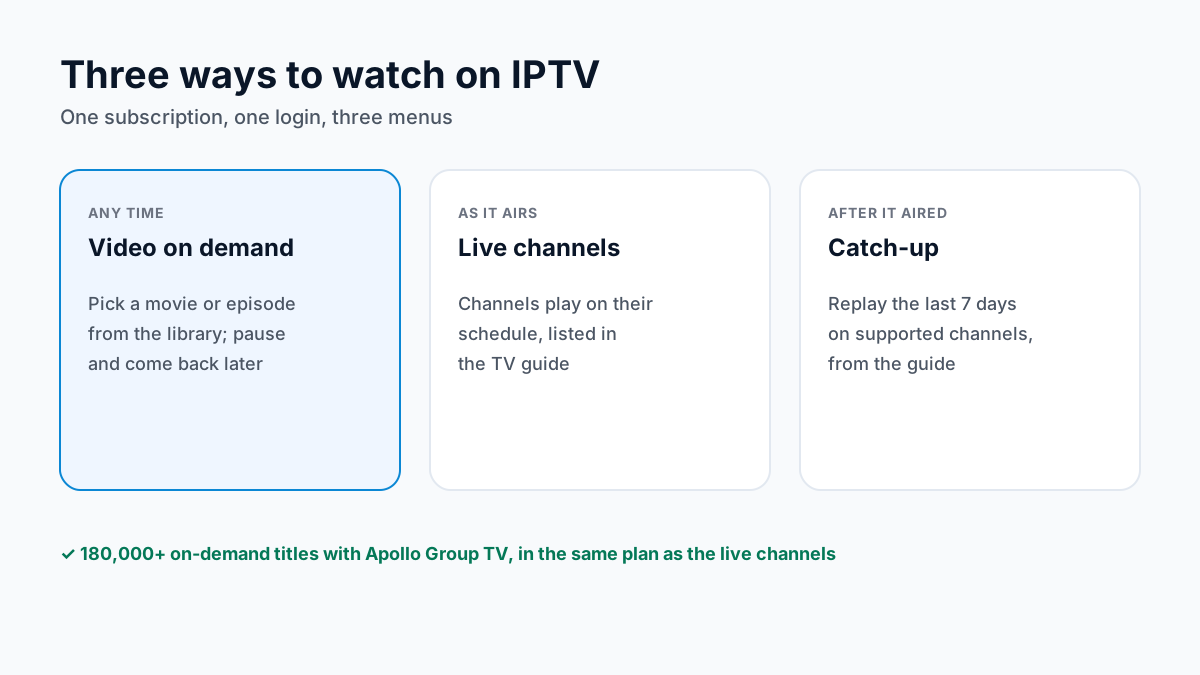
Catch-up is the bridge between the two: missed a program on a supported channel? Replay it from the guide for up to 7 days. Our TV guide setup page explains how the guide that drives catch-up loads in each player.
Inside the IPTV movies and series library
The library holds more than 180,000 titles, sorted into categories in your player app so you can browse rather than scroll. Typical categories:
- Movies, grouped by genre: action, comedy, drama, horror, sci-fi and more.
- Series, listed by season and episode so you can watch a show in order.
- Kids and family sections for animated films and children's series.
- Documentaries on nature, history, science and sport.
We do not list individual titles, because the library changes over time. If a particular movie or show is the reason you are signing up, search for it during the Apollo Group TV free trial first. In most players, VOD sits under separate Movies and Series menus from Live TV; in players that support it, one Xtream Codes login loads all three.
How to find a movie in an IPTV app
With a library this size, search beats scrolling. The steps are much the same in most IPTV player apps:
- Open the Movies (or VOD) menu rather than Live TV; series sit under their own Series menu.
- Use the magnifying-glass search and type the first word or two of the title.
- If nothing appears, try the original title or the year, then browse the genre category.
- Add titles you plan to watch to Favorites so they are one click away next time.
If the Movies menu is empty, check the login type: an Xtream Codes login fills the Movies and Series menus, while many players file an M3U link's entries under a single playlist instead, as our M3U vs Xtream Codes comparison explains.
An IPTV service with movies and series vs a stack of streaming apps
Many households pay for several streaming services at once, each a separate bill and app, and each the only home of its own originals. None of them carries a full live channel line-up. Here is how one IPTV subscription compares, including where the streaming apps win:
| Apollo Group TV | Netflix / Disney+ / Prime Video | |
|---|---|---|
| On-demand titles | 180,000+ in one library | Split across separate catalogs |
| Their own originals | Not a rights holder for them | Yes, each on its own platform |
| Live channels | 55,000+ included | Live events or free ad-supported channels on some; no full line-up |
| Apps and bills | One | One per service |
| Picture quality | 4K where the source allows | 4K on some plans |
| Commitment | Prepaid, no auto-renewal | Monthly or yearly, per service |
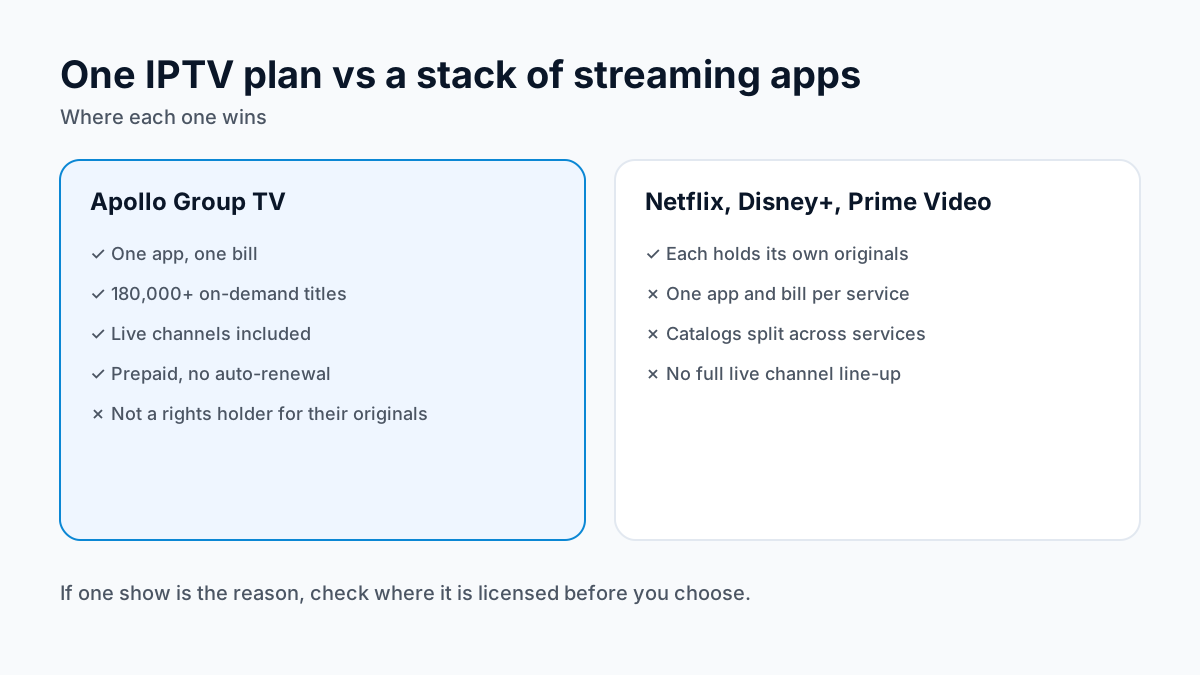
The case for an IPTV service with movies and series is format and cost: one bill and one app instead of several. The case for the streaming apps is their own originals, which only they carry. For the wider comparison, see what an IPTV subscription costs.
4K IPTV movies: the speed you need
Apollo Group TV streams in 4K where the source allows. What decides whether a 4K movie plays smoothly is your connection: allow about 35 Mbps for each 4K stream and about 10 Mbps for each HD stream, added up for every screen playing at once.
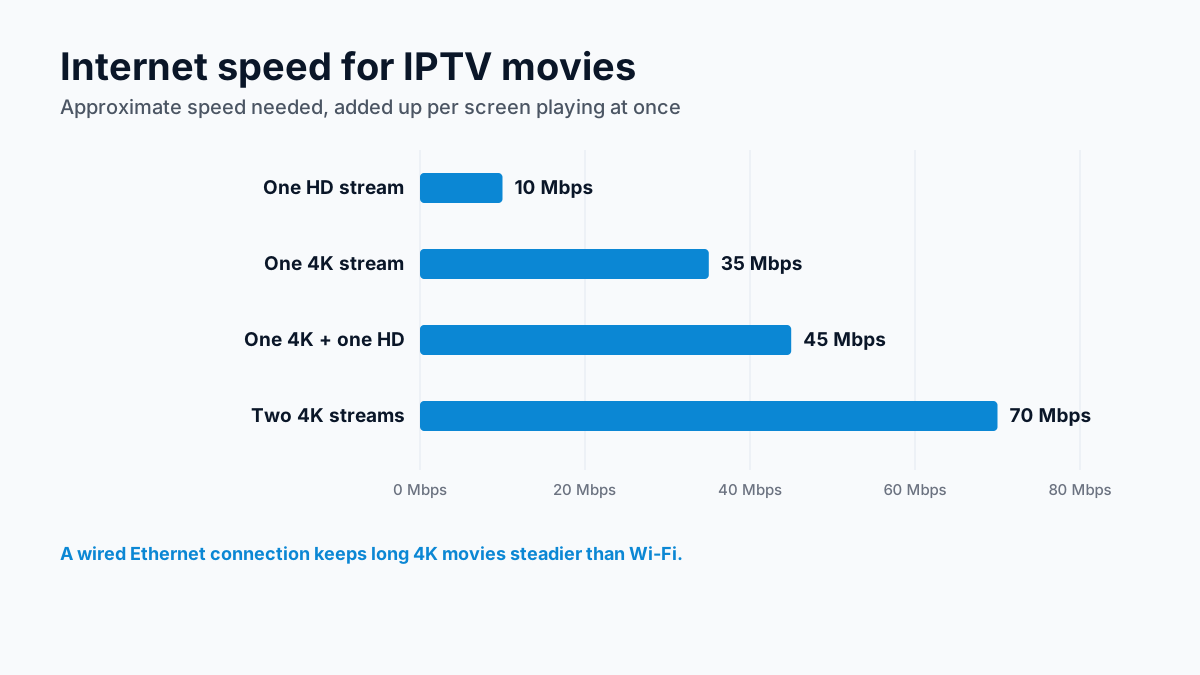
A wired Ethernet connection is steadier than Wi-Fi for long 4K films. If a movie buffers, our internet speed guide for IPTV walks through the numbers for your household.
Watching on more than one screen
The library follows you to any device with an IPTV player app: Firestick, Android TV, smart TVs, iPhone, iPad, Android phones and computers. Watching on several screens at the same time needs a multi-device plan, with extra screens discounted (2 devices −20% · 3 devices −25% · 4 devices −30%); the Apollo Group TV plans and pricing page lists them.
IPTV VOD questions, answered
What is IPTV VOD?
IPTV VOD (video on demand) is the library of movies and series that comes with an IPTV subscription: titles you start, pause and resume whenever you like, instead of channels that play on a schedule. With Apollo Group TV the on-demand library has 180,000+ titles, in the same subscription as the 55,000+ live channels, from $19.99 a month.
How many movies and series does Apollo Group TV have?
More than 180,000 on-demand movies and series titles. Which particular titles are in the library changes over time, so search for the ones you care about during the free trial rather than assuming a title is there.
Are IPTV movies in 4K?
Some are. Apollo Group TV streams in 4K where the source allows, and a 4K stream needs about 35 Mbps of internet for each screen playing it; HD needs about 10 Mbps.
Can IPTV VOD replace Netflix, Disney+ and Prime Video?
Not title for title. Netflix, Disney+ and Prime Video hold the rights to their own originals, and those stream on their platforms. An IPTV subscription is a separate on-demand library plus live channels on one bill; if a particular show matters to you, check where it is licensed.
Which devices can I watch IPTV movies on?
Any device that runs an IPTV player app: Firestick, Android TV, smart TVs, iPhone, iPad, Android phones and computers. Watching on more than one screen at once needs a multi-device plan (2 devices −20% · 3 devices −25% · 4 devices −30%).
Keep exploring: US live TV services compared · IPTV in plain English · our Apollo Group TV review
Sources
Checked on . Store listings and prices change; these are the pages to re-check.
Updated
Before you buy
What to know about Apollo Group TV
- Prepaid, no auto-renewalYou renew only when you choose to. Nothing is charged automatically.
- Support 24/7Every day, day and night. A person answers on WhatsApp, before and after you buy.
- Familiar ways to payVisa, Mastercard, Google Pay or Apple Pay.
- Terms in writingThe refund rules and subscription terms are published in full.
Try it before you pay
A free 24-hour trial lets you test the service before paying anything.
Start Free 24hr TrialOpens WhatsApp · a person replies 24/7
Plans from $19.99/month. View Apollo Group TV pricing & plans →