

What is the IPTV parental control password?
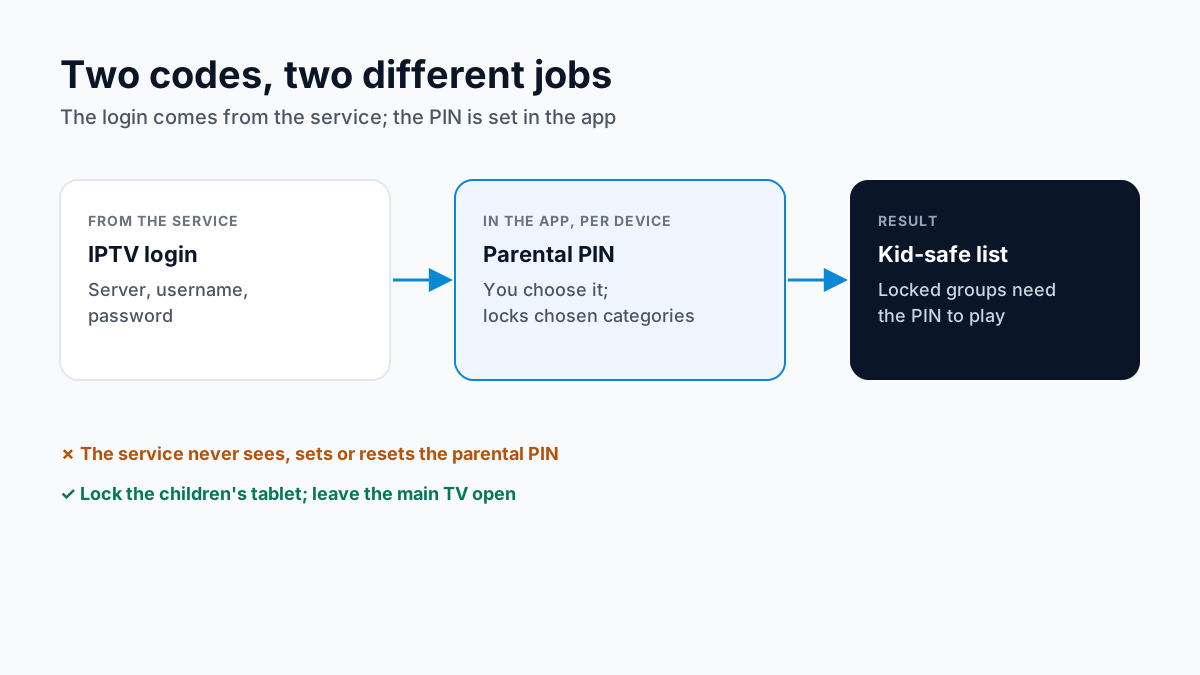
It is a PIN that belongs to the player app on your device. Your IPTV login, the server address, username and password, opens the channel list; the parental PIN sits on top of it, inside the app, and decides which categories and channels need the code before they play.
Because each app keeps its own PIN, the same login can be locked on the children's tablet and unlocked on the main TV. TiviMate lists parental controls among its features, and IPTV Smarters lists parental controls that restrict access to selected content or sections; our TiviMate review and what IPTV Smarters' parental lock covers cover the rest of each app.
How to set an IPTV parental control code
The menu names differ between apps, but the steps are the same:
- Sign in to the app on the device the children use, with the login from your provider.
- Open the app's settings and find Parental Control (sometimes called Parental lock).
- Choose a PIN only the adults know, different from any device passcode the children can see.
- Select the adult categories and any channels you want behind the PIN, and lock or hide them.
- Add the children's channels to a Favorites list so they browse only what you picked.
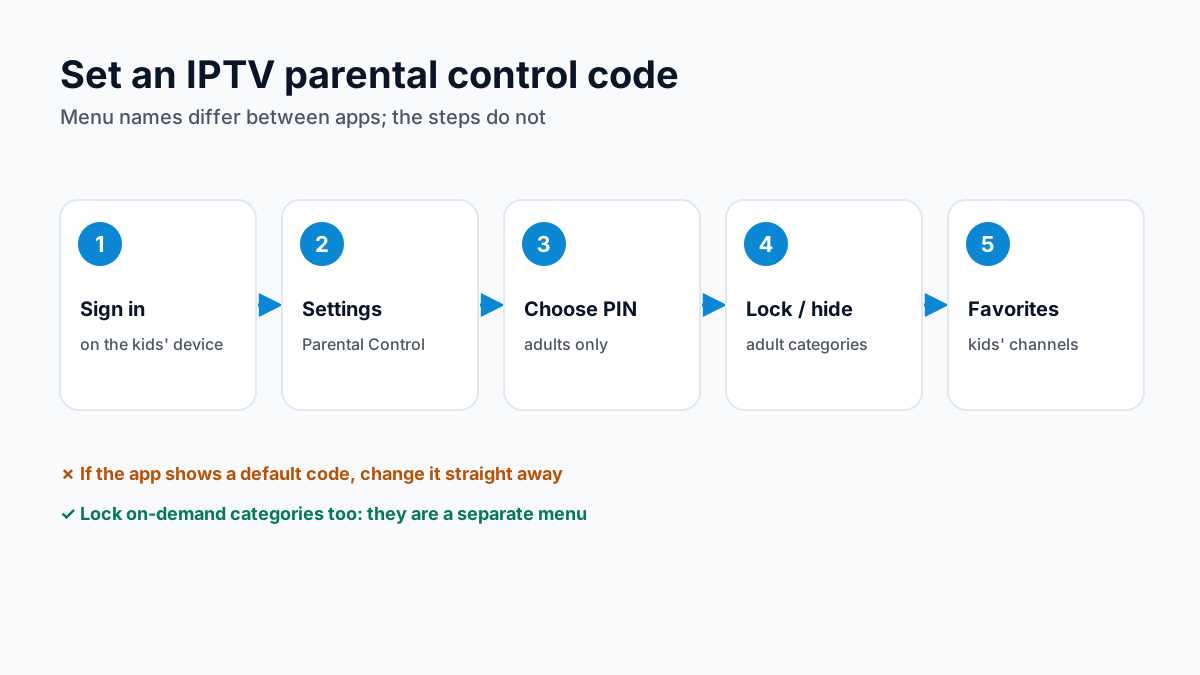
Is there a default code? Not one that applies to every app. If an app shows a default on its parental control screen, change it at once: a default is a code children can look up.
Forgot the IPTV parental control password?
Your IPTV provider cannot help with this one, because the PIN never leaves your device. What you can do depends on the device:
- Fire TV: go to Settings → Applications → Manage Installed Applications, select the app, then Clear Cache and Clear Data. The app returns to its first-launch state, PIN included.
- Android TV or Google TV: open Settings → Apps, select the app, and choose Clear data. Menu names vary a little by TV brand.
- iPhone or iPad: touch and hold the app, tap Remove App, then Delete App, and install it again from the App Store. Apple notes that deleting an app removes its data from the device, apart from anything the app saved to iCloud.
- Then: sign in again with your server address, username and password, set a new PIN, and lock the categories again.
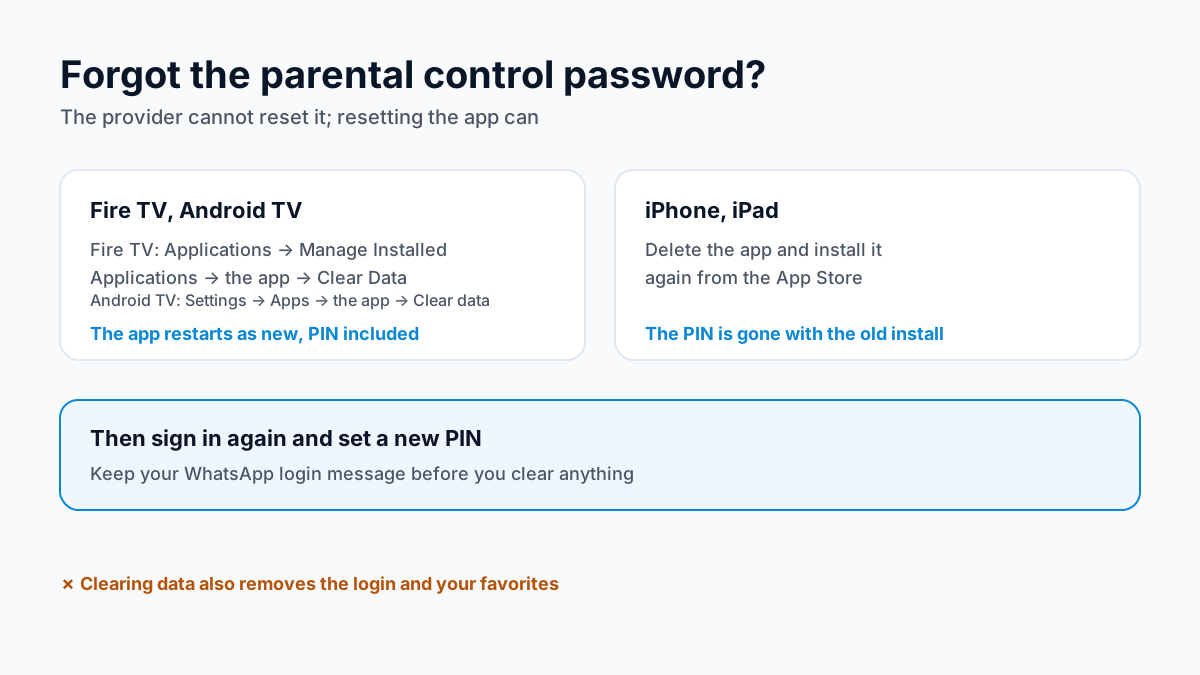
Keep the WhatsApp message with your login before you clear anything, and write the new PIN somewhere the children will not find it.
What a parental PIN does, and what it does not
A PIN lock is a gate on categories and channels inside one app. It is worth knowing its limits before you rely on it.
- It locks what you select, nothing more. A channel left unlocked plays whatever it shows, at any hour. Lock by category where the app allows it, and check that channels added later are covered too.
- It covers one app.Other apps on the same device, a web browser included, are not affected. Use the device's own profiles or parental settings for those.
- It needs a good code. Avoid birthdays, 1234 and repeated digits, and do not type it while children can see the screen.
- It is worth re-checking. After an app update, a new device or a cleared app, open a locked category to confirm the PIN still asks.
No lock replaces watching what children watch, but a PIN on the adult categories, plus a Favorites list of their channels, keeps the everyday menu simple.
Kids channels and family IPTV
On Apollo Group TV IPTV, the channel list is grouped by category, and the line-up changes over time. Search for the kids and family channels your children watch during the Apollo Group TV free trial, at the times they watch, before you pay.
The on-demand library, 180,000+ titles, sits in the same login; our IPTV VOD guide explains how to search it. Apply the same PIN locks to on-demand categories that you use on live ones, since the two are separate menus in many apps.
Kids on the tablet, adults on the TV
Each screen playing at once uses one connection, so children watching on a tablet while you watch on the TV need a plan for two screens. Plans come for 1 to 4 screens, with each extra screen discounted (2 devices −20% · 3 devices −25% · 4 devices −30%); the Apollo Group TV plans and prices pagelists them. Because the PIN is per app and per device, the children's tablet can stay locked while the main TV stays open.
Family IPTV vs a cable kids package
Cable TV comes with parental controls of its own. The FCC notes that digital set-top boxes from cable operators can block programs by several criteria, that a cable company must block a channel free of charge when a subscriber asks, and that TVs with screens of 13 inches or more made since 2000 include a V-chip that blocks shows by rating. A family IPTV plan is one prepaid price on devices you already own, from $19.99 a month and prepaid with no auto-renewal.
Cable has its own advantages: it is a licensed distributor with a published channel list, and its controls work on the box for every channel it carries; an IPTV app's PIN covers only that app. For the full comparison, see IPTV vs cable TV in the US.
Family IPTV questions, answered
What is the IPTV parental control password?
It is the PIN you choose in your player app's parental control settings, such as TiviMate or IPTV Smarters. It is not part of your IPTV login, and the IPTV service does not set it, see it or keep a copy.
Is there a default IPTV parental control code?
Not one that applies everywhere. Each app handles its own PIN, so check the app's parental control screen. If a default is shown there, change it straight away, because a default code is one children can look up.
I forgot the parental control password. Can support reset it?
No. The PIN lives in the app on your device, so we cannot see or reset it. On Fire TV or Android TV you can clear the app's data, which resets the app, PIN included; on iPhone or iPad, delete and reinstall the app. You then sign in again with your login.
Should I hide adult categories or lock them?
Some apps offer both. A hidden category disappears from the menu, which keeps the list short and simple for children; a locked one stays visible but asks for the PIN, which suits adults who still want it. Check which option your app offers.
Does Apollo Group TV have kids channels?
The channel list is grouped by category, and the line-up changes over time, so search for the kids and family channels your children watch when you start the 24-hour free trial, before you pay.
Can my kids watch on a tablet while I watch on the TV?
Yes, with a plan for two or more screens. Each screen playing at once uses one connection; plans come for 1 to 4 screens, with each extra screen discounted (2 devices −20% · 3 devices −25% · 4 devices −30%).
Sources
Checked on . Store listings and prices change; these are the pages to re-check.
- Amazon: Clear App Data and Cache on Fire TV
- Apple: Remove or delete apps from iPhone
- FCC: The V-Chip, options to restrict what your children watch on TV
- FCC: TV ratings and channel blocking (cable lockbox)
- Google Play (US): TiviMate IPTV Player (parental control listed)
- IPTV Smarters, feature list (parental controls)
Keep exploring: IPTV explained for families · how IPTV connections are counted · Apollo Group TV, reviewed in full
Updated
Before you buy
What to know about Apollo Group TV
- Prepaid, no auto-renewalYou renew only when you choose to. Nothing is charged automatically.
- Support 24/7Every day, day and night. A person answers on WhatsApp, before and after you buy.
- Familiar ways to payVisa, Mastercard, Google Pay or Apple Pay.
- Terms in writingRead how refunds work and the full service terms before paying.
Try it before you pay
A free 24-hour trial lets you test the service before paying anything.
Start Free 24hr TrialOpens WhatsApp · a person replies 24/7
Plans from $19.99/month. Check monthly and multi-month prices →