
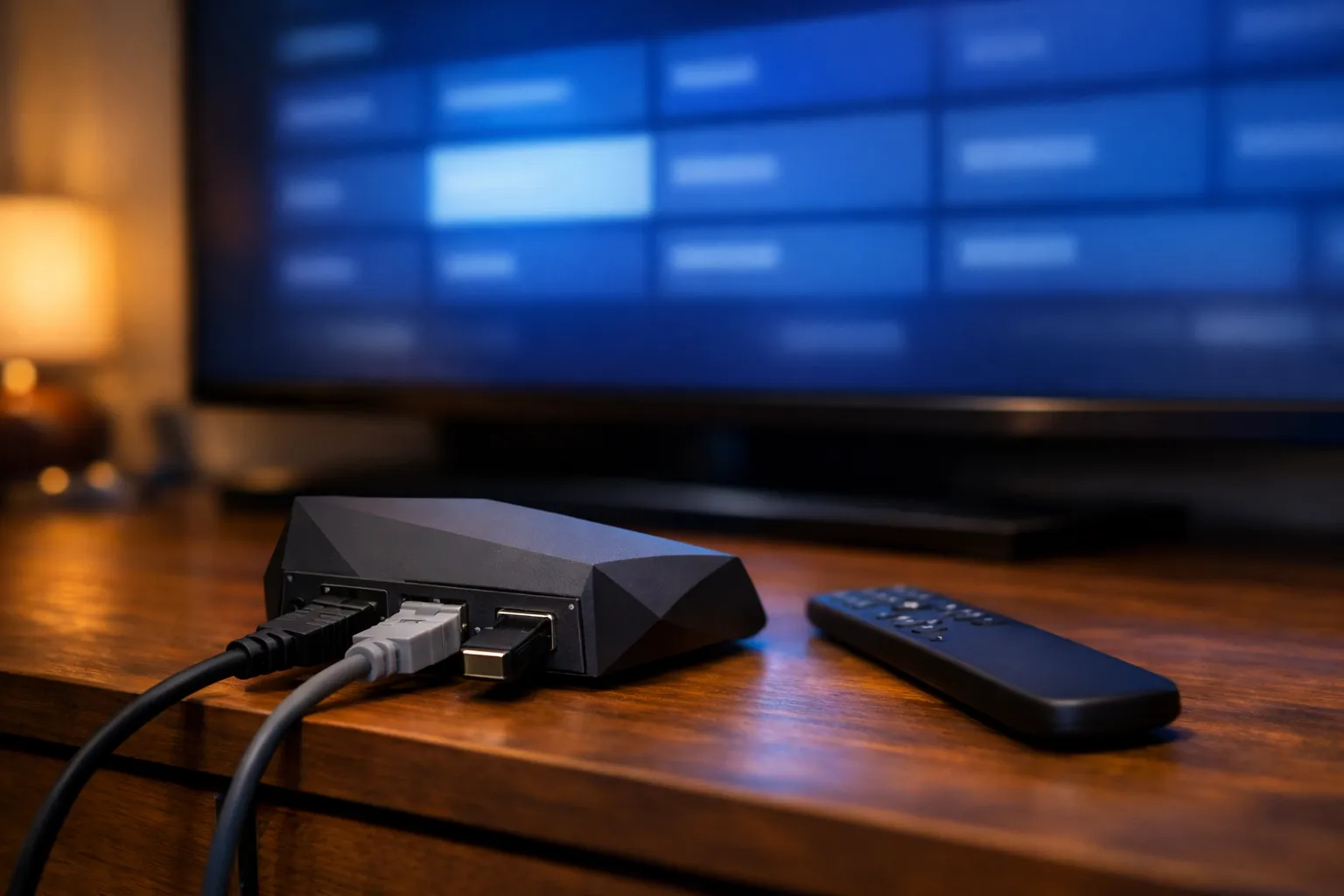
Does the Nvidia Shield work for IPTV?
Yes. The Shield TV Pro runs Android TV, and both common IPTV players have Android TV versions, so Nvidia Shield IPTV setup comes down to installing a player and signing in.
Nvidia's SHIELD TV Pro product page lists the operating system as Android 11.0 powered by Android TV, with Chromecast 4K built in. That puts the Shield in the same group as the other boxes in our guide to IPTV on Android TV and Google TV, and it runs the same two players.
The Shield TV Pro is the model to look at. 9to5Google reported on October 2, 2026 that its list price went to $299.99, up from $199.99, and that Nvidia has ended production of the non-Pro Shield TV.
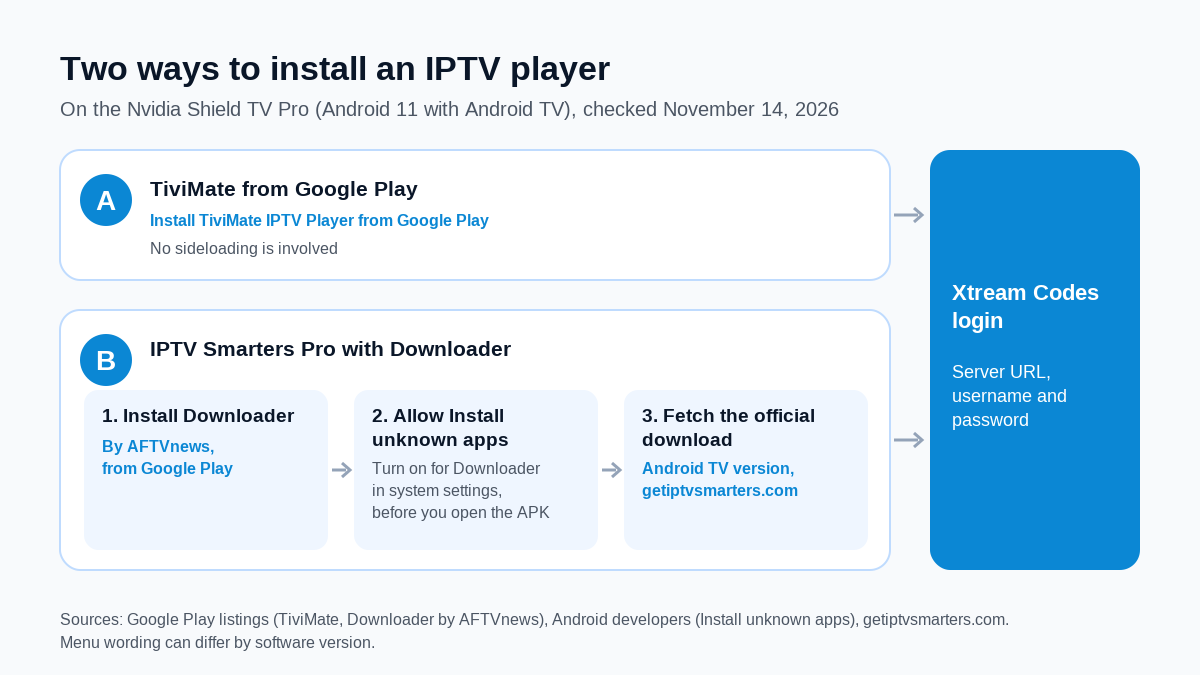
TiviMate is listed on Google Play, so on the Shield it installs from the store like any other app. IPTV Smarters Pro takes one extra step: its developer publishes the Android TV version on its own site, so you fetch it with Downloader after turning on one permission. Both players sign in with the same Xtream Codes login: a server URL, a username and a password.
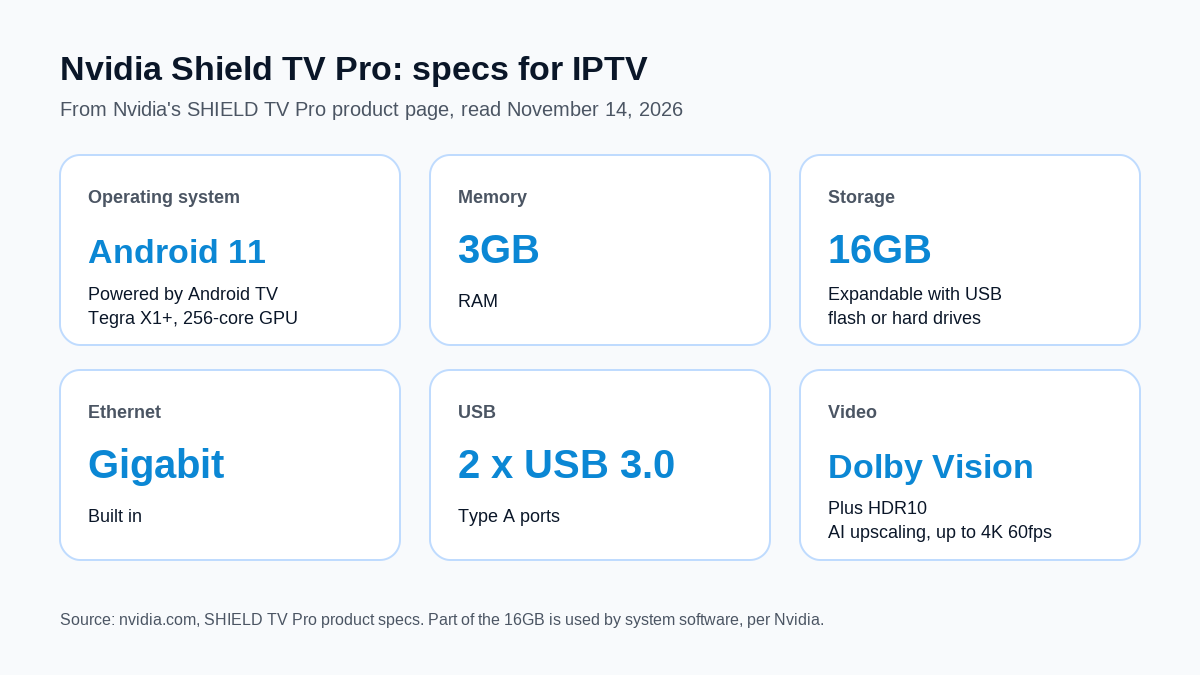
Nvidia Shield TV Pro specs that matter for IPTV
Nvidia lists a Tegra X1+ processor with a 256-core GPU, 3GB of RAM, 16GB of storage that USB drives can expand, built-in Gigabit Ethernet and two USB 3.0 ports.
| Spec | Nvidia Shield TV Pro, per Nvidia (November 14, 2026) |
|---|---|
| Operating system | Android 11.0 powered by Android TV, Chromecast 4K built in |
| Processor | Nvidia Tegra X1+ with a 256-core GPU |
| Memory | 3GB RAM |
| Storage | 16GB (part used by system software); expandable with USB flash or hard drives |
| Ethernet | Built-in Gigabit Ethernet |
| USB | Two USB 3.0 ports (Type A) |
| Wi-Fi | 802.11ac 2x2 MIMO, 2.4 and 5 GHz |
| Bluetooth | 5.0 + LE |
| HDMI | HDMI 2.0b with HDCP 2.2 and CEC |
| HDR formats | Dolby Vision and HDR10 |
| Video | Up to 4K HDR at 60fps (H.265/HEVC) |
| Upscaling | AI-enhanced upscaling for up to 4K at 60fps |
Four rows matter most for an IPTV player. Memory is 3GB, which is 1GB more than the 2GB Amazon lists for the Fire TV Stick 4K Max and 1GB less than the 4GB Google lists for the Google TV Streamer. Storage is 16GB, and Nvidia notes that the system software takes part of it and that USB flash or hard drives can expand it. Ethernet is built in and rated Gigabit, so no adapter is needed. Wi-Fi is 802.11ac on the 2.4 and 5 GHz bands.
For picture, Nvidia lists Dolby Vision and HDR10, up to 4K HDR playback at 60fps in H.265/HEVC, and HDMI 2.0b with HDCP 2.2.
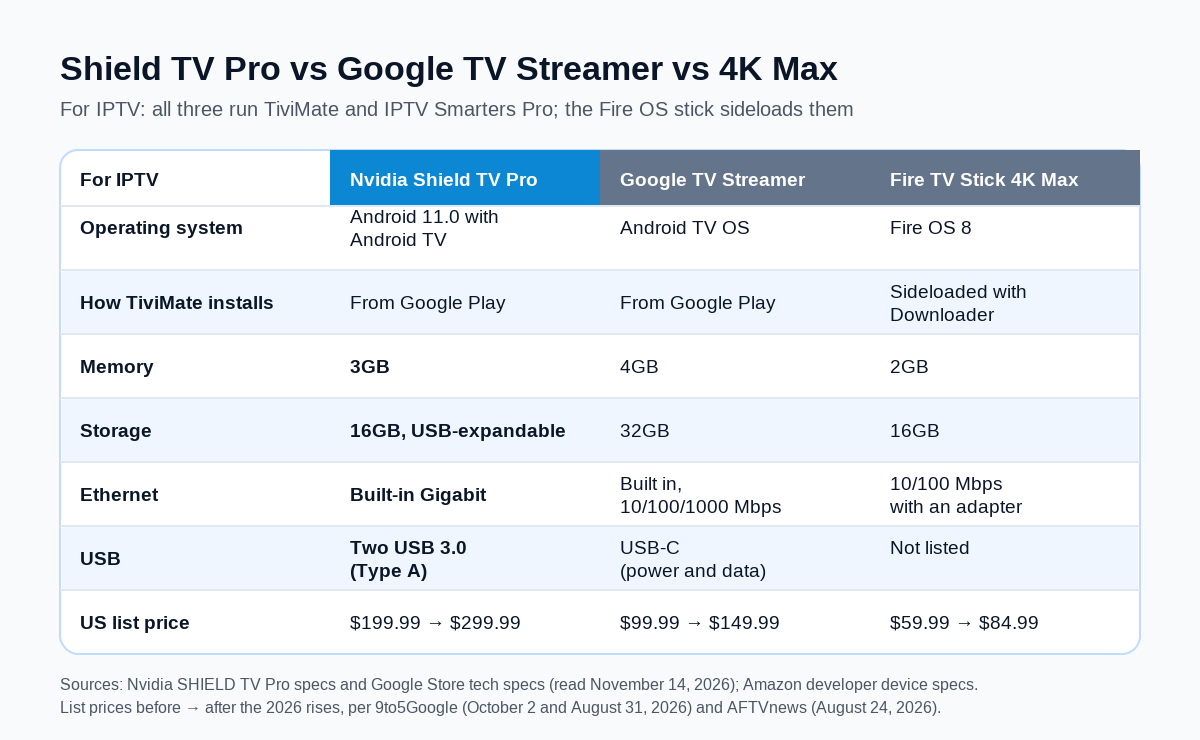
Shield TV Pro vs Google TV Streamer vs Fire TV Stick 4K Max
All three run TiviMate and IPTV Smarters Pro, so the same players run on all three; the price difference buys the hardware listed above.
| For IPTV | Nvidia Shield TV Pro | Google TV Streamer | Fire TV Stick 4K Max (2nd Gen) |
|---|---|---|---|
| Operating system | Android 11.0 with Android TV | Android TV OS | Fire OS 8 |
| How TiviMate installs | From Google Play | From Google Play | Sideloaded with Downloader |
| Memory | 3GB | 4GB | 2GB |
| Storage | 16GB, USB-expandable | 32GB | 16GB |
| Ethernet | Built-in Gigabit | Built in, 10/100/1000 Mbps | 10/100 Mbps with an adapter |
| USB | Two USB 3.0 (Type A) | USB-C (power and data) | Not listed |
| Wi-Fi | 802.11ac 2x2 MIMO | 802.11ac | Wi-Fi 6E |
| US list price | $299.99, up from $199.99 | $149.99, up from $99.99 | $84.99, up from $59.99 |
Shield specs come from Nvidia's product page, Streamer specs from Google's tech-spec page for the Google TV Streamer, and 4K Max specs from Amazon's developer device specifications. List prices rose for all three in 2026: Google confirmed the Streamer's rise to 9to5Google on August 31, 2026, and AFTVnews reported the Fire TV prices on August 24, 2026. Check the current price before you buy.
The cheaper boxes run the same players. Our Google TV Streamer IPTV setup guidecovers Google's box, which installs TiviMate from Google Play as the Shield does and lists more memory and twice the storage. Our Fire TV Stick 4K Plus guide covers the Fire OS route, where you sideload a player with Downloader.
The Shield is the most expensive of the three. For that money you get two USB 3.0 ports, storage that USB drives can expand, built-in Gigabit Ethernet and Nvidia's AI upscaling. Against the 4K Max, it lists 1GB more memory and a built-in Ethernet port rated at ten times the 10/100 Mbps adapter speed Amazon lists.
Install TiviMate from Google Play
Find TiviMate IPTV Player on Google Play on the Shield, install it, open it and sign in with Xtream Codes. No sideloading is involved.
- Install TiviMate. Search Google Play on the Shield for TiviMate IPTV Player and install it.
- Open it and choose Xtream Codes.TiviMate's Google Play listing names M3U, Xtream Codes and Stalker Portal as login types.
- Sign in. Enter the server URL, username and password from your login message.
TiviMate is free to install, with in-app purchases. Its Google Play listing names recording, multiview, catch-up, multiple playlists and parental controls among its features, and says a premium upgrade unlocks app features only, not channels. Our TiviMate review from its Google Play listing covers what is known about Premium.
You can install both TiviMate and IPTV Smarters Pro and keep the one you prefer.
Install IPTV Smarters Pro with Downloader
Install Downloader from Google Play, turn on Install unknown apps for it, fetch the official Android TV download, then sign in.
- Install Downloader. Downloader by AFTVnews on Google Play says it downloads files such as app APKs onto your Android TV, Google TV, phone or tablet. Install it on the Shield.
- Allow Install unknown apps. Android's developer documentation says that on Android 8.0 and later you turn on Install unknown apps for each source app in system settings. Turn it on for Downloader before you open the APK. The menu wording can differ by software version.
- Fetch the official download. Open Downloader and enter the address of the Android TV download on IPTV Smarters' official download page. For the short-code route, see how the Downloader short code works for Apollo Group TV.
- Install and sign in. Install the APK, open IPTV Smarters Pro, choose Xtream Codes and enter the server URL, username and password.
Fetch Smarters from its developer's site rather than searching the store: its developer publishes the Android TV version on getiptvsmarters.com, not on Google Play. Our IPTV Smarters Pro review and setup notes compare it with TiviMate.
AI upscaling and the USB ports
Nvidia lists AI-enhanced upscaling for up to 4K at 60fps, two USB 3.0 ports and storage that USB flash or hard drives can expand.
On upscaling, Nvidia's product page lists AI-enhanced upscalingfor up to 4K at 60fps among the Shield TV Pro's video features, next to Dolby Vision, HDR10 and 4K HDR playback at 60fps. That is Nvidia's description of the feature; we make no claim here about how any particular channel looks with it.
On ports, Nvidia lists two USB 3.0 Type A ports and says the 16GB of storage, part of which the system software uses, can be expanded with USB flash or hard drives. The Google TV Streamer lists one USB-C port for power and data.
What makes a 4K IPTV picture is covered in what a 4K IPTV stream needs. Apollo Group TV streams in 4K UHD where the source allows, so a 4K channel needs a 4K TV, the bandwidth and a 4K source.
Where to go next
For other Android TV boxes, see the IPTV installation guide for every device. When you are ready for a login, Apollo Group TV plans and prices start at $19.99 a month, with no contract: every plan is prepaid with no auto-renewal. Try free for 24 hours — no credit card required.
Sources
Checked on . Store listings and prices change; these are the pages to re-check.
- Nvidia: SHIELD TV Pro product page and specs
- 9to5Google: Nvidia Shield TV Pro price increase (October 2, 2026)
- Google Store: Google TV Streamer tech specs
- 9to5Google: Google TV Streamer price increase (August 31, 2026)
- Amazon Developer: Fire TV device specifications (4K Max 2nd Gen)
- AFTVnews: Amazon increases the price of all Fire TVs (August 24, 2026)
- Google Play: TiviMate IPTV Player
- Google Play: Downloader, by AFTVnews
- Android Developers: alternative distribution (Install unknown apps permission)
- IPTV Smarters, official downloads (getiptvsmarters.com)
Updated
Before you buy
What to know about Apollo Group TV
- Prepaid, no auto-renewalYou renew only when you choose to. Nothing is charged automatically.
- Support 24/7Every day, day and night. A person answers on WhatsApp, before and after you buy.
- Familiar ways to payVisa, Mastercard, Google Pay or Apple Pay.
- Terms in writingRead how refunds work and the full service terms before paying.
Try it before you pay
A free 24-hour trial lets you test the service before paying anything.
Start Free 24hr TrialOpens WhatsApp · a person replies 24/7
Plans from $19.99/month. Pick a plan length on the pricing page →