
Does the Google TV Streamer work for IPTV?
Yes. The Google TV Streamer runs Android TV OS, and both common IPTV players have Android TV versions, so Google TV Streamer IPTV setup comes down to installing a player and signing in.
Google's tech-spec page for the Google TV Streamer lists the operating system as Android TV OS. That puts it in the same group as the other boxes in our guide to IPTV on Android TV and Google TV, and it uses the same two players.
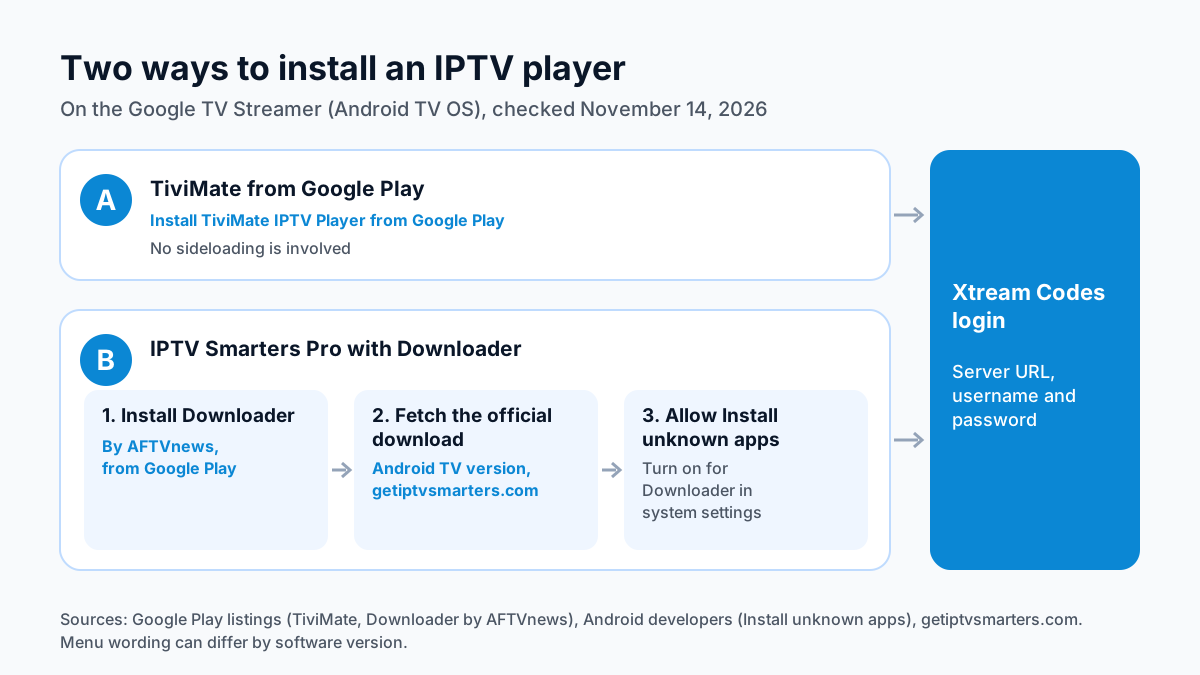
The difference from a Fire TV stick is where the player comes from. TiviMate is listed on Google Play, so on the Streamer it installs from the store like any other app. IPTV Smarters Pro is the one player that takes an extra step: its developer publishes the Android TV version on its own site, so you fetch it with Downloader after granting one permission.
Both players sign in with the same Xtream Codes login: a server URL, a username and a password.
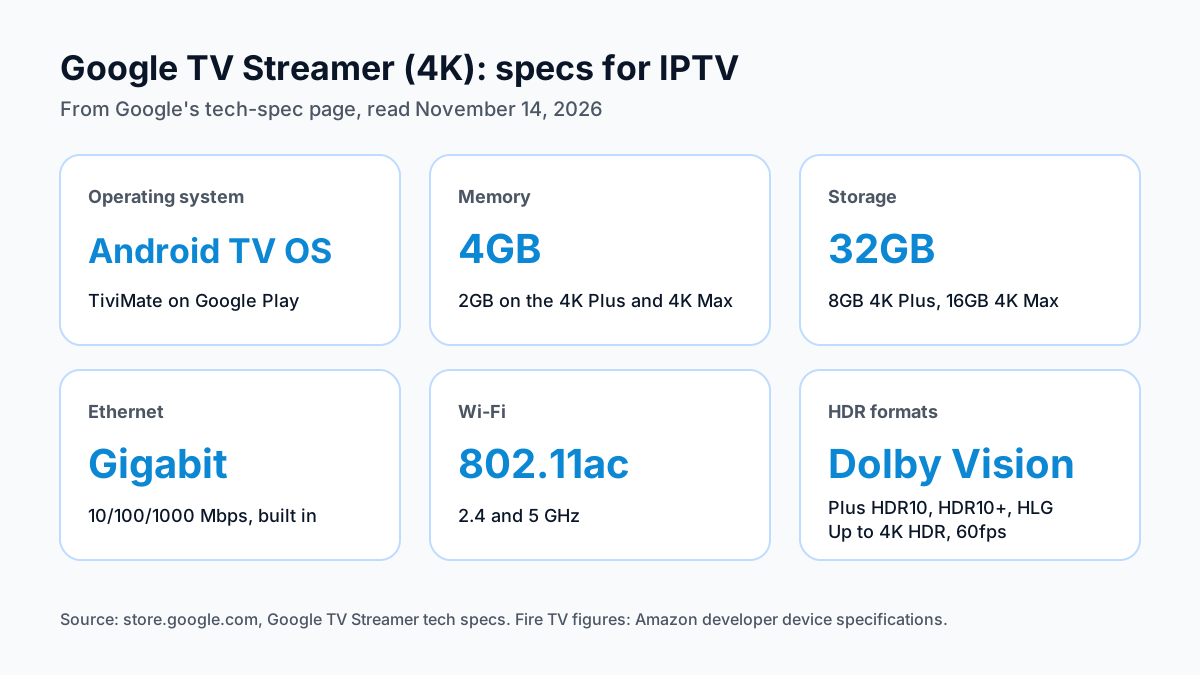
Google TV Streamer specs that matter for IPTV
Google lists 4GB of memory, 32GB of storage, Wi-Fi 802.11ac on 2.4 and 5 GHz, a gigabit Ethernet port and HDMI 2.1, with up to 4K HDR at 60fps.
| Spec | Google TV Streamer (4K), per Google (November 14, 2026) |
|---|---|
| Operating system | Android TV OS |
| Memory | 4GB |
| Storage | 32GB |
| Wi-Fi | 802.11ac, 2.4 and 5 GHz |
| Ethernet | Built in, 10/100/1000 Mbps |
| Bluetooth | 5.1 |
| Ports | USB-C (power and data), HDMI 2.1 (Type A), Ethernet |
| Video | Up to 4K HDR, 60fps |
| HDR formats | Dolby Vision, HDR10, HDR10+, HLG |
| Audio | Dolby Digital, Dolby Digital Plus, Dolby Atmos |
| Smart home | Matter and Thread border router |
| Size and weight | 6.4 x 3.0 x 1.0 in, 5.7 oz |
Four rows matter most for an IPTV player. Memory is 4GB, twice the 2GB Amazon lists for the Fire TV Stick 4K Plus and 4K Max. Storage is 32GB, against 8GB on the 4K Plus and 16GB on the 4K Max. The Ethernet port is built in and rated at 10/100/1000 Mbps, so no adapter is needed. Wi-Fi is 802.11ac on the 2.4 and 5 GHz bands.
For picture, Google lists Dolby Vision, HDR10, HDR10+ and HLG at up to 4K and 60fps, over HDMI 2.1. Google gives its size as 6.4 x 3.0 x 1.0 inches and its weight as 5.7 ounces.
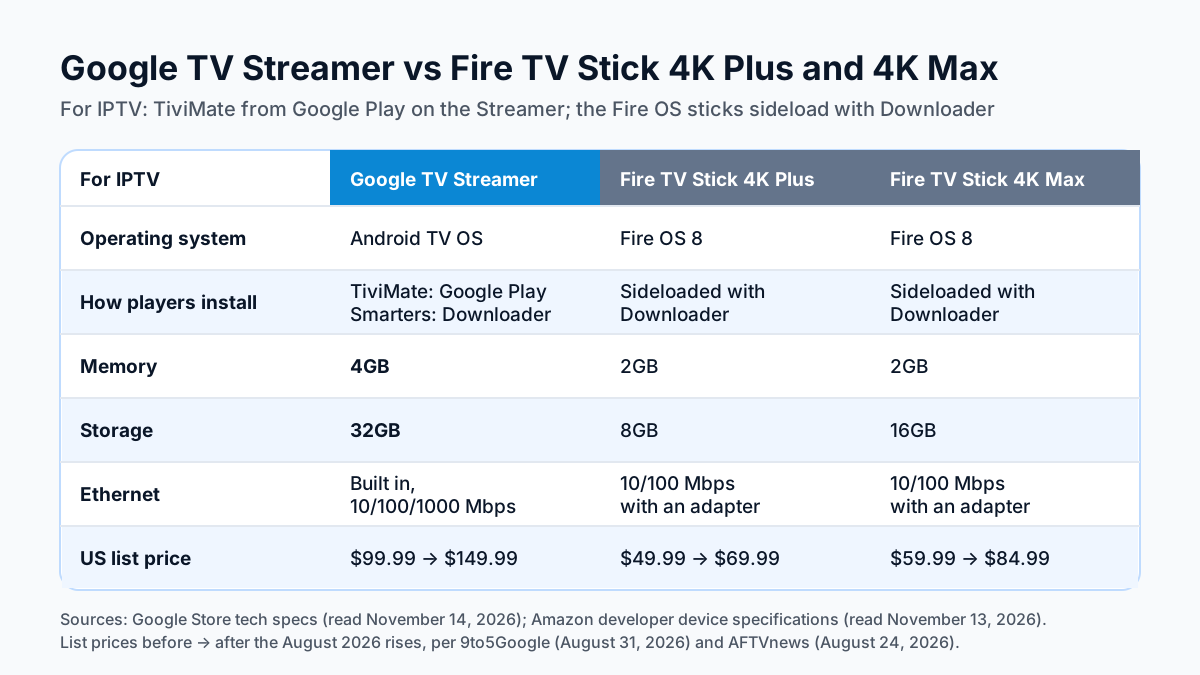
Google TV Streamer vs Fire TV Stick 4K Plus and 4K Max
For IPTV, the Streamer has twice the memory, more storage and a built-in gigabit port; the two Fire OS sticks cost less and run the same players after a sideload.
| For IPTV | Google TV Streamer | Fire TV Stick 4K Plus (2025) | Fire TV Stick 4K Max (2nd Gen) |
|---|---|---|---|
| Operating system | Android TV OS | Fire OS 8 | Fire OS 8 |
| How players install | TiviMate from Google Play; IPTV Smarters Pro with Downloader | Sideloaded with Downloader | Sideloaded with Downloader |
| Memory | 4GB | 2GB | 2GB |
| Storage | 32GB | 8GB | 16GB |
| Wi-Fi | 802.11ac (2.4 and 5 GHz) | Wi-Fi 6 | Wi-Fi 6E |
| Ethernet | Built in, 10/100/1000 Mbps | 10/100 Mbps with an adapter | 10/100 Mbps with an adapter |
| US list price | $149.99. Up from $99.99 effective 2026-08-31 (Google confirmed to 9to5Google). | $69.99 list. Up from $49.99, per AFTVnews (2026-08-24). | $84.99 list. Up from $59.99, per AFTVnews (2026-08-24). |
Specs for the sticks come from Amazon's developer device specifications. List prices rose in August 2026 for all three: Google confirmed the Streamer's rise to 9to5Google on August 31, 2026, and AFTVnews reported the Fire TV prices on August 24, 2026. Check the current price on the listing before you buy.
The sticks are the cheaper way in. Our Fire TV Stick 4K Plus setup guide covers the Fire OS route, where you allow apps from unknown sources and sideload a player with Downloader. Once installed, TiviMate and IPTV Smarters Pro take the same Xtream Codes login on either platform.
The Streamer costs more, and for that money you get the Google Play install for TiviMate, twice the memory of either stick, two to four times the storage, and a built-in Ethernet port rated at ten times the adapter speed Amazon lists for the sticks. On Wi-Fi, the sticks list Wi-Fi 6 on the 4K Plus and Wi-Fi 6E on the 4K Max, against 802.11ac on the Streamer.
Install TiviMate from Google Play
Find TiviMate IPTV Player on Google Play, install it, open it and sign in with Xtream Codes. No sideloading is involved.
- Install TiviMate. Search Google Play on the Streamer for TiviMate IPTV Player and install it.
- Open it and choose Xtream Codes.TiviMate's Google Play listing names M3U, Xtream Codes and Stalker Portal as login types.
- Sign in. Enter the server URL, username and password from your login message.
TiviMate's Google Play listing describes a TV guide grid, catch-up, multiple playlists and parental controls. It is free to install with in-app purchases, and the listing says a premium upgrade unlocks app features only, not channels. Our TiviMate review from its Google Play listing covers what is known about Premium.
You can install both TiviMate and IPTV Smarters Pro and keep the one you prefer.
Install IPTV Smarters Pro with Downloader
Install Downloader from Google Play, turn on Install unknown apps for it, fetch the official Android TV download, then sign in.
- Install Downloader. Downloader by AFTVnews on Google Play says it downloads files such as app APKs onto your Android TV, Google TV, phone or tablet. Install it on the Streamer.
- Fetch the official download. Open Downloader and enter the address of the Android TV download on IPTV Smarters' official download page. Our page on the Apollo Group TV download code explains the short-code route in Downloader.
- Allow Install unknown apps. Android's developer documentation says that on Android 8.0 and later you grant the Install unknown apps permission to each source app in system settings. Turn it on for Downloader before you open the APK. The menu wording can differ by software version.
- Install and sign in. Install the APK, open IPTV Smarters Pro, choose Xtream Codes and enter the server URL, username and password.
Fetch Smarters from its developer's site rather than searching the store: its developer publishes the Android TV version on getiptvsmarters.com, not on Google Play. Our IPTV Smarters Pro review and setup notes compare it with TiviMate.
Use the built-in Ethernet port for 4K
Plug the Streamer into your router with a cable if one reaches; the port is built in and rated at 10/100/1000 Mbps.
Google lists three ports on the Streamer: USB-C, HDMI 2.1 and Ethernet at 10/100/1000 Mbps. Amazon lists the Fire TV Stick 4K Plus and 4K Max at 10/100 Mbps through an external adapter, so a wired link on the Streamer needs nothing extra and is rated ten times higher. Without a cable, the Streamer connects over 802.11ac Wi-Fi on 2.4 or 5 GHz.
How much bandwidth a 4K stream needs is covered in our IPTV internet speed requirements, and what makes a 4K IPTV picture is covered in what a 4K IPTV stream needs. Apollo Group TV streams in 4K UHD where the source allows, so a 4K channel needs a 4K TV, the bandwidth and a 4K source.
Where to go next
For other Android TV boxes, see the IPTV installation guide for every device. When you are ready for a login, Apollo Group TV plans and prices start at $19.99 a month, with no contract: every plan is prepaid with no auto-renewal. Try free for 24 hours — no credit card required.
Sources
Checked on . Store listings and prices change; these are the pages to re-check.
- Google Store: Google TV Streamer tech specs
- 9to5Google: Google TV Streamer price increase (August 31, 2026)
- AFTVnews: Amazon increases the price of all Fire TVs (August 24, 2026)
- Amazon Developer: Fire TV device specifications (4K Plus 2025, 4K Max 2nd Gen)
- Google Play: TiviMate IPTV Player
- Google Play: Downloader, by AFTVnews
- Android Developers: alternative distribution (Install unknown apps permission)
- IPTV Smarters, official downloads (getiptvsmarters.com)
Updated
Before you buy
What to know about Apollo Group TV
- Prepaid, no auto-renewalYou renew only when you choose to. Nothing is charged automatically.
- Support 24/7Every day, day and night. A person answers on WhatsApp, before and after you buy.
- Familiar ways to payVisa, Mastercard, Google Pay or Apple Pay.
- Terms in writingThe refund rules and subscription terms are published in full.
Try it before you pay
A free 24-hour trial lets you test the service before paying anything.
Start Free 24hr TrialOpens WhatsApp · a person replies 24/7
Plans from $19.99/month. Compare every plan and price →