
What 4K IPTV means
4K, also called Ultra HD or UHD, is a picture 3840 pixels wide and 2160 high, which device makers write as 2160p. That's four times the pixels of a 1080p Full HD picture. On an IPTV service, 4K describes how a channel or film is delivered to you: as a 2160p stream instead of an HD one.
4K and HDR are separate things. 4K is the number of pixels; HDR (high dynamic range, in formats such as HDR10, HDR10+, HLG and Dolby Vision) is the range of brightness and color. Device makers list them separately, which is why the device table below has a column for each. If IPTV itself is new to you, our guide to how IPTV works explains how channels reach your TV over the internet.
The key word is delivered. An IPTV service passes on the feed each channel starts from. If a channel arrives in HD, no player, stick or plan turns it into true 4K; a 4K TV will upscale it to fill the screen, but the extra detail isn't in the signal. That's why Apollo Group TV describes its picture as 4K UHD where the source allows, rather than promising 4K on every channel.
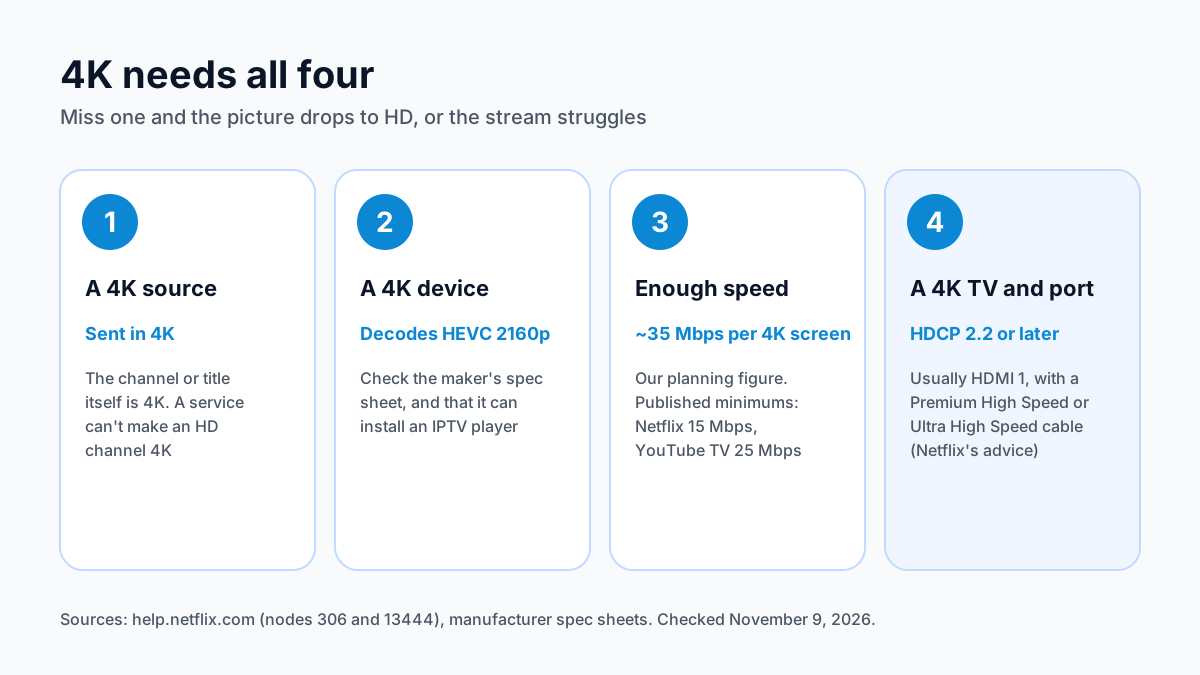
The four things 4K needs
All four have to be in place. Miss one and the picture drops to HD, or the stream struggles.
| Condition | What it means | How to check |
|---|---|---|
| A 4K source | The channel or title is sent in 4K | Check the channels you want during a free trial |
| A 4K device | The stick or box decodes 4K HEVC video | The maker's spec sheet lists 2160p or 4K and H.265 (HEVC) |
| Enough speed | About 35 Mbps for each 4K screen playing at once | A speed test at the busy evening hour |
| A 4K TV and port | The TV is 4K, and the HDMI port supports HDCP 2.2 or later | The TV manual; usually HDMI 1, per Netflix |
The speed figure is our planning number, with headroom for the rest of the household. The bare minimums streaming services publish are lower: Netflix lists 15 Mbps or higher for 4K, and YouTube TV 25 Mbps. Our internet speed for IPTV guide shows how the numbers add up across several screens.
For the TV connection, Netflix's own advice is a good rule for any 4K streaming: plug the device into an HDMI port that supports HDCP 2.2 or later, usually HDMI 1, and use a Premium High Speed or Ultra High Speed HDMI cable.
Which streaming devices play 4K
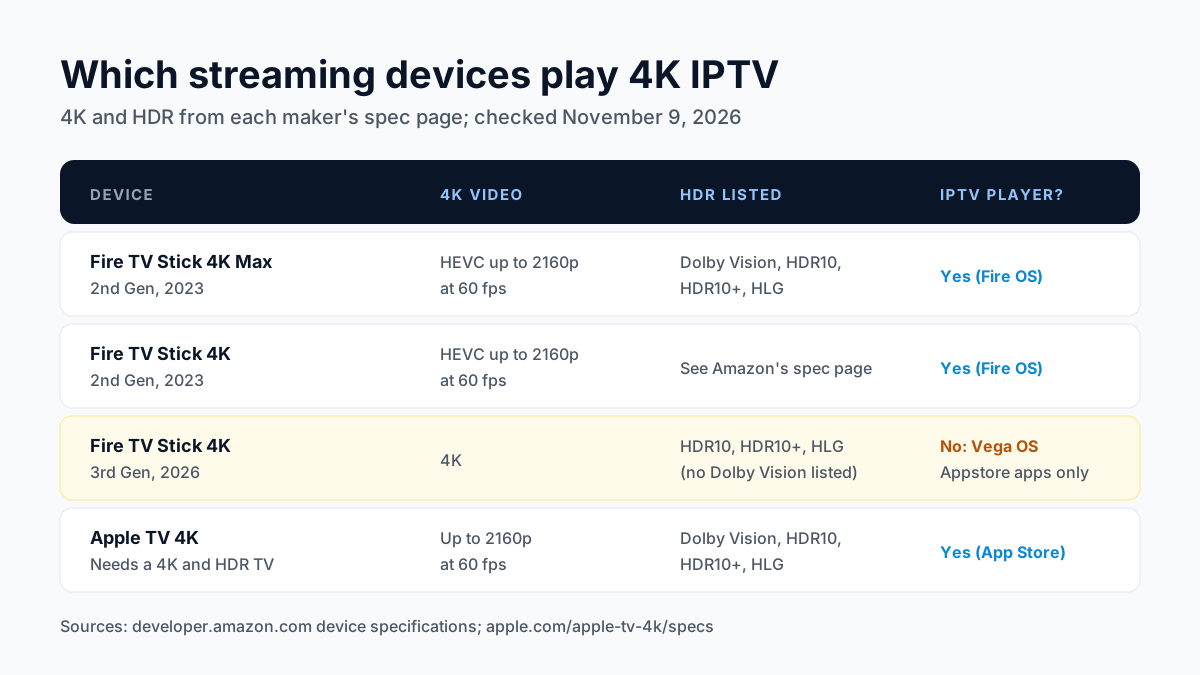
Many current streaming sticks output 4K, but for IPTV the device also has to install a player app. That's where one popular stick falls short.
| Device | 4K video (maker's spec) | HDR formats listed | Installs an IPTV player? |
|---|---|---|---|
| Fire TV Stick 4K Max (2nd Gen, 2023) | H.265 (HEVC) up to 3840×2160 at 60 fps | Dolby Vision, HDR10, HDR10+, HLG | Yes, Fire OS |
| Fire TV Stick 4K (2nd Gen, 2023) | H.265 (HEVC) up to 3840×2160 at 60 fps | See Amazon's spec page | Yes, Fire OS |
| Fire TV Stick 4K (3rd Gen, 2026) | 4K | HDR10, HDR10+, HLG (no Dolby Vision listed) | No: runs Vega OS |
| Apple TV 4K | Up to 2160p at 60 fps; AV1, VP9, H.265/HEVC, H.264 | Dolby Vision, HDR10, HDR10+, HLG | Yes, from the App Store |
The 2026 Fire TV Stick 4K runs Amazon's Vega OS, which installs Appstore apps only, so you can't sideload a player such as TiviMate. Our page on Vega OS and IPTV lists the affected sticks. The 4K Max is the Fire TV stick that both plays 4K and installs a player; our IPTV on Firestick guide covers its setup.
Apple notes that the Apple TV 4K needs a 4K and HDR TV for 4K and HDR streaming. For Android TV and Google TV boxes, including the onn 4K Pro and Google TV Streamer, our best IPTV box comparison lists current models and prices, and our IPTV on Apple TV guide covers the players there.
How much live TV is really in 4K
It depends on each channel's feed. A channel can only be as sharp as the feed it starts from, and an IPTV service can't make an HD channel 4K. When a provider says it streams in 4K, the honest reading is that 4K is available on the channels and titles whose source is 4K, and everything else plays at its own resolution.
So treat 4K as a bonus on some channels, not a property of the whole service. If 4K matters to you for particular channels, check those exact channels during a free trial on your own TV before you pay for a long plan.
Why a 4K channel can still look soft
If a channel labelled 4K looks no sharper than HD, or keeps buffering, one of the four conditions is usually missing:
- The connection dips at busy hours. When the speed drops below what the stream needs, the picture stalls and buffers. A wired Ethernet connection, or 5 GHz Wi-Fi close to the router, helps most.
- Another screen shares the line. Two 4K streams at about 35 Mbps each need about 70 Mbps between them, before anything else in the home.
- The player or device can't keep up. An older stick or an outdated player app may not decode 4K HEVC smoothly.
- The TV input isn't set up for 4K. The device may be on an HDMI port without HDCP 2.2, or set to a lower output resolution in its display settings.
Our IPTV buffering fix guide walks through each step and shows how to tell a home problem from a server one.
4K IPTV questions
Do I need a 4K TV for 4K IPTV?
Yes. A 4K stream on an HD TV is shown at the TV's own resolution. Apple, for example, notes that the Apple TV 4K needs a 4K and HDR TV for 4K and HDR streaming.
What internet speed do I need for 4K IPTV?
Plan on about 35 Mbps for each 4K screen playing at once. Netflix publishes 15 Mbps or higher for 4K and YouTube TV 25 Mbps, but those are minimums for a stream running alone.
Does the Fire TV Stick 4K play 4K IPTV?
The Fire TV Stick 4K Max (2023) and the 2023 Fire TV Stick 4K decode 4K HEVC and run Fire OS, so they install IPTV players. The 2026 Fire TV Stick 4K runs Vega OS and can't install one.
Are all channels in 4K?
No. A channel plays in 4K only if it's sent in 4K. Apollo Group TV streams in 4K UHD where the source allows.
Why does my 4K channel buffer?
Usually because the connection dips at a busy hour or another screen is using the line. Try a wired connection first.
Want to see what 4K looks like on your own TV? Try free for 24 hours and check the channels you care about, then compare plans on the pricing page.
Sources
Checked on . Store listings and prices change; these are the pages to re-check.
- Netflix Help: internet connection speed recommendations
- Netflix Help: how to stream in 4K / HDR (HDCP 2.2 port, HDMI cables)
- Apple: Apple TV 4K technical specifications
- YouTube TV Help: download speed recommendations
- Amazon Developer: Fire TV devices, Fire OS and Vega OS
- Amazon US listing: Fire TV Stick 4K (3rd Gen), “prevents sideloading or installing apps from unknown sources”
- Amazon Developer: Fire TV device specifications (Vega OS: 4K 3rd Gen, 4K Select, HD 2026; Fire OS 8: 4K Max and 4K 2nd Gen)
Updated
Before you buy
What to know about Apollo Group TV
- Prepaid, no auto-renewalYou renew only when you choose to. Nothing is charged automatically.
- Support 24/7Every day, day and night. A person answers on WhatsApp, before and after you buy.
- Familiar ways to payVisa, Mastercard, Google Pay or Apple Pay.
- Terms in writingThe refund rules and subscription terms are published in full.
Try it before you pay
A free 24-hour trial lets you test the service before paying anything.
Start Free 24hr TrialOpens WhatsApp · a person replies 24/7
Plans from $19.99/month. View Apollo Group TV pricing & plans →