
Does the Fire TV Stick 4K Plus work for IPTV?
Yes, because it runs Fire OS rather than Vega OS. Fire TV Stick 4K Plus IPTV setup works the way it always has on a Firestick: you allow apps from unknown sources, sideload a player and sign in.
That is no longer true of every new stick. Amazon's device-spec page lists the Fire TV Stick 4K Select (2025) on Vega OS 2.0, and Amazon's listing for the newest Fire TV Stick 4K says Vega OS sticks prevent sideloading or installing apps from unknown sources, which is the route TiviMate and IPTV Smarters Pro take onto a Fire TV. Our page on which Fire TV sticks block sideloading on Vega OS lists the affected models.
The 4K Plus sits on the other side of that line. The same Amazon page lists it as the Fire TV Stick 4K Plus (2025), build AFTMA08C15, on Fire OS 8 at Android API level 30, which is Android 11. Fire OS is Amazon's Android-based system, so an Android IPTV player installs on it the same way it does on the 4K Max.
Before you buy, check the name on the box or listing says “4K Plus”. The similar-sounding 4K Select is the Vega OS model.
Fire TV Stick 4K Plus specs that matter for IPTV
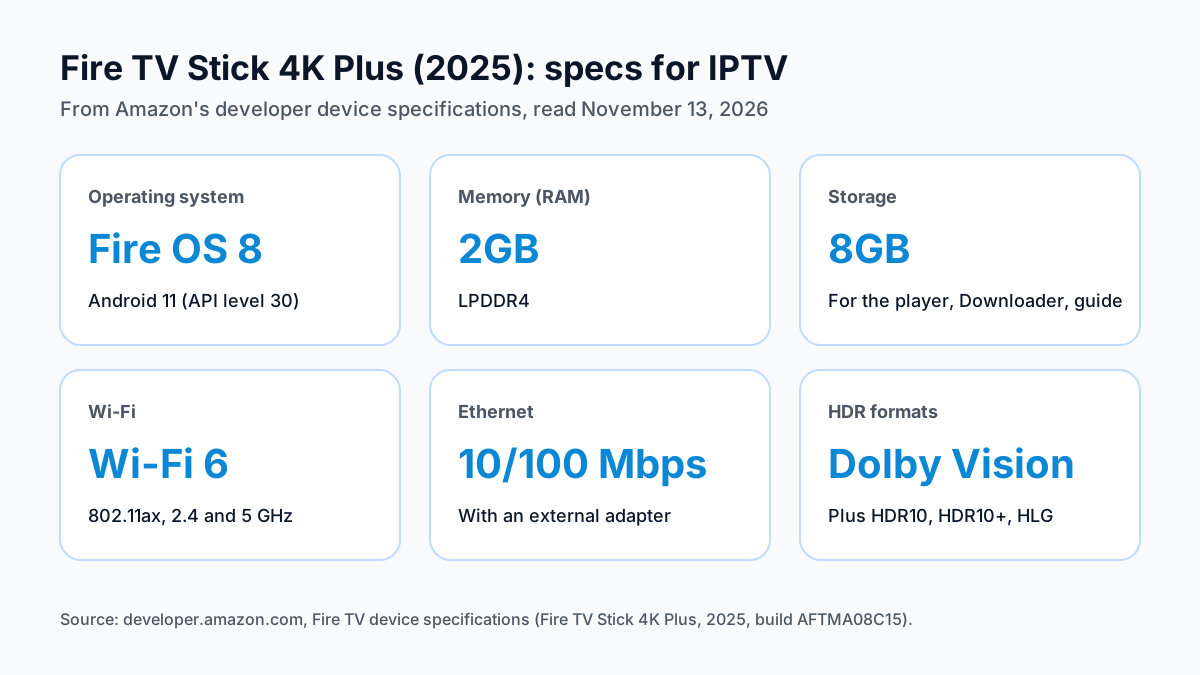
The 4K Plus has 2GB of RAM, 8GB of storage, Wi-Fi 6 and an HDMI 2.1 output with Dolby Vision, HDR10, HDR10+ and HLG, per Amazon's developer spec sheet.
| Spec | Fire TV Stick 4K Plus (2025), per Amazon (November 13, 2026) |
|---|---|
| Operating system | Fire OS 8 (Android 11, API level 30) |
| Processor | MediaTek MT8696D, 4x Cortex-A55 up to 1.7 GHz |
| Memory | 2GB LPDDR4 |
| Storage | 8GB |
| Wi-Fi | Wi-Fi 6 (802.11ax), 2.4 and 5 GHz |
| Ethernet | 10/100 Mbps with an external adapter |
| Bluetooth | 5.2 |
| Video output | HDMI 2.1 with ARC |
| HDR | HDR10, HDR10+, HLG, Dolby Vision |
For an IPTV player, three of these rows matter most. Memory first: 2GB is the same amount Amazon lists for the 4K Max, and twice the 4K Select's 1GB. Storage holds the player, Downloader and the guide data; the 4K Plus has 8GB, half the 4K Max's 16GB. Wi-Fi 6 is the newer Wi-Fi standard, on 2.4 and 5 GHz.
There is no Ethernet port on the stick itself. Amazon lists Ethernet at 10/100 Mbps through an external adapter. Dolby Vision support is a difference from the 4K Select, which Amazon lists with HDR10, HDR10+ and HLG but no Dolby Vision.
4K Plus vs 4K Max vs 4K Select for IPTV
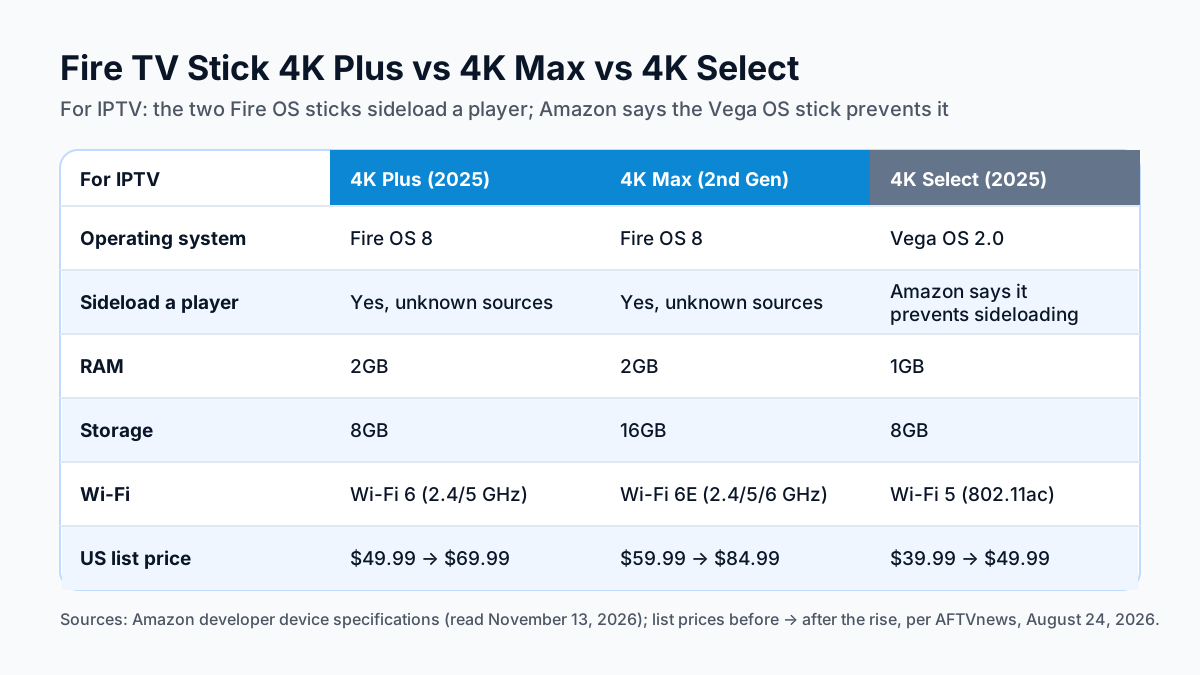
For IPTV, buy a Fire OS stick: the 4K Plus or the 4K Max. The 4K Select runs Vega OS, and Amazon says Vega OS sticks prevent sideloading or installing apps from unknown sources.
| For IPTV | Fire TV Stick 4K Plus (2025) | Fire TV Stick 4K Max (2nd Gen, 2023) | Fire TV Stick 4K Select (2025) |
|---|---|---|---|
| Operating system | Fire OS 8 | Fire OS 8 | Vega OS 2.0 |
| Sideload an IPTV player | Yes, from unknown sources | Yes, from unknown sources | Amazon says it prevents sideloading |
| RAM | 2GB | 2GB | 1GB |
| Storage | 8GB | 16GB | 8GB |
| Wi-Fi | Wi-Fi 6 (2.4 and 5 GHz) | Wi-Fi 6E (2.4, 5 and 6 GHz) | Wi-Fi 5 (802.11ac) |
| Ethernet | With an adapter | With an adapter | With Amazon's adapter |
| Dolby Vision | Yes | Yes | Not listed |
| US list price | $69.99 list. Up from $49.99, per AFTVnews (2026-08-24). | $84.99 list. Up from $59.99, per AFTVnews (2026-08-24). | $49.99 list. Up from $39.99, per AFTVnews (2026-08-24). |
Prices rose across the line in August 2026, as AFTVnews reported on August 24, 2026; check the current price on the listing before you buy.
Between the two Fire OS sticks, the 4K Max adds twice the storage and Wi-Fi 6E, which uses the 6 GHz band if your router has it. The 4K Plus has the same 2GB of memory and the same HDR formats for less money. If your router is not a Wi-Fi 6E model, the 6 GHz band is not something you will use.
The 4K Select costs less than both, but the price is not the point for IPTV. The usual install route for an Android player runs through sideloading, so plan on a Fire OS stick or a Google TV device instead. Our Google TV Streamer vs Fire TV stick comparisonsets Google's box against the 4K Plus and 4K Max.
How to set up IPTV on the Fire TV Stick 4K Plus
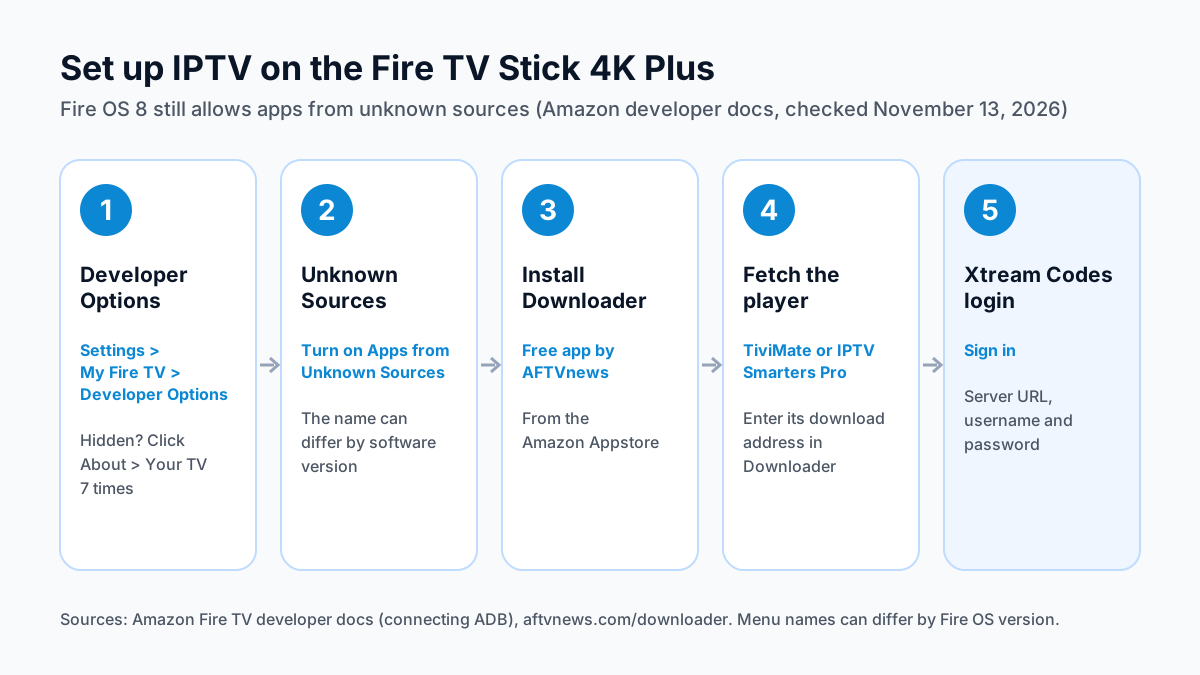
Allow apps from unknown sources in Developer Options, install Downloader from the Amazon Appstore, use it to fetch a player, then sign in with your Xtream Codes login.
- Turn on Developer Options. Amazon's developer docsgive the path Settings > My Fire TV > Developer Options. On some software versions Developer Options is hidden: open Settings > My Fire TV > About and click Your TV 7 times to show it.
- Allow Apps from Unknown Sources.In Developer Options, turn on Apps from Unknown Sources. That is Amazon's documented wording; the exact name of this setting can differ by software version.
- Install Downloader. Search the Amazon Appstore for Downloader, the free app by AFTVnews, and install it.
- Fetch the player. Open Downloader and enter the download address for your player. For IPTV Smarters Pro, that is the official Android TV download from getiptvsmarters.com, or the Apollo Group TV download code typed into Downloader. For TiviMate, ask support for the download address.
- Sign in. Open the player, choose Xtream Codes, and enter the server URL, username and password from your login message.
The full IPTV on Firestick setup guide walks through each player screen by screen, and the IPTV installation guide for every device covers the other boxes and TVs in your home.
TiviMate or IPTV Smarters Pro on the 4K Plus
Choose TiviMate for a cable-style TV guide and IPTV Smarters Pro for a free, simpler player. Both sign in with the same Xtream Codes login.
TiviMate's Google Play listing describes a TV guide grid, catch-up, recording, multiview, multiple playlists and parental controls, with logins by M3U, Xtream Codes or Stalker Portal. It is free to install, with in-app purchases, and does not say which features need Premium. It is built for a TV remote. Because Fire OS has no Google Play Store, it reaches the 4K Plus through Downloader like any other sideloaded app. Our TiviMate review from its Google Play listing covers what is known about Premium.
IPTV Smarters Pro is free. Its developer publishes the Android TV version on getiptvsmarters.com, not on Google Play, so the official download is the one to fetch with Downloader; many look-alike apps reuse the Smarters name. It takes an Xtream Codes login or an M3U URL. Our IPTV Smarters Pro review and setup notes cover where it trails TiviMate.
You can install both and keep the one you prefer. The 4K Plus has 8GB of storage, so remove the player you don't use.
Getting steady 4K on the 4K Plus
Use a strong 5 GHz Wi-Fi 6 signal or a wired adapter, and check that your connection has room for a 4K stream.
The stick plugs in behind the TV, so give it a clear path to the router: keep the router close, with few walls in between, and use the 5 GHz band. If the router is far away, a wired link is the alternative. Amazon lists Ethernet at 10/100 Mbps through an external adapter, so the wired connection tops out at 100 Mbps.
How much bandwidth 4K needs is covered in our IPTV internet speed requirements, and what makes a 4K IPTV picture, from the source to the TV's HDR modes, is covered in what a 4K IPTV stream needs. Apollo Group TV streams in 4K UHD where the source allows, so a 4K channel needs a 4K TV, the bandwidth and a 4K source.
Where to go next
For the full player walkthrough, start with Firestick IPTV setup step by step. When you are ready for a login, Apollo Group TV plans and prices start at $19.99 a month, with no contract: every plan is prepaid with no auto-renewal. Try free for 24 hours — no credit card required.
Sources
Checked on . Store listings and prices change; these are the pages to re-check.
- Amazon Developer: Fire TV device specifications (4K Plus 2025, 4K Max 2nd Gen, 4K Select)
- Amazon Developer: connecting ADB to a Fire TV (Developer Options, Apps from Unknown Sources)
- AFTVnews: Amazon increases the price of all Fire TVs (August 24, 2026)
- AFTVnews: Downloader app
- IPTV Smarters, official downloads (getiptvsmarters.com)
- Google Play: TiviMate IPTV Player
- Amazon US listing: Fire TV Stick 4K (3rd Gen), “prevents sideloading or installing apps from unknown sources”
Updated
Before you buy
What to know about Apollo Group TV
- Prepaid, no auto-renewalYou renew only when you choose to. Nothing is charged automatically.
- Support 24/7Every day, day and night. A person answers on WhatsApp, before and after you buy.
- Familiar ways to payVisa, Mastercard, Google Pay or Apple Pay.
- Terms in writingRead the refund policy and terms of service before you pay.
Try it before you pay
A free 24-hour trial lets you test the service before paying anything.
Start Free 24hr TrialOpens WhatsApp · a person replies 24/7
Plans from $19.99/month. Compare every plan and price →