
What IPTVX is
IPTVX is a player, not an IPTV service. It shows nothing until you add a source, and its App Store listing says so plainly: “Neither IPTVX nor its founder provides digital content and they are not responsible for your content.” The channels come from whichever service's login you add.
According to the listing, IPTVX “supports the major formats and services including Xtream API, M3U, M3U8, PLEX and SMB”. It lists a TV Guide tab with an EPG grid, TV archive and catch-up, parental control, multiple playlists, Family Sharing, offline mode on iOS, and synchronization of your data through your Apple iCloud account, so a playlist added on an iPhone appears on the Apple TV too.
The current version is 25.1, released on November 9, 2026. Its release notes mention a better channel-surfing map on Apple TV and fixes for crashes on Apple TV. On the US App Store it shows 4.4 out of 5 from about 3,200 ratings; that's the store's figure, not a review of ours. We haven't run IPTVX for this page; every detail is from the App Store and the developer's site.
Where IPTVX runs
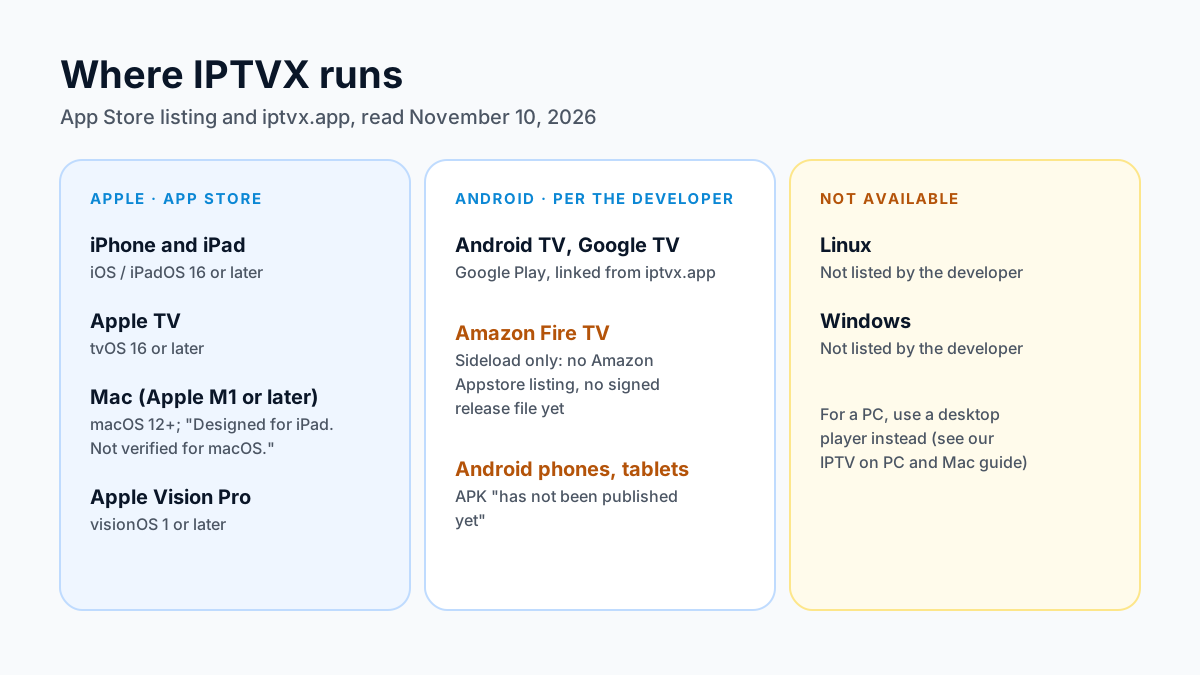
IPTVX started on Apple devices, and that's still where it's complete. Its developer now lists Android devices as well, but not all of them are ready yet.
| Platform | How you get it | Status, November 10, 2026 |
|---|---|---|
| iPhone and iPad | App Store | iOS or iPadOS 16.0 or later |
| Apple TV | App Store | tvOS 16.0 or later |
| Mac | App Store | Apple M1 chip or later, macOS 12.0 or later; “Designed for iPad. Not verified for macOS.” |
| Apple Vision Pro | App Store | visionOS 1.0 or later |
| Android TV and Google TV | Google Play, linked from iptvx.app | Listed by the developer |
| Amazon Fire TV | Sideload only | “There is no Amazon Appstore listing”; no signed release file published yet |
| Android phones and tablets | Direct APK | “Has not been published yet” |
| Linux or Windows | None | Not listed by the developer |
So the answer to “IPTVX on Linux” is no: the developer lists no Linux or Windows version. On a Windows PC or Mac, our IPTV on PC and Mac guidecompares the desktop players that do exist. On Fire TV, the developer hasn't published a release yet; when it does, it will be sideload-only, which Vega OS models can't do. Don't install IPTVX files from other sites. For Android TV boxes, our IPTV on Android TV guide covers the other players.
What IPTVX costs
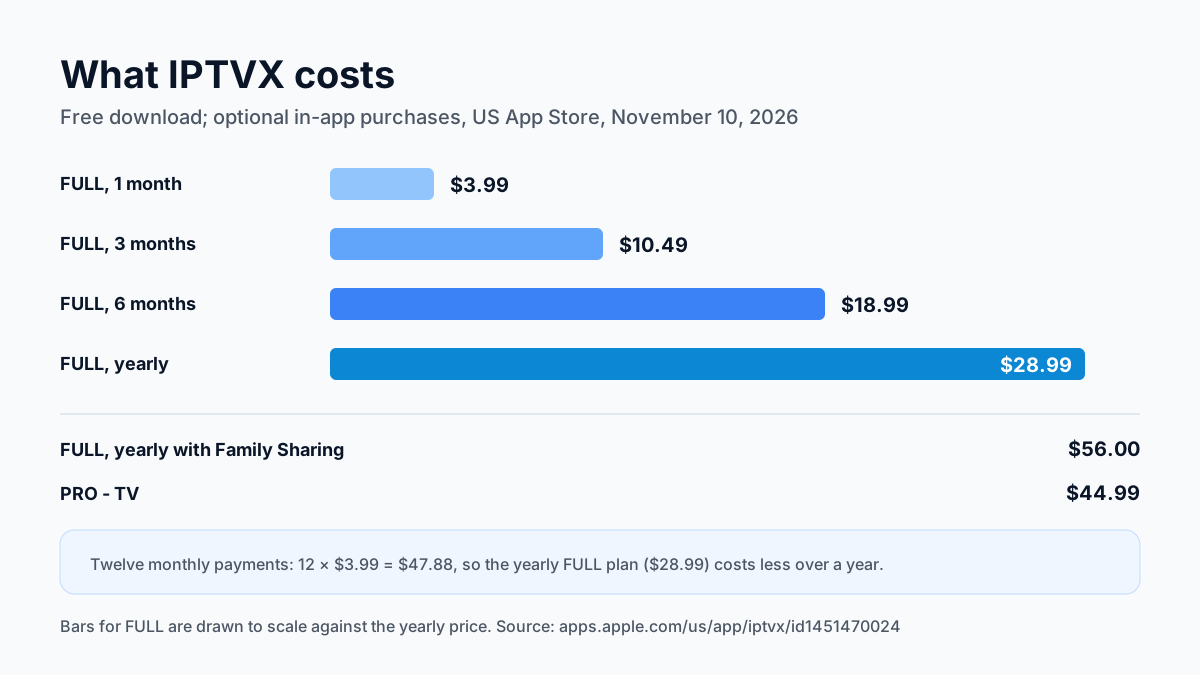
IPTVX is free to download. The App Store lists optional in-app purchases; these are the US prices shown on November 10, 2026:
| Purchase | US price |
|---|---|
| FULL, 1 month | $3.99 |
| FULL, 3 months | $10.49 |
| FULL, 6 months | $18.99 |
| FULL, yearly | $28.99 |
| FULL, yearly with Family Sharing | $56.00 |
| PRO - TV | $44.99 |
| FULL for PRO | $28.99 |
| Skins | $4.99 and $6.99 |
Paying monthly for a full year comes to $47.88 (12 × $3.99), so the yearly FULL subscription at $28.99 costs less if you plan to keep the app; the six-month option works out to about $3.17 a month. The listing doesn't say which features the free download leaves out, so check inside the app before you subscribe. On Android, the developer's Fire TV page says purchases go through Google Play, with no Amazon purchase option at the moment. Prices change, so the App Store page is the place to confirm them.
The app's price is separate from your IPTV service: IPTVX charges for the player, and the service charges for the channels.
What the IPTVX privacy label says
The App Store shows a privacy label that the developer fills in and Apple doesn't verify. For IPTVX, the developer declares that location and usage data may be used to track you, and that purchases, location, user content, identifiers, usage data and diagnostics are collected but not linked to your identity. The listing also says your IPTVX data syncs through your own iCloud account. If tracking matters to you, read the full label on the App Store page before you install.
How to add your IPTV login to IPTVX
IPTVX takes the same two common login types as most players. Which one you use depends on what your provider sends:
- Xtream API (Xtream Codes). Three values: a server URL including the port, a username and a password. This loads live channels, the guide and on-demand titles together, so use it when you have it.
- M3U or M3U8 playlist. One long link. This loads the channel list; the guide may need a separate guide address.
In IPTVX, add a new playlist, choose the login type your provider sent, and enter the details exactly as written. Because IPTVX syncs through iCloud, a playlist added on one Apple device appears on your others signed in to the same Apple ID. Our M3U vs Xtream Codes guide explains the two types in detail, and our IPTV on Apple TV guide covers the Apple TV setup screens in general.
IPTVX vs other Apple TV players
IPTVX is one of three Apple TV players we cover. They take the same login, so the choice comes down to price and features. The Smarters Player Lite row is from its US App Store listing read November 10, 2026, and the GSE Smart IPTV Pro row from its listing read October 30, 2026.
| Player | Login | Price on Apple TV | Best for |
|---|---|---|---|
| IPTVX (Bending X - FZE) | Xtream API, M3U, M3U8, Plex, SMB | Free; FULL from $3.99 a month | iCloud sync across Apple devices, guide grid, catch-up |
| Smarters Player Lite (WHMCS SMARTERS) | Xtream Codes | Free with ads; Premium $1.99 | The official Smarters app, from WHMCS SMARTERS |
| GSE Smart IPTV Pro | Xtream Codes or M3U | $4.99 one-off | Managing several playlists |
If you use APTV, IPTVX is the closest match in features; our page on the APTV app and its App Store status has the details. For every device, the best IPTV players compared page lists the options, and our UHF guide covers the Apple TV player that also plays Plex, Jellyfin and Emby.
IPTVX questions
Is IPTVX free?
The download is free. As of November 10, 2026, optional FULL subscriptions start at $3.99 a month or $28.99 a year on the US App Store.
How much does IPTVX cost?
On the US App Store on November 10, 2026, FULL is $3.99 a month, $10.49 for three months, $18.99 for six months or $28.99 a year; the yearly Family Sharing option is $56.00. PRO - TV is $44.99.
Does IPTVX work on Apple TV?
Yes. It's on the Apple TV App Store and needs tvOS 16.0 or later.
Is IPTVX on Android or Fire TV?
The developer lists Android TV and Google TV through Google Play. Fire TV is sideload only, with no signed release file published yet, and the Android phone app hasn't been published.
Is there an IPTVX for Linux or Windows?
No. The developer lists no Linux or Windows version.
Does IPTVX come with channels?
No. It's a player; the channels come from the IPTV service whose login you add.
Want to try IPTVX with a real login before paying for the app or a plan? Try free for 24 hours — no credit card required.
Sources
Checked on . Store listings and prices change; these are the pages to re-check.
- App Store (US): IPTVX, by Bending X - FZE
- Apple lookup for IPTVX (id 1451470024): version, release date, description
- IPTVX, developer site (iptvx.app): supported platforms
- IPTVX: Fire TV installation status
- IPTVX: Android APK status
- App Store (US): Smarters Player Lite, by WHMCS SMARTERS (read November 10, 2026)
- App Store (US): GSE SMART IPTV PRO for Apple TV (read October 30, 2026)
Updated
Before you buy
What to know about Apollo Group TV
- Prepaid, no auto-renewalYou renew only when you choose to. Nothing is charged automatically.
- Support 24/7Every day, day and night. A person answers on WhatsApp, before and after you buy.
- Familiar ways to payVisa, Mastercard, Google Pay or Apple Pay.
- Terms in writingBoth the Apollo Group TV refund policy and the Apollo Group TV terms are on the site.
Try it before you pay
A free 24-hour trial lets you test the service before paying anything.
Start Free 24hr TrialOpens WhatsApp · a person replies 24/7
Plans from $19.99/month. See what each plan costs →