
What UHF is
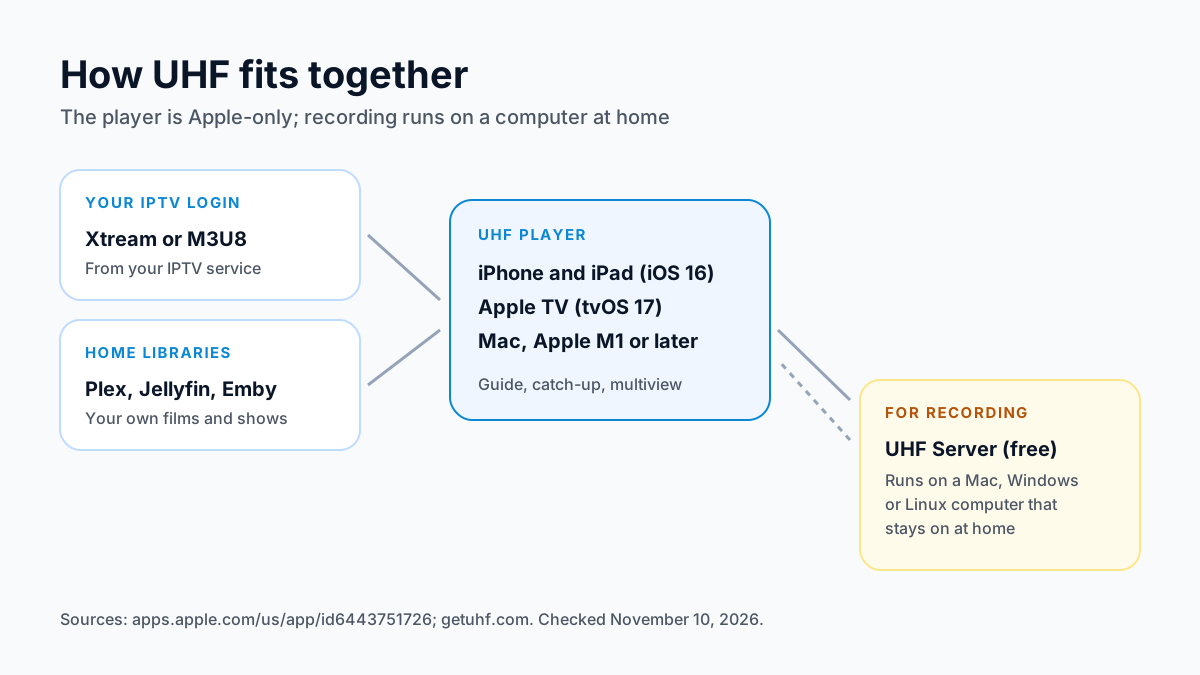
UHF is a player, not an IPTV service. Its App Store listing describes it as designed to work with “content or playlists that users create themselves”: you bring the source, and UHF plays it. In the listing's words, “Whether you use M3U8, Xtream, Plex, Jellyfin, or Emby playlists,” UHF brings them into one app.
That mix is what sets UHF apart. Most IPTV players handle a provider's login and nothing else; UHF also opens the media libraries people run at home on Plex, Jellyfin or Emby, so live channels and your own films sit side by side. The listing describes a guide (EPG) the developer “designed ... from scratch”, catch-up, downloads to watch offline, and “full AirPlay and Chromecast support” for sending a stream to another screen.
The current version is 2.6.0, released on November 9, 2026. Its release notes say the multi-player was rebuilt: “Multiviews: We have rebuilt the multi-player to make it more flexible and easier to control.” On the US App Store, UHF shows 4.7 out of 5 from about 3,200 ratings; that's the store's figure, not a review of ours. We haven't run UHF for this page.
Where UHF runs
UHF is Apple-only. Its developer's site says it is “designed from the ground up for iPhone, iPad, Apple TV and Mac,” and lists no Android, Fire TV, Windows or Linux player.
| Device | Requirement on the App Store, November 10, 2026 |
|---|---|
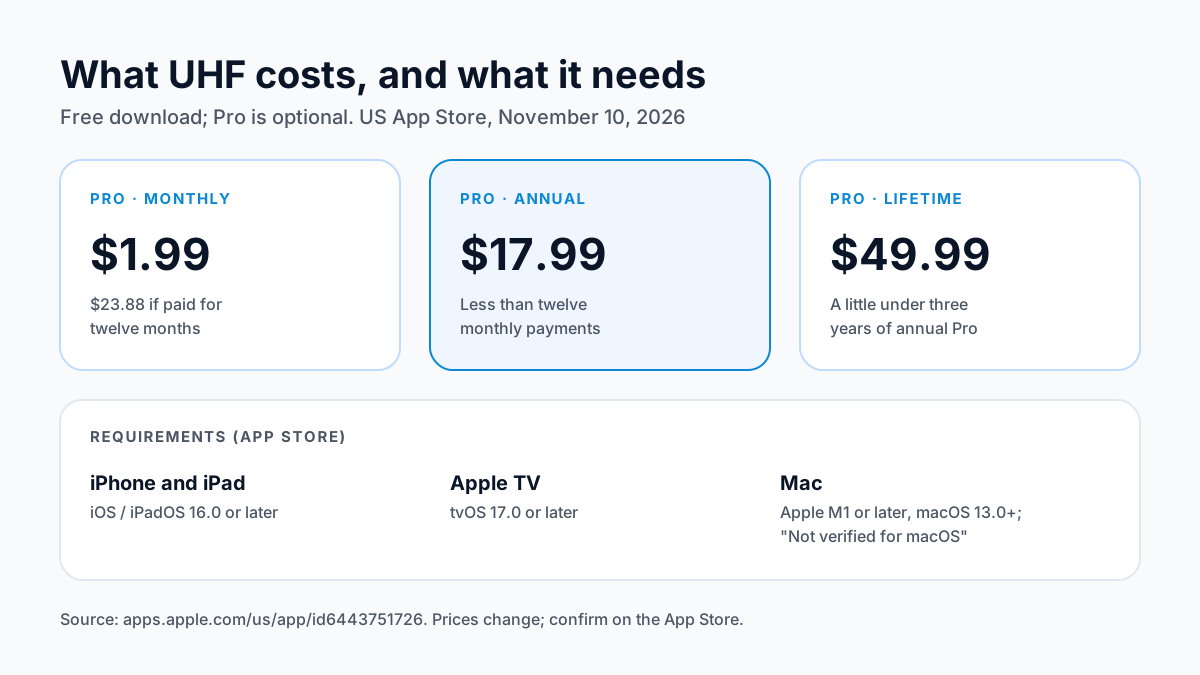
| iPhone and iPad | iOS or iPadOS 16.0 or later |
| Apple TV | tvOS 17.0 or later |
| Mac | macOS 13.0 or later and a Mac with an Apple M1 chip or later; “Designed for iPad. Not verified for macOS.” |
| Apple Vision Pro | visionOS 1.0 or later |
| Android, Fire TV, Windows, Linux | No UHF player listed |
Apple TV needs tvOS 17, newer than IPTVX (tvOS 16) or Smarters Player Lite (tvOS 12) ask for, so check your Apple TV's software version in Settings first. For Fire TV and Android TV boxes, our best IPTV players compared page lists the players that run there.
What UHF costs
UHF is free to download. These are the in-app purchases on the US App Store on November 10, 2026:
| Purchase | US price |
|---|---|
| Pro, monthly | $1.99 |
| Pro, annual | $17.99 |
| Pro, lifetime | $49.99 |
The developer's site lists what Pro adds: “Instant cross-device sync”, “No ads or watermarks”, “Unlimited EPG navigation”, “Family Sharing” and “Reminders”. Paying monthly for a year comes to $23.88 (12 × $1.99), so the annual plan costs less if you'll keep it, and the lifetime purchase equals a little under three years of the annual plan.
Two things to know. First, the developer's own homepage appears to show a different monthly price than the App Store, so treat the App Store as the price you'll actually pay. Second, the App Store listing shows “Contains Advertising”, while the developer lists “No ads or watermarks” among the Pro features; the label means the free version may show ads.
The App Store privacy label, which the developer fills in and Apple doesn't verify, lists no data used to track you; it declares user content, identifiers, diagnostics and usage data as collected but not linked to your identity.
How to use UHF with your IPTV login
UHF takes the two common IPTV login types. Use whichever your provider sends:
- Xtream.A server URL including the port, a username and a password. This brings in live channels, the guide and on-demand titles together, so it's the one to use when you have it.
- M3U8 playlist. One long link that loads the channel list. The guide may need a separate guide address.
In UHF, add a new source, choose the login type, and enter the details exactly as your provider wrote them. If you also run Plex, Jellyfin or Emby at home, add that library as a separate source. Our M3U vs Xtream Codes guide explains the login types, and our IPTV on Apple TV guide covers Apple TV setup in general.
Recording with UHF Server
UHF records through a home server rather than on the device: its listing says to “Record live TV with your own home server” using UHF Server: “Run our free companion app on any Mac, Windows, or Linux machine.” The server does the recording on a computer at home, and UHF plays the recordings back on your Apple devices.
That gives UHF a recording path on Apple TV, as long as you have a computer on your network that stays on while a show records. Because the server runs on Windows and Linux as well as macOS, it's also the only part of UHF that does: the player itself stays on Apple devices. If you'd rather not run a server, catch-up covers recent programs on channels that offer it. Our guide to recording IPTV compares recording options by device, and our IPTV DVR guide covers server-based recording in more depth.
UHF vs other Apple TV players
All three take an Xtream login, so the choice comes down to what else you need.
| Player | Also plays | Price | Choose it for |
|---|---|---|---|
| UHF | Plex, Jellyfin, Emby | Free; Pro $1.99 a month or $17.99 a year | Home media libraries and recording through UHF Server |
| IPTVX | Plex, SMB shares | Free; FULL $3.99 a month or $28.99 a year | iCloud sync and a guide grid |
| Smarters Player Lite | No | Free with ads; Premium $1.99 | The official Smarters app; our support sets it up on iPhone and iPad |
The UHF row is from its listing read November 10, 2026; IPTVX and Smarters Player Lite prices are from their US App Store listings read the same day. Our IPTVX guide covers that player in detail, and our page on the APTV app compares it with the other Apple TV players.
UHF IPTV questions
Is UHF IPTV free?
The download is free. As of November 10, 2026, Pro costs $1.99 a month, $17.99 a year or $49.99 lifetime on the US App Store.
How much does UHF Pro cost?
$1.99 a month, $17.99 a year or $49.99 for a lifetime purchase, as listed on the US App Store on November 10, 2026. The developer lists cross-device sync, no ads or watermarks, unlimited guide navigation, Family Sharing and reminders as what Pro adds.
Does UHF work on Apple TV?
Yes. It's on the Apple TV App Store and needs tvOS 17.0 or later.
Is UHF on Android or Fire TV?
No. The developer lists iPhone, iPad, Apple TV and Mac only.
Can UHF record live TV?
Yes, through UHF Server, a free companion app that runs on a Mac, Windows or Linux computer on your home network.
Does UHF come with channels?
No. It's a player; the channels come from the IPTV service whose login you add.
Want to try UHF with a real login before paying for Pro or a plan? Try free for 24 hours — no credit card required.
Sources
Checked on . Store listings and prices change; these are the pages to re-check.
- App Store (US): UHF - Love your IPTV, by Short Wavelength Applications SL
- Apple lookup for UHF (id 6443751726): version, release notes, description
- UHF, developer site (getuhf.com): platforms, Pro features, UHF Server
- App Store (US): IPTVX, by Bending X - FZE
- App Store (US): Smarters Player Lite, by WHMCS SMARTERS
Updated
Before you buy
What to know about Apollo Group TV
- Prepaid, no auto-renewalYou renew only when you choose to. Nothing is charged automatically.
- Support 24/7Every day, day and night. A person answers on WhatsApp, before and after you buy.
- Familiar ways to payVisa, Mastercard, Google Pay or Apple Pay.
- Terms in writingBoth the Apollo Group TV refund policy and the Apollo Group TV terms are on the site.
Try it before you pay
A free 24-hour trial lets you test the service before paying anything.
Start Free 24hr TrialOpens WhatsApp · a person replies 24/7
Plans from $19.99/month. Check monthly and multi-month prices →