

Can VLC play IPTV?
Yes. VLC is a media player from the VideoLAN project, and an IPTV playlist is a list of stream addresses it can open. VLC plays whatever your provider streams; it doesn't come with any channels itself. VideoLAN's documentation describes opening a stream from a network address, which is exactly what an M3U playlist link is.
The current desktop release is VLC 3.0.24, published on September 22, 2026, which VideoLAN describes as a major security update with over 130 security fixes. If you installed VLC a while ago, update it before you add a playlist.
What VLC gives you is playback. It doesn't sign in to a provider, so it uses the M3U playlist link rather than the server, username and password of an Xtream Codes login. Our M3U vs Xtream Codes guide explains the two login types.
How to open an IPTV playlist in VLC on Windows and Mac
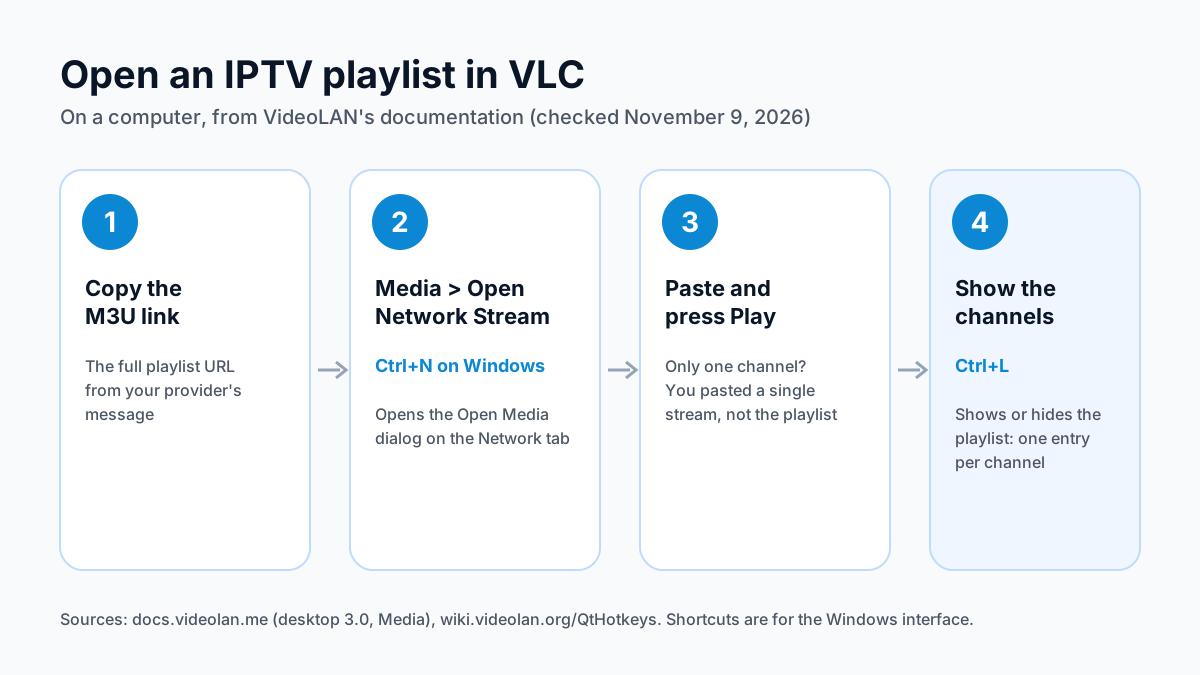
You need one thing from your provider: the M3U playlist URL. It's a long web address, usually ending in an M3U file name or containing your username. Then:
- Copy the full M3U playlist URL from your provider's message.
- In VLC, click Media on the menu bar and choose Open Network Stream. On Windows, Ctrl+N opens it directly. The Open Media dialog opens on the Network tab.
- Paste the URL into the network address box and press Play.
- Press Ctrl+L to show or hide the playlist. Each channel is one entry in the list; pick one to switch to it.
The macOS app has the same Open Network option. If only one channel plays, you probably pasted the address of a single stream rather than the full playlist link, so go back to your provider's message and copy the playlist URL.
Keep the playlist link private
An IPTV provider's M3U link usually carries your username and password inside it. Don't post it in forums or share screenshots of it; anyone with the link can use your connection.
VLC on iPhone, iPad, Apple TV and Android
VLC isn't just a desktop app. VideoLAN publishes it for phones, tablets and TV boxes, and each version opens a stream from a network address.
| Device | VLC app | What VideoLAN or the store says (November 9, 2026) |
|---|---|---|
| iPhone and iPad | VLC media player, App Store | Version 3.7.4, released November 3, 2026, by VideoLAN |
| Apple TV | Same App Store listing | Requires tvOS 13.0 or later |
| Android phones and tablets | VLC for Android, Google Play | VideoLAN's Android page lists version 3.7.0 |
| Android TV and Chromebook | VLC for Android | “Support Android TV” and “Support Chromebooks” |
| Amazon Fire TV | VLC for Fire | VideoLAN's Android page links a Fire version on the Amazon Appstore |
On iPhone, iPad and Apple TV, look for the Browse tab. VLC 3.6.6 renamed the old Network tab to Browse, so older guides that tell you to tap Network describe a tab that no longer exists.
On a TV, typing a long playlist URL with a remote is slow. It's quicker to check the playlist on a computer first, then use a TV player that signs in with a username and password.
What VLC can't do for live TV
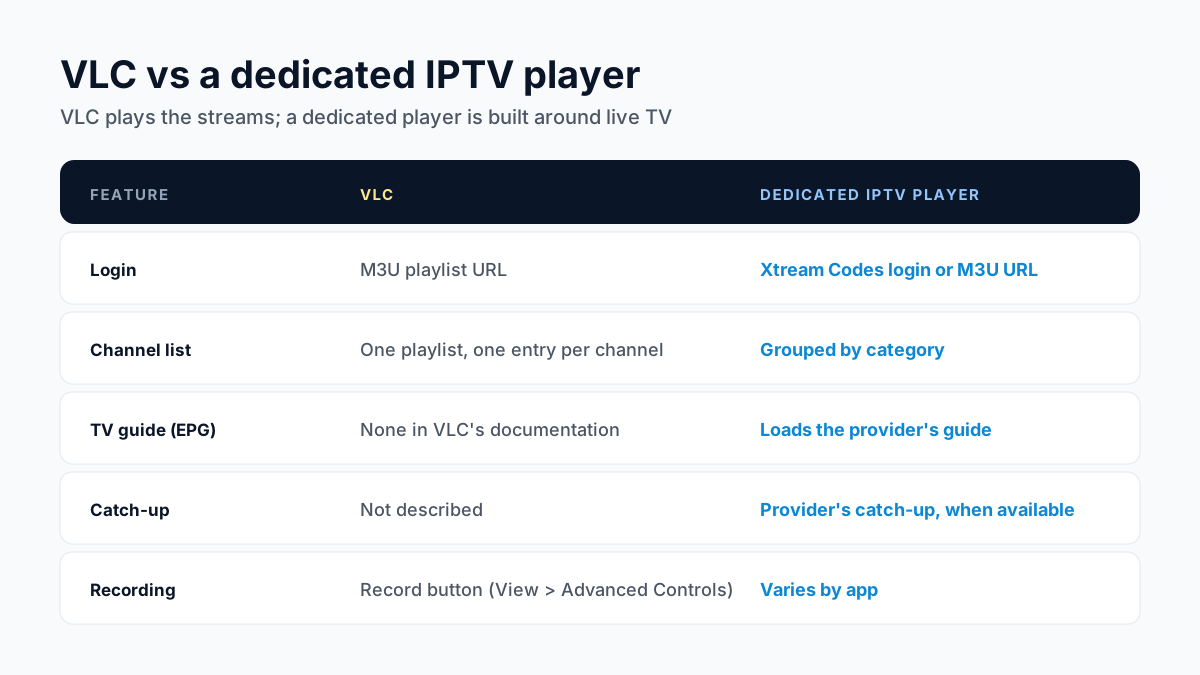
VLC plays the streams in your playlist, and that's where its job ends. VideoLAN's documentation describes opening network streams and recording, but no TV guide import and no screen for a provider's login. A dedicated IPTV player is built around those things.
| Feature | VLC | Dedicated IPTV player (TiviMate, Smarters and others) |
|---|---|---|
| Login | M3U playlist URL | Xtream Codes login or M3U URL |
| Channel list | A playlist, one entry per channel | Channels grouped by category |
| TV guide (EPG) | None described in VLC's documentation | Loads the provider's guide |
| Catch-up | Not described | Uses the provider's catch-up when available |
| Recording | Record button on the advanced toolbar | Varies by app |
If you want to see what's on now and next, or scroll back through a channel's past programs, use a player that loads the guide. Our IPTV EPG setup guide explains how guides attach to a playlist, and the best IPTV players compared page lists players by device.
Recording a channel in VLC
VLC on a computer can record what it's playing. In VideoLAN's desktop documentation, you click View > Advanced Controls to show the advanced toolbar, then click the Record button while the channel plays, and click it again to stop. VideoLAN's documentation also shows the button in the Playback menu, and Tools > Customize interface can add it to the main toolbar.
Recording this way captures the stream as it plays on your computer; it isn't a scheduled recorder. For timers and series recording, see our guide to recording IPTV.
When VLC is the right tool, and when to switch
VLC is the right tool when you want to:
- check that a new playlist link works before setting up a TV,
- watch on a Windows or Mac computer without installing a dedicated player,
- record a program while it plays on your computer.
Switch to a dedicated player when you watch every day on a TV, want the channel guide, or want channels grouped by category. On Windows and Mac, our IPTV on PC and Mac guide compares the desktop players. On Android TV and Google TV, our review of TiviMate, a guide-first player built for TV remotes, is the place to start.
The same login works in all of them. When you buy an Apollo Group TV plan, the login is sent on WhatsApp after payment, within 5–15 minutes, and includes the server URL, username and password plus playlist or portal details. Paste the playlist link into VLC, or the username and password into a player that takes an Xtream Codes login.
VLC IPTV questions
Can VLC play an M3U playlist from a URL?
Yes. Use Media > Open Network Stream, paste the URL and press Play. You don't need to download the file first.
Why does VLC show only one channel?
You most likely pasted the address of one stream instead of the full playlist link. Copy the M3U playlist URL from your provider's message and open it again.
Does VLC show a TV guide for IPTV?
VideoLAN's documentation describes no TV guide import, so plan on a dedicated player if you want a guide.
Can I log in to VLC with an IPTV username and password?
VLC opens a stream or playlist address; it has no provider login screen. Use the M3U link, or a player that takes an Xtream Codes login.
Is VLC on Apple TV?
Yes. VLC media player is on the App Store for iPhone, iPad and Apple TV, and Apple TV needs tvOS 13.0 or later.
Can VLC record IPTV?
Yes, on a computer: VideoLAN's desktop documentation shows View > Advanced Controls, then the Record button while the channel plays.
Want to try it with a real playlist? Try free for 24 hours — no credit card required.
Sources
Checked on . Store listings and prices change; these are the pages to re-check.
- VideoLAN: VLC media player download page (3.0.24)
- VideoLAN news: VLC 3.0.24, September 22, 2026
- VLC user documentation (desktop 3.0): opening media
- VLC user documentation (desktop 3.0): recording
- VideoLAN wiki: keyboard shortcuts (Qt interface)
- App Store (US): VLC media player, by VideoLAN
- VideoLAN: VLC for Apple TV
- VideoLAN: VLC for Android
Updated
Before you buy
What to know about Apollo Group TV
- Prepaid, no auto-renewalYou renew only when you choose to. Nothing is charged automatically.
- Support 24/7Every day, day and night. A person answers on WhatsApp, before and after you buy.
- Familiar ways to payVisa, Mastercard, Google Pay or Apple Pay.
- Terms in writingBoth the Apollo Group TV refund policy and the Apollo Group TV terms are on the site.
Try it before you pay
A free 24-hour trial lets you test the service before paying anything.
Start Free 24hr TrialOpens WhatsApp · a person replies 24/7
Plans from $19.99/month. View Apollo Group TV pricing & plans →