
How to choose an IPTV service with a free trial
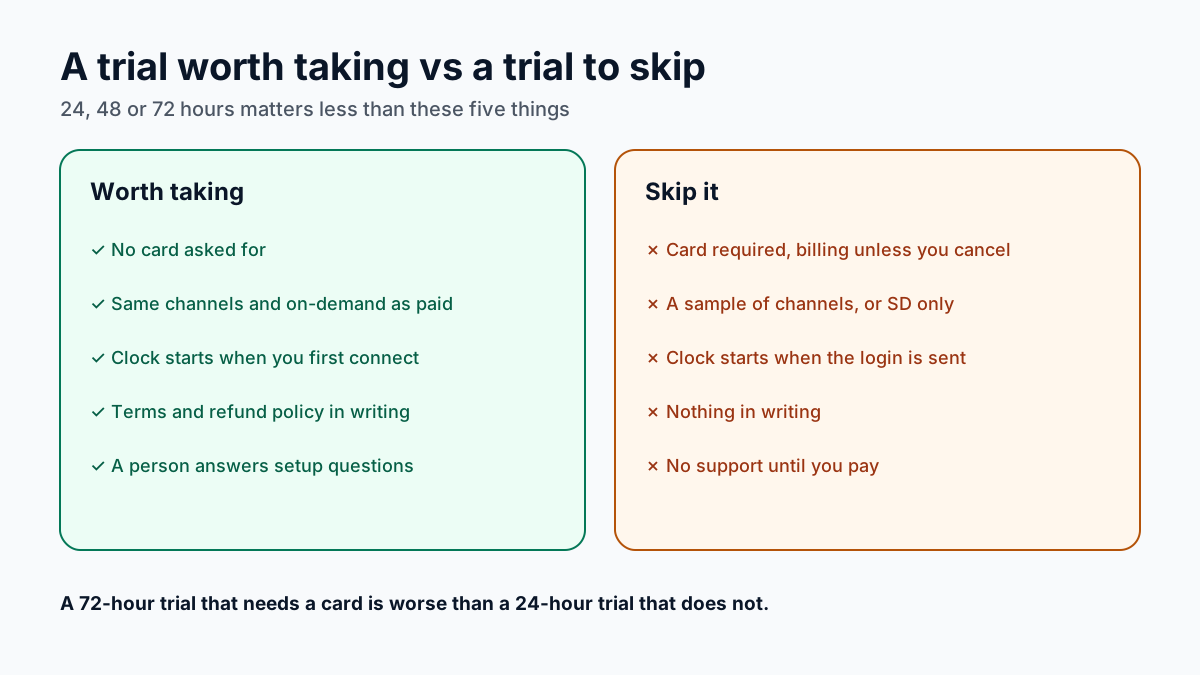
Many IPTV sellers advertise a trial of some kind. Before you compare lengths, compare the terms, because they decide whether the trial can tell you anything:
- No card asked for. A trial that needs payment details can turn into a charge if you forget to cancel.
- The full lineup. The same channels and on-demand library a paying customer gets, not a sample.
- A clock that starts when you connect. Not when the login is sent, so setup does not eat the test.
- Terms in writing. Plans, prices and a refund policy you can read before paying.
- A person on the other end. Someone who answers a setup question during the trial.
24, 48 or 72 hours: does the trial length matter?
Less than it looks. Some sellers advertise 48- or 72-hour trials, and a longer window is welcome if every other term is the same. But the extra hours do not help if the trial needs a card, shows only part of the lineup or starts the clock before you have set anything up.
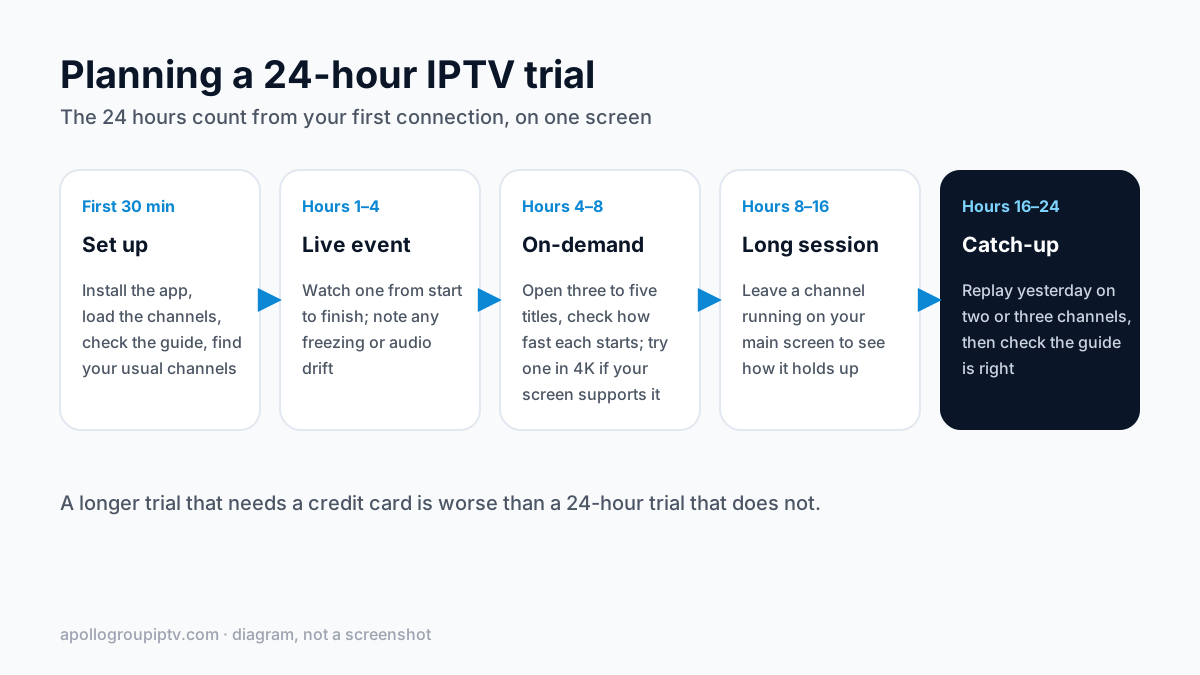
Twenty-four hours is enough if you plan it: one live event, a handful of on-demand titles, a long session and catch-up all fit, as the schedule below shows. What a trial of any length cannot show is how the seller handles a renewal or a problem next month, so read those terms before you pay.
Red flags in IPTV providers with free trials
| Trial approach | Why it is a problem |
|---|---|
| A “free trial” that needs a card | Billing can start unless you cancel in time |
| A sample of channels | You cannot judge the lineup you would pay for |
| SD-only streams in the trial | Says nothing about HD or 4K on the paid plan |
| A “trial” with a small fee | Not free, and it collects your payment details |
| The clock starts when the login is sent | Setup time eats into the test |
| No support during the trial | Setup problems end the test early |
| An empty or wrong TV guide | The paid plan runs on the same guide data |
| No refund policy anywhere | Nothing to rely on if the paid plan fails |
If the seller sells only through social media messages, our guide to IPTV scams on Instagram covers the warning signs before you pay anything.
What to have ready before the trial starts
- The device you will actually watch on. A trial on a laptop says little about how a streaming stick in the living room will cope.
- A player app already installed. TiviMate, IPTV Smarters Pro or XCIPTV all take the three-part login; the device-by-device installation guide covers each one.
- A known internet speed. Run a speed test on the TV device so you can tell a slow connection from a slow service; our IPTV speed requirements give the figures for HD and 4K.
- WhatsApp on your phone. That is where an Apollo Group TV login and any setup help arrive.
Which devices work for an IPTV free trial?
Test on the hardware you will watch on, because the same stream can behave differently on a phone and an older streaming stick. Setup guides cover the Amazon Firestick, Samsung smart TVs, Android TV boxes and Apple TV. Amazon says the newest Vega OS Fire TV sticks (4K 3rd Gen, 4K Select, HD (2026)) prevent sideloading or installing apps from unknown sources, so a player can't be installed the usual way with Downloader. MAG boxes use a portal URL instead of a username and password, so ask on WhatsApp before you start a trial on one. Roku has no IPTV player app, so it works by screen mirroring only; see IPTV on Roku before you start the clock.
How to test an IPTV free trial in 24 hours
First 30 minutes
Set up the app on your main TV, load the channel list, check the guide is filled in, and find the channels you watch most.
Hours 1–4
Watch one live event from start to finish, the hardest test for any server, and note freezing or audio drift.
Hours 4–8
Open three to five on-demand titles, note how quickly each starts, and play one in 4K if your screen supports it.
Hours 8–16
Leave a channel running for a long session to see how it holds up.
Hours 16–24
Replay yesterday's shows from catch-up on two or three channels, and check the guide against what is actually on.
Buffering on every channel at quiet hours points to the server; buffering only in the evening or only in 4K points to load or your connection. The buffering diagnosis steps help tell them apart, and a blank guide has its own fix for a TV guide that will not load.
Apollo Group TV's free trial, against the same checklist
- No card: Free 24hr trial — no credit card.
- Full lineup: the same 55,000+ live channels and 180,000+ VOD titles a paying customer gets, with 7-day catch-up on supported channels.
- The clock: 24 hours from your first connection, on one screen; one trial per customer.
- Terms in writing: published plans and prices from $19.99/month (the cheapest plan per month is the longest term) and a written refund policy.
- A person: WhatsApp support 7 days a week, during the trial and after.
The full terms, and the button to start, are on the Apollo Group TV free trial page. Apollo Group TV does not hold broadcast rights to any network, league or event, so use the trial to check the channels you watch.
IPTV free trial questions, answered
Is a 48- or 72-hour IPTV free trial better than 24 hours?
Only if everything else is equal. A longer trial that needs a card, or that limits the channels, tells you less than a 24-hour trial with the full lineup and no card. Twenty-four hours is enough for a live event, on-demand titles and catch-up if you plan the time.
How do I get an Apollo Group TV free trial?
Message Apollo Group TV on WhatsApp and ask for a trial; support sends the login usually within minutes of request. No card or payment details are needed. The 24 hours count from your first connection, on one screen, and there is one trial per customer.
Is the trial login the same as a paid login?
Yes. It is a server URL, a username and a password, entered in the same apps. If you subscribe, paying reactivates the same login, so the player you set up keeps working.
What happens after the 24-hour free trial?
The trial ends and nothing is charged. If you want to continue, plans start at $19.99/month, prepaid with no auto-renewal.
Updated
Before you buy
What to know about Apollo Group TV
- Prepaid, no auto-renewalYou renew only when you choose to. Nothing is charged automatically.
- Support 24/7Every day, day and night. A person answers on WhatsApp, before and after you buy.
- Familiar ways to payVisa, Mastercard, Google Pay or Apple Pay.
- Terms in writingRead the refund policy and terms of service before you pay.
Try it before you pay
A free 24-hour trial lets you test the service before paying anything.
Start Free 24hr TrialOpens WhatsApp · a person replies 24/7
Plans from $19.99/month. Check monthly and multi-month prices →